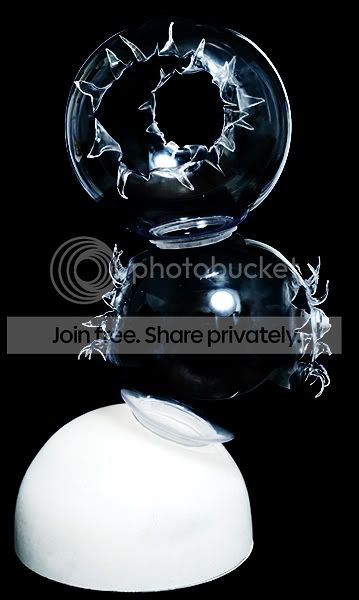
Removing reflections?

herrickphoto

Suspended / Banned
Messages
35
Name
Lynn
Edit My Images
No
Hi, hoping someone can help me with this. I'm a portrait photographer but just took some product shots of this lamp for a designer and unfortunately, the whole studio and all my lights are reflected in it! Anyone know of a photoshop process I can use to get rid of the hot lights/reflection but not lose the look of the lamp. Photo can be found at http://www.herrickphoto.co.uk/lamp.html
Thanks for any and all help!

Lynn
 
tricky one, above my skill level.
 
I wonder if you would get less reflection if you shot it against a lighter background?
 
Is this not what a Circular Polarizer is for? Also, should you not use a light tent which allows the studio to illuminate your product without the reflections?

I am stabbing in the dark to be fair.

Gary.
 
About 3-4 mins with photoshop gave me this:

lamp.jpg


I cleaned up the white bowl at the same time. Its not perfect but if it was your own picture you would spend a little more time over it.
 
It is a tricky one because the lamp has to have reflections of some kind or it would just be black! I'll have a play and see what can be done.
 
I've had a bash too.

I've cloned out some of the more obvious reflections and darkened the rest. I then used a mask to bring back the highlights so that the shape is still recognisable.

lamp.jpg
 
Ive heard of movie studios encasing camera etc in large black binbags, to help reduce reflections in shiney surfaces. Also a dark background behind you would help mask the shape too.
 
I just used the marquee tool to select two circles, (one for each glass ball) then feathered the selection by about 15-20px then used either curves or levels adjustment keeping the whites and blacks where they are but moving the mid point to darken everything else
 
Back
Top