Removing join in merged images

andy_fozzy

SPAM Merchant
Suspended / Banned
Messages
7,450
Name
Andy!
Edit My Images
Yes
Hi all :wave:

Can anyone suggest a way of removing joins in merged/pano shots?

I'm using the Canon Photostich software and CS3

Cheers :thumbs:
 
Hmm most likely it's the Canon merge software not doing a great job.

Try using the Stitch utility in Photoshop or try Autostitch which is very quick and easy to use.
 
I've done a few panos and i have never yet seen any joins. I've used autostich and photoshop. Both do a great job.
 
In hindsight I think it is also worth just asking if we could see the image? To understand the nature of how the joins are apparent.

Dumb question - do you lock the exposure for the series of shots? If not you will see light / dark / light etc through the series of joins.

If the joins are 'harder', literally a line / split where 2 photos are joined I'd be tempted to blame the Canon software. I have seen this with the Canon software but not Photoshop or Autostitch.
 
Cheers chaps. Image coming.....

Tried using photoshop and the results are somewhat better.
I think it may be a case of me not locking the exposure. I was shooting in Av mode......
 
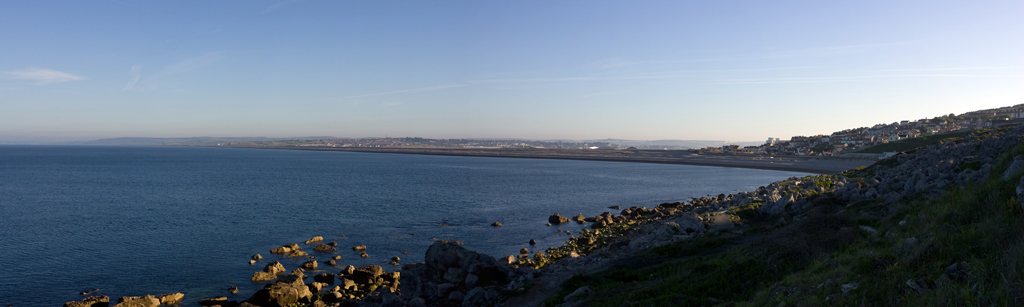
4635776628_164a41b628_o.jpg


Can anyone see the join?
 
Andy

It's better to fix the exposure, as this does help reduce the "join" problem. You need to experiment with the exposure, I normally take a few shots of the scene in Av , have a look at them, then decide what is going to be the best exposure and set that manually.
 
I shoot manually, hand held and not had a problem yet

I can't see the join in it, but at that size it would be hard. I'd also like to see what it would look like if you cropped the bottom half of the sea out. It woudlr emove a lot of the darkness on the right and put the horizon at 1.3rd of the way up.

How much of an overlap did you have?
 
Andy, you could try giving iMerge a spin... the default setting includes an auto brightness feature... or MS ICE, that seems to want to even it all out for you.
 
No real join apparent in the picture above from what I can see...

Here is a really bad example of what can happen if you forget to lock the exposure. Note the light / dark / light dark in the sky.

 
Closer look I can see a definite gradation from dark to light around the middle...

To be honest the easiest way to avoid this is to shoot the same exposure for all shots in a pano, either by using exposure lock or manual.

Afterwards the only way is to tweak all of the images to have a similar exposure and then merge. This is a hit and miss affair. You could possible do something clever in photoshop with the paint brush and darkening / blending layers but it's easier to get it right before the merge!!!
 
Closer look I can see a definite gradation from dark to light around the middle...

To be honest the easiest way to avoid this is to shoot the same exposure for all shots in a pano, either by using exposure lock or manual.

Afterwards the only way is to tweak all of the images to have a similar exposure and then merge. This is a hit and miss affair. You could possible do something clever in photoshop with the paint brush and darkening / blending layers but it's easier to get it right before the merge!!!

That's me out then!!

:lol:

Thanks for the advice, and thanks to everyone.
I think I'll be getting the 'in camera' right in the future!!!
 
Back
Top