Recommended external hard drives for permanent connection to mac mini

Donnie

Suspended / Banned
Messages
7,027
Name
Paul
Edit My Images
No
Hi all, got a late 2012 mac mini i use for media downloading / sharing and the 1tb internal drive is going to be full in the next few months by the look of things so looking at an external drive to make more space. Not being used for portable, literally just want to extend the space on the mac.
However I've no idea what would be best in this regards ie plug and play via thunderbolt (up to 10gbs which I guess will be quicker then the USB) or externally powered drives? Obviously the bigger the better spacewise.

I mean something like this looks good https://www.westerndigital.com/en-g...ts-desktop-usb-3-0-hdd?sku=WDBWLG0040HBK-EESN with 4TB which should last a few years?
 
I've got good experience with a Samsung SSD I bought for my OH's computer to replace the original HDD.
 
Crucial have some good deals on at the moment. Their x9 gets decent reviews with a 1050mbs transfer rate. More portable than a desktop though.

2tb one on Amazon
 
I've got good experience with a Samsung SSD I bought for my OH's computer to replace the original HDD.
Yep already replaced the internalwith a samsung one which has been great.

On more exploring and looking at reviews I think that a 2TB external may be the way to go, theory being that its gonna take a couple / few years to fill and then more storage later will be cheaper again.
Also considering a 2TB NVME with a caddy can be had off amazon for less than £120 to the door is tempting.
 
Crucial have some good deals on at the moment. Their x9 gets decent reviews with a 1050mbs transfer rate. More portable than a desktop though.

2tb one on Amazon

Now that is a good deal! justs looking at the pro version for mac on crucials site and they stipulate read and write speeds at 1050Mbps, the non pro one only stipulates read speed.
On saying that the mac version is £18 more expensive for some reason?
 
I have 4 external drives attached to my Mac Mini. One has a

WD_BLACK SN770 2TB NVMe M.2 SSD, M.2 2280 NVMe SSD, Gaming Solid State drive, PCIe Gen4 NVMe, High Performance Gaming drive, Read speeds up to 5150 MB/s, Black

in a caddy. I initially tried a cheap caddies, but the quality was poor and some were not recognised by the Mac.
 
Now that is a good deal! justs looking at the pro version for mac on crucials site and they stipulate read and write speeds at 1050Mbps, the non pro one only stipulates read speed.
On saying that the mac version is £18 more expensive for some reason?
X9 is QLC, and has a 10 Gbps USB 3.2 Gen 2 interface (max 1050 MB/s)
X9 Pro is TLC, and has a 10 Gbps USB 3.2 Gen 2 interface (max 1050 MB/s), has hardware encryption, and has IP55 dust/water resistance.

The Mac is just a different colour and already formatted for Mac I believe.
 
Will a 2012 Mac Mini even be able to make use of these fast speeds being talked about? I thought they were restricted to USB 3.0 with a theoretical maximum of 500MB/s...
 
Will a 2012 Mac Mini even be able to make use of these fast speeds being talked about? I thought they were restricted to USB 3.0 with a theoretical maximum of 500MB/s...
Good point, it has a thunderbolt port though, so using a thunderbolt to usb c cable has a supposed maximum of 1250MB/s apparently.
 
Will a 2012 Mac Mini even be able to make use of these fast speeds being talked about? I thought they were restricted to USB 3.0 with a theoretical maximum of 500MB/s...
It might have a thunderbolt port?
 
I have a Seagate 4Tb HDD plugged into my Mac Mini. It's in a USB hub so I'm fairly sure the speed isn't that high, but it works fine for me. I leave it plugged into the wall but when it's not in use for long periods I switch it off at the hub and then it doesn't spin up at all.
 
It might have a thunderbolt port?
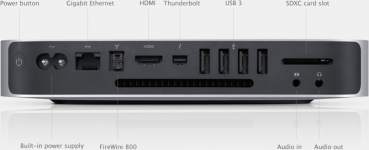
What generation of Thunderbolt though? The highest sustained speed on that generation will be FW800.
 
What generation of Thunderbolt though? The highest sustained speed on that generation will be FW800.
No idea. If it is just to be used for documents I don’t think it needs to be fast and a HDD or basic SSD should be fine.
 
Last edited:
... so looking at an external drive to make more space.
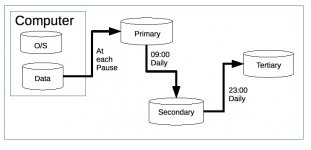
Whatever you do, I'd suggest that you consider data safety first.

Storage systems fail. As someone who worked in IT for a few decades, I guarantee that it's not a question of "if" but only "when". For many years, I've bought storage units three at a time and run them in a simple "father, son, grandson" mode...

20150414 01 Screen Grab.JPG
 
What generation of Thunderbolt though? The highest sustained speed on that generation will be FW800.
Thunderbolt 1 which apparantly is good for 10GBps
 
You are aware the transfer speeds of these advertised ssds very rarely achieve these speeds.
If your pc has either hdd or ssd you can only transfer to one of the superfast ssds at the speed it can read your drive that has the data you want to copy/backup so if your running and old hdd 5400 type sata drive you need to find out the read times of said drive. if your running a superfast ssd in your pc same applies, but that should be far quicker.

I have Kingstone Fury Renegade PCIe 4.0 NVMe M.2 SSD in my laptop which reads and writes 7,300/7,000MB/s¹ read/write and up to 1,000,000 IOPS when transfering to my externall crucial sate ssd via thunderbolt 4 output it will only transfer at apr 5.000 mbs as that is the write speed of the external drive. Now reverse the procedure and it will transfer at apr 5.800mbs as that the read spead of the external drive.

to achieve these 10gbs speeds both drives have to support those speeds.

Not trying to put you off at all as the speeds i currently get are crazy compared to what we where used to.

I will be getting another external 2tb ssd soon as all my spare extenal drives are full except the crucial which when i do final back up of this year that will be full so im looking at another Kingstone same as i have or something even fast to utilise the 7.000mbs i have


You are aware the transfer speeds of these advertised ssds very rarely achieve these speeds.
If your pc has either hdd or ssd you can only transfer to one of the superfast ssds at the speed it can read your drive that has the data you want to copy/backup so if your running and old hdd 5400 type sata drive you need to find out the read times of said drive. if your running a superfast ssd in your pc same applies, but that should be far quicker.

I have Kingstone Fury Renegade PCIe 4.0 NVMe M.2 SSD in my laptop which reads and writes 7,300/7,000MB/s¹ read/write and up to 1,000,000 IOPS when transfering to my externall crucial sate ssd via thunderbolt 4 output it will only transfer at apr 5.000 mbs as that is the write speed of the external drive. Now reverse the procedure and it will transfer at apr 5.800mbs as that the read spead of the external drive.

to achieve these 10gbs speeds both drives have to support those speeds.

Not trying to put you off at all as the speeds i currently get are crazy compared to what we where used to.

I will be getting another external 2tb ssd soon as all my spare extenal drives are full except the crucial which when i do final back up of this year that will be full so im looking at another Kingstone same as i have or something even fast to utilise the 7.000mbs i have


Is it not the Thunderbolt4 port though ? It’s rated to 40GBps which equates to 5000Mbs.

A faster 7000mbs external drive will still be throttled at Thunderbolt4 speeds will it not ?
 
I have the Crucial x9 and it is great (so far). I think that the dedicated and slightly more expensive version is intended to work with Time Machine - I could but don’t use the x9 for Time Machine so bought the cheaper version.
 
An enclosure with 40gbps speed.

An SSD that is TCL.

Like this, has around 2850mb/s read and write.


With this


If you want better cooling for the case, and also 10% faster (3100mb/s read and write)

This

 
why are they charging £130 for the Mac version, they are Pi$$ taking.... it does not make a difference at all whether it is for a windows machine or a Mac.


Oh, wait, I see the Mac color is different, well that does make a difference to the price I suppose :eek:
 
why are they charging £130 for the Mac version, they are Pi$$ taking.... it does not make a difference at all whether it is for a windows machine or a Mac.


Oh, wait, I see the Mac color is different, well that does make a difference to the price I suppose :eek:
Yep, from what ive read you're paying for aesthetics and the fact you don't need to format for mac, Im happy to save the money and format it myself, don't care about colour. (y)
 
Is it not the Thunderbolt4 port though ? It’s rated to 40GBps which equates to 5000Mbs.

A faster 7000mbs external drive will still be throttled at Thunderbolt4 speeds will it not ?
Thunderbolt 4 is the fastest way to transfer data unless you use Ethernet cables. Ive done many tests now on all the ports from USB 3, 3.2 Thunderbolt 3 and 4 and Ethernet via a hub. But as ive stated above all these speed specs are only relative when your transferring to a drive that can match the supplying drive, Let me go to the extreme for example you have a laptop with HDD inside and buy an external drive that is advertised it can transfer at 1050gbs , So you have a folder full of images say 100gb in your laptop plug in your super fast external it wont achieve anywhere near the rated speeds it will only be able to accept the date at the read speed of the HDD But if your laptop has ssd inside capable of matching or besting the external ssd drive then you will get those lightning fast speeds.

As stated i have Kingston Fury renegade in my laptop 1tb mvme m2 gen4 reads at 7750mgb writes at 6900mbs i now have a 2T in an ssd NVME m2 gen 4 that reads at the same but can write faster at 7300mbs and speeds i get transferring to and from are within 1% of stated specs amazingly fast Now obviously i have several other drives an older crucial ssd 2.5 inch sata and with same folder the speeds drop between that and my laptop to roughly the specs of the sats ssd mind this is still bloody fast bust only just over half the NVME drives then we go to my Maxell 2T hdd external run the same folder and speeds now back to very slow and rather than a few minutes to transfer folder its now into 3 hours.

The fastest ive achieved are thru Thunderbolt 4 thru quality cables with USB 3.2 very close not even worth arguing the difference Stock USB 3 is slower but still well capable. So yes these fast speeds are well achievable and are lightning fast IF YOU HAVE equipment IE internal drive motherboard ports processor etc capable of matching or besting them, no good using these drive on a 10 year old budget pc.

I dont get the top specs Thunderbolt 4 and USB 3.2 can achieve as my drives as good as they are are not fast enough
 
On the odd occasion I have had to move many large files or do a bulk transfer I have had to wait, even using a fast drive. To retrieve a RAW file from the Crucial x9 it feels seamless to me and that is fine for my needs.
 
2T in an ssd NVME m2 gen 4 that reads at the same but can write faster at 7300mbs and speeds i get transferring to and from are within 1% of stated specs
I dont get the top specs Thunderbolt 4 and USB 3.2 can achieve as my drives as good as they are are not fast enough
How do you get 7300mbs from an external drive when the theoretical limit for Thunderbolt 4 is 40gbs (5000mbs).
 
How do you get 7300mbs from an external drive when the theoretical limit for Thunderbolt 4 is 40gbs (5000mbs).
No idea im afraid but thats what im getting, Maybe ive got something wrong but i dont think so also i didn't mention i was using one pf these units from amazon and strangely enough i get these results from that but not from directly plugging external drives in pc Also i might add my Kingston 2T drive is not specifically classed as external drive as its just internal NVME fitted to a relevant caddy links below


Just to add the reason i chose the Kingston NVME was i had one fitted in the internal slot in my PS5 and totally amazed by how fast it was particularly when downloading new games as you normally download then wait for it to install after now i have Virgin media 1T broadband so its fast but as soon as download is done its ready with a couple seconds to play so it literally instals it as quick as it downloads, So swapped the main NVME out of my laptop and put a 1T in and it improved strait away, Then moved on to same in caddy wgen other drives are full

Again i may have the maths wrong but my test folder is 147gb of RAW files and takes just over 2 minutes to transfer although a similar size file in PS5 takes 90 secs but it is different data and as far as im aware type of data can have an affect
 
Last edited:
Again i may have the maths wrong but my test folder is 147gb of RAW files and takes just over 2 minutes to transfer although a similar size file in PS5 takes 90 secs but it is different data and as far as im aware type of data can have an affect

Have you tried the Blackmagic Disk Speed Test app? (For Mac)
 
Have you tried the Blackmagic Disk Speed Test app? (For Mac)
Sorry no im all Windows and PS5 although i do have iPhone But i should think on Mac speeds should be relatively the same as its the read and write of the drives that matter again to get really high speeds both drives IE the one your reading off has to have read specs similar the the drive your writing to or visa versa.
 
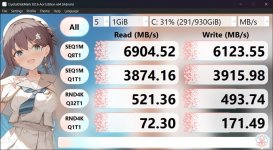
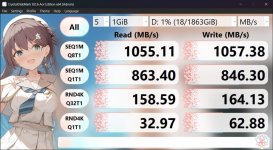
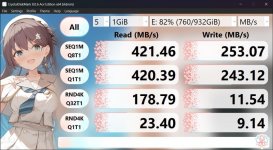
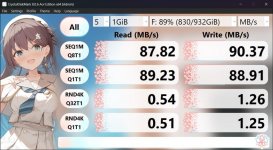
I prefure real world test like actually using my own folders and files but here are some figures from Cristal disk run on my laptop

This is the 1T kingston Fury Renegade NVME M2 gen 4 installed in laptop
 

Attachments

  • CrystalDiskMark_T1.jpg
    CrystalDiskMark_T1.jpg
    121 KB · Views: 3
Last edited:
Here is the 2T kingston Fury Renegade NVME M2 gen 4 drive in a NVME caddy
 

Attachments

  • CrystalDiskMark 2T.jpg
    CrystalDiskMark 2T.jpg
    119.2 KB · Views: 4
Last edited:
Here is my old crucial ssd sata 2.5 inch drive soon to be full end of year, and i thought this was stupid fast compared to HDD
 

Attachments

  • CrystalDiskMark_1T sata crcial.jpg
    CrystalDiskMark_1T sata crcial.jpg
    116.4 KB · Views: 2
Last edited:
Last but not least here is an HDD external drive 1T USB 3 Sata typical of budget and medium priced laptops 10 years ago and as ive stated above if your plug in an external drive of todays specs NVME gen 4 it can only write at the maximum speed of the HDD its reading from so would be totally pointless in this case.

Please do your homework and run some form of test on your installed drives to get an idea of what you can achieve
 

Attachments

  • CrystalDiskMark_Toshiba 1T hdd .jpg
    CrystalDiskMark_Toshiba 1T hdd .jpg
    112.5 KB · Views: 2
Last edited:
I get where @Chunkey Monkey is coming from, you will always get the fastest speed on an internal drive and currently the fastest external method is with Thunderbolt 4 (although Thunderbolt 5 is now appearing)

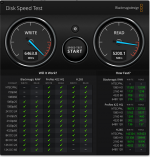
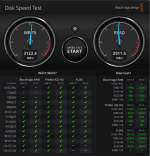
My Western digital 770 is in a housing connected to my MacBook, it is capable of over 5000 MB/s but will not achieve that due to bus limitations and will get around 3000 MB/s.

So the fastest speed I will get is 3000 writing to the internal drive even though the internal drive can read a lot faster. And write to the external drive will be around the same even though the internal drive can write nearly twice as fast

Pic 1 Internal Drive

Pict 2 External drive

Screenshot 2024-11-22 at 14.46.54.png

Screenshot 2024-11-22 at 14.45.24.png
 
Hmmmmmmmm well the drive's arrived and i've had to connect via usba to c as I cant seem to find a cable that will do thunderbolt to usb c :(

View attachment 439523
USB 3.2 can be as quick as Thunderbolt which should ordinarily be a USB c port does a USB c lead not fit in the thunderbolt port ? it does appear to be slightly different in having 2 corners square ? But you should still get same or very similar results connecting vis USB 3 and your USB c port on the drive. The testing i did there wasnt any significant difference between a C port and USB 3.2
 
As I mentioned earlier in the thread, that generation of Mac mini only supports Thunderbolt 1, the USB-C connector for Thunderbolt only came out with Thunderbolt 3.
 
My advice would be to stay away from any of the HD from WD. The reason for that is that their HD are hardware crypted and if you have to swap the drive to another HD chassis it will probably make a lot of problems for you. I had a My Book Studio Edition some years ago, and I had a lot of work to do to be able to get the data out of the HD.

This is the message I got from the WD Support:

I am very sorry to hear that the issue is with the My Book Studio Edition.


I would also like to inform you that My Book Studio Edition was never meant to be user serviceable, meaning that the internal drive might not be detected on the computer.

Each controller is tuned to the specific hard drive and should never be tampered with, altered or removed.

For every hard drive model that Western Digital manufacturers, there are many firmware changes that would make it very difficult to find a circuit board with the same firmware of the defective drive. If you attempt to install a circuit board with a different firmware than the original, this may damage the hard drive further.
 
USB 3.2 can be as quick as Thunderbolt which should ordinarily be a USB c port does a USB c lead not fit in the thunderbolt port ? it does appear to be slightly different in having 2 corners square ? But you should still get same or very similar results connecting vis USB 3 and your USB c port on the drive. The testing i did there wasnt any significant difference between a C port and USB 3.2

As I mentioned earlier in the thread, that generation of Mac mini only supports Thunderbolt 1, the USB-C connector for Thunderbolt only came out with Thunderbolt 3.

And it's not even usb3.2, it's only 3
 
Not what you expected, but does it meet your needs? Fast speeds can be impressive but how often do you need them.
 
Back
Top