Recommendation for W10 software to view jpeg EXIF/caption/metadata info

Tony101

Suspended / Banned
Messages
391
Edit My Images
No
I'm looking for a recommendation for a friend/colleague for a simple bit of software so they can view the IPTC/XMP caption info embedded into jpeg files.

The simpler the better and preferably free (it's only for very occasional use). But I guess a good photo browser would be useful regardless.

I know Irfanview is frequently recommended but this looks to be a bit more complicated than necessary for this simple task. I used XNView many many years ago, would this still be suitable?

She has tried viewing 'Properties' using Windows10 but apparently could only see author/copyright/date taken etc. If she's missing something simple here then that would be useful to know.

FWIW I use a Mac along with 'Pro' applications which doesn't help much for this situation.

Many thanks in advance for any advice you may have.
 
I'd second Irfanview - fast, simple and an incredibly tiny application by modern standards.
 
Many thanks @neil_g & @ancient_mariner for the recommendation, your input is much appreciated.

I've been back to the Irfanview website.
It's good at showing the wide variety of tasks the software can do, and that there's oodles of preferences, but it does a bad job of indicating how easy the software is to use for non-enthusiasts.

Can Irfanview be easily setup to be display the desired information in a fairly clean and simple way? (The screenshots on the website demonstrate using multiple frames to display different information and is peppered with a possibly bewildering choice of settings.)

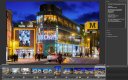
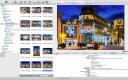
I was hoping for a simple photo browser which can display the desired info in an uncluttered way (for ease and clarity). For example, a layout along the lines of...

Photo Mechanic can be configured to browse and display the desired info like this:
PMscreen.jpg

Or GraphicConverter (venerable Mac shareware, this is an old version I keep around for a few specialised tasks) can display the information in an ordered way (file tree : thumbnails : preview + info):
GCscreen.jpg

NB: I'm using these apps purely to illustrate the sort of display that may be helpful; if my friend was a Mac user I would not recommend these apps in this instance as they don't meet the requirements (PM is expensive, and GC can be confusing and isn't free).

Hopefully Irfanview can be suitably configured.

Unfortunately I don't have access to a Windows machine to have a play myself and I don't want to recommend something that may cause more problems than the simple one I'm trying to solve. Hence my annoying questions!

Many thanks for reading this far. :)
 
Last edited:
On my (windows 10) machine, on the tool bar at the top of the irfanview window there is a large blue disc with an 'i' in the middle. Clicking that gives basic image information. There are 2 buttons on the box that pops up, allowing the viewer to see exif and IPTC data. It seems that these need to be opened & closed for each image individually - it isn't possible to scroll through a set of images with the info changing as you scroll.

HTH
 
Back
Top