RAW vs JPG

Do you shoot RAW, JPG or BOTH?

  • RAW

    Votes: 96 61.9%
  • JPG

    Votes: 25 16.1%
  • RAW+JPG

    Votes: 34 21.9%

  • Total voters
    155

jontucker

Suspended / Banned
Messages
799
Name
Jon
Edit My Images
Yes
I've just been reading up on the pro's and con's (on both sides) of RAW vs JPG and I was just wondering if there is a trend one way or the other.

I've been shooting RAW and post processing but recently I've started shooting RAW+JPG and I'm struggling to process the RAW images and make them look as good as my camera does the JPG so I beginning to wonder if there's any point in me shooting RAW at all.

Any thoughts?
 
RAW here, I guess as and when and if I become competant with my camera I may switch to JPEG.
 
now mostly jpeg, saves time and space and shortens the processing time.

basis is, get it right in camera and youll only be diong the same stuff the camera is doing anyway. i process a bit more from jpeg but its just more straight forward.

i still shoot in raw regularly though incase i decide to switch and i dont want to be out of touch with it.
 
I mostly use jpg,but sometimes raw,i find it just too much like hard work all that processing:)
 
I save both but I'm not an event shooter and space isn't that much of a problem for me.

Browsing round over the last few months it seems a lot of people are starting to switch over to just using JPEGs now in camera processing/ white balance systems have improved.
 
both, most need only minor tweeks in RAW and if I have a lot I will use the JPEGs or batch process the RAW
 
Theres no benifit in shooting both really, it's so easy to extract the inbuilt jpeg, it only takes a few seconds and then your saving card space.
 
RAW for me. I'm still learning so having the option to really work in PP helps me to learn what I'm doing right and wrong in camera as well as saving those that aren't so great.
 
Theres no benifit in shooting both really, it's so easy to extract the inbuilt jpeg, it only takes a few seconds and then your saving card space.

On the contrary Wayne, there is a benefit if you shoot Nikon and would rather use a combination of Lightroom and Photoshop over NX2.

Over the past couple of months I have chosen to shoot both. It's been a very interesting experience.

The difference is quite notable and this is due to the camera control info, including the very handy Active D Lighting being ignored by the ACR engine. With JPEG however this information is unavoidably intact. Colours can be much better and hard to match identically when processing the NEF file, even with the use of the vital adobe labs camera profiles.

The main issue for me is I can't stand the mechanics of NX2, I'm a LR and CS4 chap through and through.

This method has been a huge advantage to me and I dare say I will continue to shoot like this at the cost of a couple of extra meg.
 
On the contrary Wayne, there is a benefit if you shoot Nikon and would rather use a combination of Lightroom and Photoshop over NX2.

Over the past couple of months I have chosen to shoot both. It's been a very interesting experience.

The difference is quite notable and this is due to the camera control info, including the very handy Active D Lighting being ignored by the ACR engine. With JPEG however this information is unavoidably intact. Colours can be much better and hard to match identically when processing the NEF file, even with the use of the vital adobe labs camera profiles.

The main issue for me is I can't stand the mechanics of NX2, I'm a LR and CS4 chap through and through.

This method has been a huge advantage to me and I dare say I will continue to shoot like this at the cost of a couple of extra meg.

The jpegs are still there, just embeded, all the jpeg features (d-lighting etc) still apply
 
I've been taking RAW and JPG and if the JPG is OK then no need to open the RAW but now I am getting a better handle on RAW I'll be dropping the JPG's and simply converting the RAW.
 
The jpegs are still there, just embeded, all the jpeg features (d-lighting etc) still apply

Really? Are you sure it's possible to retrieve ADL from a NEF without using NX2?
I've tried and failed so if you can elaborate a little on the process your using, I'd love to give it a go :thumbs:
 
RAW all the way - I much prefer having the additional control in PP. On the downside I have ended up with a massive backlog of RAW files I need to process from various outings :(
 
Voted for RAW as I can't remember my last jpeg file.

I was thinking of shooting only jpeg for a week to see how my shots turn out.
 
It's raw not RAW by the way guys - it's no an anacronym ;);)

I shoot raw for 99 per cent of the time because I do honestly believe it gives me a better image for print reproduction in my line of work. However, JPEG does still give good results (and it's quicker for our repro guys to process... apparently), which is why I'm playing with shooting both to compare results and hopefully come to a proper conclusion about which is ultimately the best format for my work use. I'll still use raw for personal stuff.

Thomas Whitehouse, Swansweamale, I am interested in what you're saying aboud embedding and what you can do in LR, CS etc. The past few days I've been shooting both JPEG and raw and I imported into LR and instead of showing both the JPEGs and the raw files (as it would if you had as TIFF and a raw in the same imported folder) it shows the image with the image code in the top corner accompanied by the affix 'NEF + JPG' - is this what you're on about.

Am I right in thinking that if I make an adjustment in LR to the file I am adjusting the raw (NEF) files AND the jpeg, or is it just a strange anomally?
 
Thomas Whitehouse, Swansweamale, I am interested in what you're saying aboud embedding and what you can do in LR, CS etc. The past few days I've been shooting both JPEG and raw and I imported into LR and instead of showing both the JPEGs and the raw files (as it would if you had as TIFF and a raw in the same imported folder) it shows the image with the image code in the top corner accompanied by the affix 'NEF + JPG' - is this what you're on about.

It's also about, not aboud ?

And shouldn't it be jpeg too, and jpeg's ?
 
I shoot RAW just for peace of mind, in case I could have a great photo that would need slight tweaking that JPEG couldn't give me.
 
It's RAW for me. Why spend ££££ on the camera and then throw half the picture information away?
 
All done and dusted 3 months ago HERE (raw won BTW)
 
Sorry, the caps lock key mustn't have engaged

It's also about, not aboud ?
And shouldn't it be jpeg too, and jpeg's ?

The latter would hint at something belonging to the jpeg/JPEG - no apostrophe S if we are going to get picky. ;) ;)

Sorry for taking this off topic but my question to TW and SM still stands (despite the spelling errors)....

This is fun :D
 
Really? Are you sure it's possible to retrieve ADL from a NEF without using NX2?
I've tried and failed so if you can elaborate a little on the process your using, I'd love to give it a go :thumbs:

There is a little program called instant jpeg from raw, does it in a trice.
the inbuilt Jpeg in the raw file is size limited.
 
Thomas Whitehouse[/B], Swansweamale, I am interested in what you're saying aboud embedding and what you can do in LR, CS etc. The past few days I've been shooting both JPEG and raw and I imported into LR and instead of showing both the JPEGs and the raw files (as it would if you had as TIFF and a raw in the same imported folder) it shows the image with the image code in the top corner accompanied by the affix 'NEF + JPG' - is this what you're on about.

Am I right in thinking that if I make an adjustment in LR to the file I am adjusting the raw (NEF) files AND the jpeg, or is it just a strange anomally?

Hi mate,

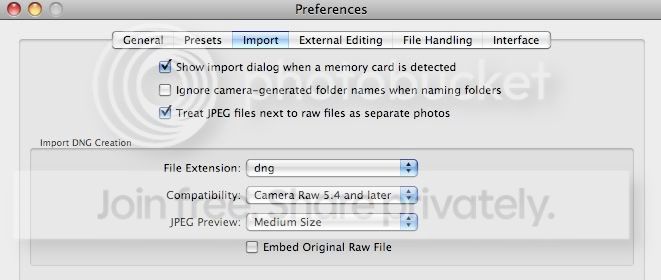
you need to change a preference in Lightroom to have the JPEG treated as a separate file upon import:
LRJPEGPREF.jpg


Tick the box - 'Treat jpeg files next to raw files as separate photo's.

In the library module you will now have the jpeg sitting next to the raw, you'll clearly be able to see the difference between the two.
If this is something that will bother you, having duplicates, then you can simply and effortlessly apply a filter in the metadata drop down menu > file type.

As for the method that Wayne has mentioned, I'm unsure if extracting a jpeg from a raw is going to produce the same results in all honesty.
I've searched in the Lightroom forums and on google and all that is returned is some dodgy software marketing ploys.
 
There is a little program called instant jpeg from raw, does it in a trice.
the inbuilt Jpeg in the raw file is size limited.

Yep do it all the time, download IJFR (instant jpeg from raw) free from
http://www.rawworkflow.com/instant-jpeg-from-raw-utility/
It certainly works on D200/300 and D3. Wayne

Cheers Terry & Wayne :thumbs:
To be honest though, having to rely on another program to do the job would actually draw out the workflow too much, as is, everything is done from Lightroom and when batching a few hundred or even thousands of files, having to involve another program would overly complicate things for me.

If I were going to rely on another program, it would be NX2 (which I have) as it reads the xmp from a nef anyway, the problem is it does not suit me at all.

Originally I thought that shooting both would be a pain, but it really doesn't add any stress or hassle to my workflow thanks to the LR engine, just a few extra MB at the most.
 
RAW - but I do a very basic edit when in the field - the reason for using RAW in my case is that it allows me the option of doing additional work afterwards - maybe even a year after the original job...
My output on the day, so to speak is invariably a resized JPEG of about 1.5-2Mb for the Print and online media outlets that we service.

Subsequent use in advertising and PR means that being able to go back to the original RAW file and further optimise the image for those applications is vital IMO...
 
Thomas Whitehouse, cheers for that, most helpful :)

Ney bother mate. I notice a fair difference when I'm using my D200 too, the jpegs have a much better colour and contrast.
It's possible to get the process of the nef close having the jpeg version adjacent for reference, to match them up like.

I'd never shoot in jpeg alone though, exposure, highlight and shadow recovery are pants with jpeg.
Sometimes the nef with the camera calibration profiles from adobe labs applied look far better then the jpeg, it's only when the ADL has affected the highlight and shadow detail do I sometimes prefer the jpeg version.

I'm still experimenting and it gets more interesting as time goes by :thumbs:
 
Back
Top