

You are using an out of date browser. It may not display this or other websites correctly.
You should upgrade or use an alternative browser.
You should upgrade or use an alternative browser.
RAW vs Jpeg
- Thread starter mrtoad
- Start date


bartoszwozniak
Suspended / Banned
- Messages
- 880
- Name
- Bartosz Wozniak
- Edit My Images
- Yes
Of course there is an advantage! Things like exposure, levels, saturation, sharpness, vibrancy etc can be corrected much easier and much more effectively when working with a RAW file. Raw files also loose less quality when you edit them as such.
I would do it, since I do not know, what I would do without RAW. It is well worth it.
Bart
I would do it, since I do not know, what I would do without RAW. It is well worth it.
Bart
OP

mrtoad
Suspended / Banned
- Messages
- 18,182
- Name
- Geof
- Edit My Images
- Yes
Of course there is an advantage! Things like exposure, levels, saturation, sharpness, vibrancy etc can be corrected much easier and much more effectively when working with a RAW file. Raw files also loose less quality when you edit them as such.
I would do it, since I do not know, what I would do without RAW. It is well worth it.
Bart
i thought that was the case
if one has a 12Mp dslr...and uses RAW what amount of the Mp are being used to record the RAW image...and i understand a duplicate in Jpeg is also saved in the camera?
as said earlier i was prompted to ask after seeing a professional camera which does...i think RAW only...at 4.3Mp
thanks

Craikeybaby
Suspended / Banned
- Messages
- 7,590
- Name
- Lewis
- Edit My Images
- Yes
The same amount of pixels are being used to record a raw or jpeg file. Raw files tend to be bigger file sizes though, so more mega bytes (MB).
A camera with higher resolution (more pixels) produces larger files sizes for the given type (raw/jpeg) than one with less pixels.
A camera with higher resolution (more pixels) produces larger files sizes for the given type (raw/jpeg) than one with less pixels.
OP
mrtoad
Suspended / Banned
- Messages
- 18,182
- Name
- Geof
- Edit My Images
- Yes
It will usually be the same amount unless you're saving as sRAW.
so this professional camera which takes 4.3Mp is really designed to let the owner get more shots on a card
i guess the resulting performance is relatively comparable with the larger professional cameras taking say 12Mp
its been an eye opener for me to think that Mp arent really setting the pace for quality and performance...
cheers

Little John
Suspended / Banned
- Messages
- 2,051
- Edit My Images
- No
OK I may be able to help you here
I have the olympus C770UZ the same as your 765 but with the metal caseing and a hotshoe I thing were the main differences. I also have a 15.1MP canon 500D. I just had a look through some of my old images their file sizes are about 2Mb each some 2.6 some 1.1 it all depends on what the image is, fireworks in the sky produce smaller files as most of it is black pixels.
A similar fireworks image on my 500D will produce somthing about the size of 2.5Mb jpg and a 16Mb raw file. Normal shots will produce 4-5Mb JPG and a 19-21Mb raw file. So what does that mean? well i can take about 130 photos per 4GB memory card when shooting raw+jpg If I change it to high quality JPG only it says 605 shots.
I am fairly new to raw myself but you can make mistakes with a manual setting camera slightly over/under expose get the white ballance wrong but with the help of software you can correct these mistakes and a lot more with ease.
Your 765 allows the takeing of photos in the TIFF format well the 770 does try setting it to that you will see your number of shots drop and the speed that the camera writes the files will increase meaning you can't shoot again or as often. The XD cards have 2 speeds the H and M I couldn't see much difference in operation myself but on a DSLR your writieng ~25MB per image every image and you can shoot 3-9 shots per second depending on the camera so you need high speed memory in them to benefit but the camera has somthing to do with it as well. I used to think the C770UZ was awesome and I learnt to use it and get the best from it but DSLR is sooooooo much better in every way.
I have the olympus C770UZ the same as your 765 but with the metal caseing and a hotshoe I thing were the main differences. I also have a 15.1MP canon 500D. I just had a look through some of my old images their file sizes are about 2Mb each some 2.6 some 1.1 it all depends on what the image is, fireworks in the sky produce smaller files as most of it is black pixels.
A similar fireworks image on my 500D will produce somthing about the size of 2.5Mb jpg and a 16Mb raw file. Normal shots will produce 4-5Mb JPG and a 19-21Mb raw file. So what does that mean? well i can take about 130 photos per 4GB memory card when shooting raw+jpg If I change it to high quality JPG only it says 605 shots.
I am fairly new to raw myself but you can make mistakes with a manual setting camera slightly over/under expose get the white ballance wrong but with the help of software you can correct these mistakes and a lot more with ease.
Your 765 allows the takeing of photos in the TIFF format well the 770 does try setting it to that you will see your number of shots drop and the speed that the camera writes the files will increase meaning you can't shoot again or as often. The XD cards have 2 speeds the H and M I couldn't see much difference in operation myself but on a DSLR your writieng ~25MB per image every image and you can shoot 3-9 shots per second depending on the camera so you need high speed memory in them to benefit but the camera has somthing to do with it as well. I used to think the C770UZ was awesome and I learnt to use it and get the best from it but DSLR is sooooooo much better in every way.
ummm...I think there's a little confusion here...
A 4.5Mp chip is a 4.5Mp chip, no matter what file-format the images are saved at - the reason a JPEG is smaller than a RAW file is the the compression algorithms in effect 'throw away' some of the digital information in order to reduce the file size. It does this by comparing information across the image and where two pixels are recording similar values, it discards that information - this results in the 'blocking' or artifacts that appear when a JPEG is enlarged greatly.
That's a very simplified version of what actually happens, but it serves to illustrate the point.
The amount of information 'lost' is calculated by the amount of compression you select: JPEG-High; Medium and Low are the typical in-camera settings.
RAW merely records all information available and allows much greater flexibility in Post-Production...that image still has to be saved as a Tiff or JPEG for the majority of end-uses...and the amount of compression you apply at that final stage also has an effect on image-quality.
Shooting RAW enables you to get the best out of the sensor you have. To get a bigger and better image you need a chip that records more information - or more mega-pixels...
The Nikon D2x recorded a RAW file at about 18.5Mb - that would open up into a 35Mb Tiff or an 8Mb full-size JPEG.
The D3 is about the same as it has the same size chip (though vastly improved in terms of performance) and records images at 2832 x 4256px.
The D3x (and the D3) records a lossless/compressed RAW at about 20.5Mb - 4032 x 6048px (and an uncompressed RAW at about 23Mb) and that opens to a full-size JPEG of about 10-14Mb.
A 4.5Mp chip was fine about five years ago, but nowadays Mobile Phones have almost as much recording capability as that...
A 4.5Mp chip is a 4.5Mp chip, no matter what file-format the images are saved at - the reason a JPEG is smaller than a RAW file is the the compression algorithms in effect 'throw away' some of the digital information in order to reduce the file size. It does this by comparing information across the image and where two pixels are recording similar values, it discards that information - this results in the 'blocking' or artifacts that appear when a JPEG is enlarged greatly.
That's a very simplified version of what actually happens, but it serves to illustrate the point.
The amount of information 'lost' is calculated by the amount of compression you select: JPEG-High; Medium and Low are the typical in-camera settings.
RAW merely records all information available and allows much greater flexibility in Post-Production...that image still has to be saved as a Tiff or JPEG for the majority of end-uses...and the amount of compression you apply at that final stage also has an effect on image-quality.
Shooting RAW enables you to get the best out of the sensor you have. To get a bigger and better image you need a chip that records more information - or more mega-pixels...
The Nikon D2x recorded a RAW file at about 18.5Mb - that would open up into a 35Mb Tiff or an 8Mb full-size JPEG.
The D3 is about the same as it has the same size chip (though vastly improved in terms of performance) and records images at 2832 x 4256px.
The D3x (and the D3) records a lossless/compressed RAW at about 20.5Mb - 4032 x 6048px (and an uncompressed RAW at about 23Mb) and that opens to a full-size JPEG of about 10-14Mb.
A 4.5Mp chip was fine about five years ago, but nowadays Mobile Phones have almost as much recording capability as that...

- Messages
- 9,277
- Edit My Images
- No
The same amount of pixels are being used to record a raw or jpeg file.
A JPG file has three times the information of a RAW file. A camera sensor only records a single colour at each position - red, green or blue. The other colours are interpolated from the sensors around it.
However, RAW data is usually 12 or 14 bit whereas JPG is 8 bit. Also JPG files are compressed reducing the file size even more.
If you were to convert a RAW to a TIF - an un-compressed RGB recording format, you would get a file about three times the size of the RAW file.
Steve.

petersmart
Suspended / Banned
- Messages
- 5,000
- Edit My Images
- Yes
If you were to convert a RAW to a TIF - an un-compressed RGB recording format, you would get a file about three times the size of the RAW file.
Steve.
In fact it's about SIX times the size - at least mine are when I convert a 12Mp RAW file to a TIFF file I usually end up around 71.6 Mp for a 16 bit TIFF file.
- Messages
- 9,277
- Edit My Images
- No
In fact it's about SIX times the size - at least mine are when I convert a 12Mp RAW file to a TIFF file I usually end up around 71.6 Mp for a 16 bit TIFF file.
I suppose it varies a bit. My only experience is when I used to have a Nikon D100. The TIF files were about three times the RAW file size.
Are you sure you are not comparing a TIF with a compressed RAW? Also, you are using Mp as a unit. 12 Mega Pixels is not the same as 12 Mega Bytes.
Steve.
Craikeybaby
Suspended / Banned
- Messages
- 7,590
- Name
- Lewis
- Edit My Images
- Yes
A JPG file has three times the information of a RAW file. A camera sensor only records a single colour at each position - red, green or blue. The other colours are interpolated from the sensors around it.
However, RAW data is usually 12 or 14 bit whereas JPG is 8 bit. Also JPG files are compressed reducing the file size even more.
If you were to convert a RAW to a TIF - an un-compressed RGB recording format, you would get a file about three times the size of the RAW file.
Steve.
Yes, but it is still created from the same amount of pixels

- Messages
- 9,277
- Edit My Images
- No
Yes, but it is still created from the same amount of pixels
Indeed it is but the RAW data only holds a third of the actual image data. The other two thirds is interpolated.
The RAW data for each pixel can only be red, green or blue - not all three.
Steve.
OP
mrtoad
Suspended / Banned
- Messages
- 18,182
- Name
- Geof
- Edit My Images
- Yes
a recent post revealed to me a good camera which takes RAW at 4.3 Mp..its a professional job by the looks of it and is priced around the value of my central heating reinstall
i take 4.2Mp Jpeg
is there an advantage there...
that was some education...what it tells me is there is an awful lot i have to learn...
i was talking to the costco printing tech today about resolution and other things
its a vast subject...:|

- Messages
- 6,283
- Name
- Chaz
- Edit My Images
- Yes
a professional camera which does...i think RAW only...at 4.3Mp
thanks
What one is that then?
- Messages
- 6,283
- Name
- Chaz
- Edit My Images
- Yes
In fact it's about SIX times the size - at least mine are when I convert a 12Mp RAW file to a TIFF file I usually end up around 71.6 Mp for a 16 bit TIFF file.
12 Mp RAW has noting to do with file size the 12 MP is how many pix it has the file size will be different for each photo depending on the info in each photo if most of your histogram is to the left it will be a small file BUT if you get it in the top end as you should you get a much bigger file.
If you look at a histogram and divide it into five the 1.5 to the right has 50% of the max data possible for your photo miss this and you will only have 50% of the data possible.
- Messages
- 6,283
- Name
- Chaz
- Edit My Images
- Yes
I do not think there is ANY interpoation on any file from a cameraIndeed it is but the RAW data only holds a third of the actual image data. The other two thirds is interpolated.
The RAW data for each pixel can only be red, green or blue - not all three.
Steve.

its a nikon with built in motor drive...i think its been superceded though...
D2H click for stats
...one for sale at 350 with stuff
I'd see if you can source a D2X instead - they should be selling for about the same price about now...
...and that's 10.2Mpx - really good camera - even better if you find a D2Xs...

EdMoss
Suspended / Banned
- Messages
- 1,643
- Name
- Ed
- Edit My Images
- No
I used one of these for a couple of years, nearly one of the worst cameras I've used (NC2000 wins that award, closely followed by the D1.) White balance was off 85% of the time and the rubber bits kept falling off, I would look elsewhere to spend your £350.
Craikeybaby
Suspended / Banned
- Messages
- 7,590
- Name
- Lewis
- Edit My Images
- Yes
Indeed it is but the RAW data only holds a third of the actual image data. The other two thirds is interpolated.
The RAW data for each pixel can only be red, green or blue - not all three.
Steve.
The point is separating MP (Mega Pixels) from MB (Mega Bytes) as they measure different things...
- Messages
- 9,277
- Edit My Images
- No
I do not think there is ANY interpoation on any file from a camera
Then how do you get, for instance, the red and green information for a pixel position which is only sensitive to blue light?
In a six million pixel camera, 1.5 million sensor sites will be blue, 1.5 million will be red and 3 million will be green (more green because it's a more commonly occuring colour in nature).
Open up a file from that camera and it will have a full colour pixel for each of the six million positions relating to the photo sites. That extra informatioon must have come from somewhere and the only way to get it is to approximate it from the surrounding sensor sites.
The only sensor which gives full red, green and blue information from each site is the Fovean multi-layer sensor as used in the Sigma SD9 and SD 10 cameras.
Steve.
I used one of these for a couple of years, nearly one of the worst cameras I've used (NC2000 wins that award, closely followed by the D1.) White balance was off 85% of the time and the rubber bits kept falling off, I would look elsewhere to spend your £350.
Then you had a duff one - we used them for four years and there were very few problems with either these or the D2X/D2Xs.
After the firmware updates were applied it was very good indeed and only the improved ISO capability of the D3 would have made me swap if I'd been spending my own money.
We did have the same probs with rubber falling off with the D1 and D1x in Iraq in 2002-2003 though...

i will pass on that one then
really i was surprised at such an expensive camera...in its time...to be 4.3Mp
things have really moved on...although i suspect those Mp were full of detail and resolution
Hmmm... a bit...lol
Its predecessor, the D1 had an even smaller chip: 2.7Mp - the colours and white-balance really were atrocious by today's standards and that puppy cost about £5k when it was announced in 1999...
The alternative was the Kodak DCS 620 with a 2Mp chip at £8k - yes - £8,000...lol

The previous Kodak DCS was about £12-14K if I remember right...it had a 1Mp chip...lol
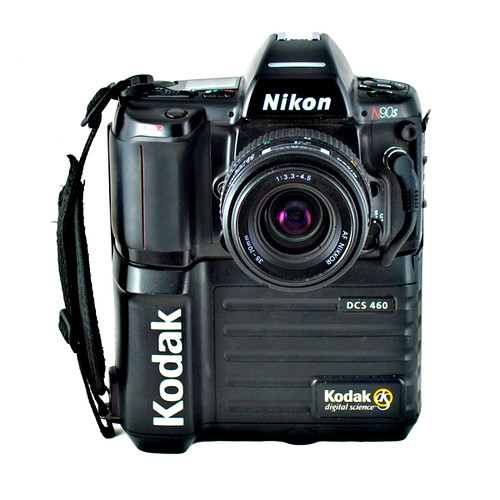
Just ten years of Pro-Spec DSLRs and look where we are...
- Messages
- 9,277
- Edit My Images
- No
Just ten years of Pro-Spec DSLRs and look where we are...
Nearly there!
Steve.

StewartR
Suspended / Banned
- Messages
- 11,513
- Name
- Stewart
- Edit My Images
- Yes
I do not think there is ANY interpoation on any file from a camera
That's all true, Steve, but it doesn't have to happen in the camera. A RAW file is a straight dump of what each sensor site records. The conversion to proper (interpolated) colour information happens when you process the RAW file on your computer.Then how do you get, for instance, the red and green information for a pixel position which is only sensitive to blue light?
In a six million pixel camera, 1.5 million sensor sites will be blue, 1.5 million will be red and 3 million will be green (more green because it's a more commonly occuring colour in nature).
Open up a file from that camera and it will have a full colour pixel for each of the six million positions relating to the photo sites. That extra informatioon must have come from somewhere and the only way to get it is to approximate it from the surrounding sensor sites.
- Messages
- 9,277
- Edit My Images
- No
That's all true, Steve, but it doesn't have to happen in the camera.
That's right. It doesn't happen in the camera unless you you get the camera to provide a JPG (or a TIF as my D100 did).
If you use the RAW data from the camera then this extra information is always created by external software as a RAW file does not contain full colour information for every pixel. If it did it would be three times the file size and would essentially be the same type of file as a TIF. If that was the case, TIF files would have been used instead because they already existed and there would have been no need to to create a new file type.
Steve.
OP
mrtoad
Suspended / Banned
- Messages
- 18,182
- Name
- Geof
- Edit My Images
- Yes
That's right. It doesn't happen in the camera unless you you get the camera to provide a JPG (or a TIF as my D100 did).
If you use the RAW data from the camera then this extra information is always created by external software as a RAW file does not contain full colour information for every pixel. If it did it would be three times the file size and would essentially be the same type of file as a TIF. If that was the case, TIF files would have been used instead because they already existed and there would have been no need to to create a new file type.
Steve.
i have TIF..whats the advantage of that..it is larger and comes with a second file..
is it better to pp than a jpeg
i have TIF..whats the advantage of that..it is larger and comes with a second file..
is it better to pp than a jpeg
If you want the best quality image from your camera, then shoot RAW - shooting TIFF does give a far better image than JPEG as there is no compression - however it will apply all the in-camera settings to the image which cannot be undone (or can but with some difficulty) in PP...
Shooting TIFF also uses up huge amounts of memory.
Why bother? With a RAW file you get all the image-information - the maximum amount of PP possibilities and it takes up less space than a TIFF...
OP
mrtoad
Suspended / Banned
- Messages
- 18,182
- Name
- Geof
- Edit My Images
- Yes
If you want the best quality image from your camera, then shoot RAW - shooting TIFF does give a far better image than JPEG as there is no compression - however it will apply all the in-camera settings to the image which cannot be undone (or can but with some difficulty) in PP...
Shooting TIFF also uses up huge amounts of memory.
Why bother? With a RAW file you get all the image-information - the maximum amount of PP possibilities and it takes up less space than a TIFF...
*ticks tiff of his christmas list*
raw it is ps are capitals obligatory for Raw

OP
mrtoad
Suspended / Banned
- Messages
- 18,182
- Name
- Geof
- Edit My Images
- Yes
wasnt the idea of the d2h to be able to shoot fast sports ,,,8 fps with a high buffer capability ? is that why its only 4 mp?
this crossed my mind...only 4Mp but what pics...that could be the answer...
yannick_reveur
Suspended / Banned
- Messages
- 145
- Edit My Images
- No
if you are not using any post processing soft shoot jpeg.
otherwise go for RAW, you will certainly come to a stage where you'll edit your picture in LR or so. If i were you i would shoot raw from now so you can always work later on the pictures but all depend of you usage and need
otherwise go for RAW, you will certainly come to a stage where you'll edit your picture in LR or so. If i were you i would shoot raw from now so you can always work later on the pictures but all depend of you usage and need
Jamieconverge
Suspended / Banned
- Messages
- 286
- Edit My Images
- Yes
absolutely nothing wrong with the d2h, takes very very fine images. the 4mp resolution can be a blessing if you dont print bigger than A4, you dont tend to crop and you like working with small file sizes!
second hand prices for it are a bargain, same with the d2x (i should think about £700ish? it was around the middle of this year anyway) - especially given how much they cost when they came out!
<yes i did drop a few thousand on a d2x when they came out!>
second hand prices for it are a bargain, same with the d2x (i should think about £700ish? it was around the middle of this year anyway) - especially given how much they cost when they came out!
<yes i did drop a few thousand on a d2x when they came out!>
wasnt the idea of the d2h to be able to shoot fast sports ,,,8 fps with a high buffer capability ? is that why its only 4 mp?
That is exactly what it was for - it partnered the D2x which has 10.2Mpi...
The logic was that hard-news and sports toggers would be more interested in the large buffer and faster frame-rate than high image quality as thier images were destined for fast transmission to newspapers and photo agencies...
For newspaper use, an image of 1mb is more than enough - for news-magazine (weekend supplements) you only need about 1.2-1.5mb - for Library and agency use, bigger is better, but for that you bought the D2x...
And now it's the same rationale with D3/D3s & D3X...