Raw or not?

I wish people would actually check out some of the things they quote.

Firstly I used to shoot in RAW but then found that there was so little difference between RAW and JPEGs for the kind of pics I shoot that I now shoot almost exclusively in JPEG.

thats about how i feel :)
 
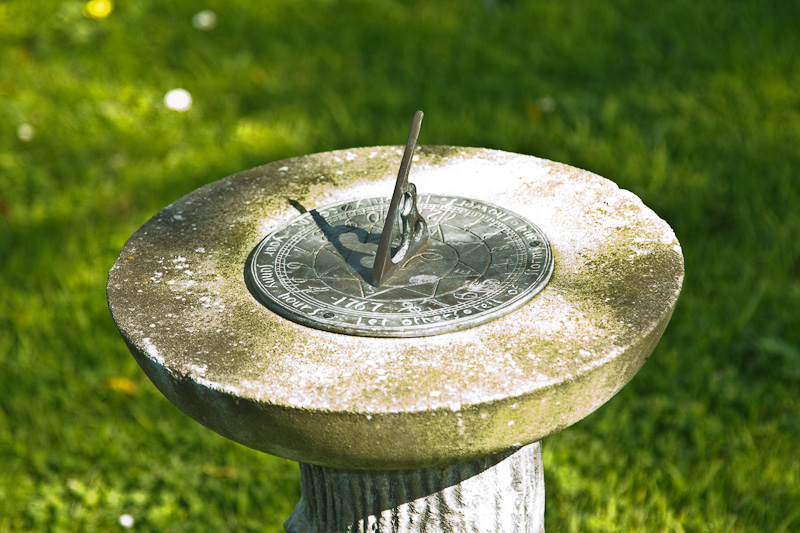
OK, here's the full-size jpeg (warning it's 3.2MB).

I took these images for one purpose. A poster on another forum claimed that it was always possible to process a jpeg to produce an image just as good as you can get from processing the raw, and no amount of argument based on logic could dissuade him of this delusion. So I deliberatley got the exposure and white balance wrong and shot in raw+jpeg. The challenge is to process the jpeg image to recover the proper colour range and the detail visible in the processed raw image (reproduced below).

Grass%20Proc%20Raw.jpg

as i have already said i wouldnt take a photo like that in the first place.
the whole idea is that my jpegs only need the minimum amount of work,
so i set out to get exposure wb,etc, correct from the start.
if its an important shot i will take more than one picture anyway.
yes there is extra info wb etc. but if your wb is correct you dont need that extra info.anyway!

its a pointless argument,everyones photos speak for themselves HOWEVER THEY ACHIEVED THE RESULTS.

i have just had another band contact me asking for a band shoot they have not asked if i shoot raw nor what camera i use and i havent asked if they use gibson les paul or fender straocaster guitars.
 
OK, here's the full-size jpeg (warning it's 3.2MB).

I took these images for one purpose. A poster on another forum claimed that it was always possible to process a jpeg to produce an image just as good as you can get from processing the raw, and no amount of argument based on logic could dissuade him of this delusion. So I deliberatley got the exposure and white balance wrong and shot in raw+jpeg. The challenge is to process the jpeg image to recover the proper colour range and the detail visible in the processed raw image (reproduced below).

<snip>

:boxer: A tenner says Frank's going to win this one. By some margin.

One thing you cannot do with a JPEG (of which I'm a regular user) is recover blown highlights - because they've been dumped. You can do a lot with everything else because mostly it's all retained, just mathematically compressed. Not highlights.

I use Canon's oft-derided Highlight Tone Priority mode when shooting JPEGs for this reason. It retains about a stop more in the highlights, at the expense of a bit more noise in the shadows - it's basically a highlight recovery trick in-camera, similar to what you might do in post with a Raw.

BTW Frank, how far over-exposed is your original, and in your Raw conversion, are some of those highlights still actually blown?

Thanks. My money is safe :D
 
And this is why I put the little disclaimer on one of my posts, particularly with a previous thread with petersmart in mind. ;)

Firstly I used to shoot in RAW but then found that there was so little difference between RAW and JPEGs for the kind of pics I shoot that I now shoot almost exclusively in JPEG.

Whatever works for you. :thumbs:

Firstly:"You can't alter the WB in JPEG".

Well if you use Canon's DPP to edit your JPEGs and get the latest updates you certainly CAN, and batch edit too.

No, you can change the colour of the pixels, which already have had colour applied, but the larger the change, the more degrading it will be. The RAW file has a White Balance in preview, but no White Balance is applied till you save it as Jpeg or a Tiff, so if it is a totally different WB there is not as much degradation because you're not physically changing a colour, because until a RAW file is converted the colour is just a viewing instruction. Also the RAW file has more detail to work with, being a 12bit file as opposed to an 8bit file, that's a difference of 4,096 levels of adjustment per pixel versus 256 levels of adjustment. It is easier to get smooth changes, or more variation in colour, with more information. Once you've edited it with as much detail you can, then save it in whatever format for output.

In other words you can treat a JPEG exactly as a RAW file.

You can treat it same, to some degree, but the results may not be the same, and for the most part, as good.

But for me I usually convert my source JPEGs (as I call them) to TIFF files then edit them as needed before converting back to JPEGs for the internet etc.

As was pointed out in a previous thread, there is little or no benefit in converting to Tiff to edit. You've already got as much detail as you can get in the initial save as a Jpeg.

Think of a 1bit file which is black and white, so that is two tones, either black or white. Change that to a 2bit file, and you will 4 available tones, say from black, 2 shades of grey, to white, but converting from the original 1 bit file doesn't give you the shades of grey, because they were not there in the original file. So in theory you have more information to play with, but the information is not there to play with. :shrug: I hope I've explained that OK.

But like I said, whatever works for you. :thumbs:
 
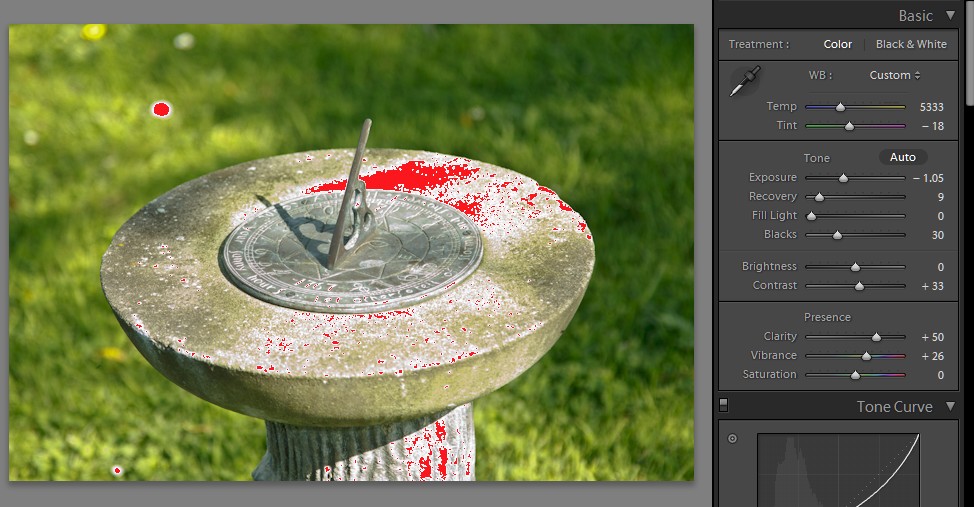
BTW Frank, how far over-exposed is your original, and in your Raw conversion, are some of those highlights still actually blown?

Here's a screencap of the LR develop page. Knocking the exposure down by just over a stop is enough to recover most of the blown highlights, but not all. However, dropping the exposure any more doesn't really help. Winding up the 'Recovery' slider does remove the red 'blinkies' but there's no extra detail that's revealed.

Grass%20LR.jpg


It's the recovery of the blown highlights that's one of the major reasons for me to shoot raw. If you ETTR then it's quite easy to go a bit too far. That's not a problem if you shoot things that don't move - landscapes, buildings, obedient humans - because you can chimp and repeat. But it's very different with what I tend to shoot. It's not easy to ask an eagle to fly past again because you've not quite got the exposure correct.

When I took my first trip to Africa I'd only just started shooting with a dSLR and I believed what I'd read about how jpeg was 'good enough'. Of course, with just a couple of month's experience I made quite a few errors; errors that would have been recoverable if I'd shot in raw. Now, when I look at those images I could almost weep when I think how much better they could have been.
 
it's worse than I thought :D
 
Thanks for that Frank :)

Echo your comments about ETTR and highlight recovery, which I am using more and more now I've got into Lightroom - it's the only PP programme that I've really got on with. Just so easy to pull those sliders which do such clever things under the bonnet, hold those highlights and, with the amazing files that a 5D2 produces, pull wonderful detail out of the shadows too :thumbs:

it's worse than I thought :D

Well I never...
 
Last edited:
But for me I usually convert my source JPEGs (as I call them) to TIFF files then edit them as needed before converting back to JPEGs for the internet etc.

Why the conversion? You're not magically going to gain any increase in editable latitude by converting to TIFF.
 
Why the conversion? You're not magically going to gain any increase in editable latitude by converting to TIFF.

Because I put them through Neat Image first to reduce noise then edit them in Photo Plus X2.

I never edit JPEGs because there may be a loss of IQ in saving them several times wherease TIFFs are lossless.

.
 
best I can get to without wasting toooo much time :) Not perfect by a long stretch, not enough yellow and recovering parts of it has caused extra clipping :|

not too bad for such an extreme example though :)

large processed
 
Because I put them through Neat Image first to reduce noise then edit them in Photo Plus X2.

I never edit JPEGs because there may be a loss of IQ in saving them several times wherease TIFFs are lossless.

But you have lost some information with the initial save to Jpeg in the camera, and you will lose more information when you save the Tiff as a Jpeg. There is no need for the Tiff middle step imho. :shrug:

Whatever works for you though. :D
 
Because I put them through Neat Image first to reduce noise then edit them in Photo Plus X2.

I never edit JPEGs because there may be a loss of IQ in saving them several times wherease TIFFs are lossless.

.

But if you're going to do post work on them, then why not simply cut out that middle step and shoot in RAW in the first place?
 
I read your reply already, and your methodology just makes no sense to me. Please don't patronise me, I'm not an idiot. Considering it's obvious that you realise that JPEG is a lossy format, it just seems strange to me that you'd continue to use it. You're basically adding in a step that could be cut out if you simply shot in a different format; what I don't understand is why you simply don't just shoot in that format - saying that you don't need it doesn't really explain it. Do you really shoot continuously so much that RAW is a problem? Why not simply get faster cards?
 
Last edited:
I read your reply already, and your methodology just makes no sense to me. Please don't patronise me, I'm not an idiot. Considering it's obvious that you realise that JPEG is a lossy format, it just seems strange to me that you'd continue to use it. You're basically adding in a step that could be cut out if you simply shot in a different format; what I don't understand is why you simply don't just shoot in that format - saying that you don't need it doesn't really explain it. Do you really shoot continuously so much that RAW is a problem? Why not simply get faster cards?
I use it because I don't need to use RAW.

It really is that simple.

IF I was a professional photographer THEN I probably would use RAW but I simply don't need to.

If you look at my Flickr pics for the last 2 years or so virtually all of them were taken using JPEGs.

The main point that most people seem to make for using RAW on here is that it allows them to recover highlights - if that is so and the subject is static then I simply use HDR and get a far wider dynamic range than using RAW would give me anyway.

If it is not static then I simply use the "blinkies" to make sure that I DON'T burn out the highlights - simples!

JPEGs are lossy, but most of the algorithms now available can produce JPEGs where any lost detail is in areas that aren't noticeable in much the same way that MP3s throw away detail in music most of us can't hear.

And of course in the final picture a great deal of the information you have striven to protect will actually be thrown away anyway since most of your pics will be converted to JPEGs anyway.

And, yes, I do know and understand that that information MAY be available during the editing process but as I've already said I prefer NOT to burn out highlights etc if I can help it but if it does happen I usually don't worry about it and simply shoot again.

.
 

And did you not see my reply to your post? ;)

I don't think I mention in my post about recovering highlights, which you seem to think is the reason for shooting in the RAW format.

I use it because I don't need to use RAW.

It really is that simple.


I remember a thread where you said RAW files were the same as Jpegs, and so of no benefit, and it turned out I think, after a lot of too'ing and fro'ing that you were converting the RAW straight to a Jpeg or Tiff with no editing, and that was your proof that they were as good as each other. You were just using the computer, rather than the camera, to convert the RAW file with the same settings as the camera was doing, and that was 'proof' that RAW was no good. If you convert the same settings then they look the same. Which by the way is why there is no need to shoot RAW +Jpeg btw. ;)

The main point that most people seem to make for using RAW on here is that it allows them to recover highlights - if that is so and the subject is static then I simply use HDR and get a far wider dynamic range than using RAW would give me anyway.

I think White Balance is also mentioned as frequently as a major benefit of RAW.

JPEGs are lossy, but most of the algorithms now available can produce JPEGs where any lost detail is in areas that aren't noticeable in much the same way that MP3s throw away detail in music most of us can't hear.

Yes you don't hear what's missing, until you listen to the full CD quality song next to the MP3 copy. The dynamic range is reduced, a lot of the reverb has been stripped away. The lower the bit rate of the MP3, the further away it is from the original song, and how it was meant to be.

MP3 if the first time that a new technology has made music worse. Don't get me wrong, it's all I listen to now, but the transition from CD quality to MP3 was painful. I have forsaken CDs for portability and small file sizes. Which is what a lot of people do with Jpeg. I know that CDs are better though. ;)

And of course in the final picture a great deal of the information you have striven to protect will actually be thrown away anyway since most of your pics will be converted to JPEGs anyway.

Again, as I said earlier, Jpeg will most probably be the final image format, but there is more information available to edit with before that final Jpeg step. :shrug:

And, yes, I do know and understand that that information MAY be available during the editing process but as I've already said I prefer NOT to burn out highlights etc if I can help it but if it does happen I usually don't worry about it and simply shoot again.

As onona pointed out, you could save the RAW straight Tiff if you wanted to skip out a step of compression. But again, if you're OK with that, there is no need to save as a Tiff, because you gain nothing by it. :shrug: Again imho.

You are happy with your workflow and choice of file format capture, and that's fine. :D And I don't what anyone says will change your mind.

I write this to just point out where 'I think' you're making mistakes so people don't copy those mistakes. :shrug: If you don't consider them mistakes, and are happy with your final images then all the World's happy. :)
 
I use it because I don't need to use RAW.

It really is that simple.

I think Leigh's confusion is that you're so vehemently against the 'Shoot raw - Convert to jpeg' workflow, yet you vigourously defend the 'Shoot jpeg - Convert to Tiff - Convert to jpeg' workflow.

That's what I reckon is the cause for Leigh's confusion. Because it totally confuses me!
 
I think Leigh's confusion is that you're so vehemently against the 'Shoot raw - Convert to jpeg' workflow, yet you vigourously defend the 'Shoot jpeg - Convert to Tiff - Convert to jpeg' workflow.

That's what I reckon is the cause for Leigh's confusion. Because it totally confuses me!

I am NOT against the 'Shoot raw - Convert to jpeg' because I have NEVER done it.

Even when shooting RAW I ALWAYS converted to TIFF files for editing because as I already said I use at least 2 stages of editing (Neat Image to denoise them then Photo Plus X2 for editing) then finally converting to JPEGs for the finished products.

So using the 'Shoot jpeg - Convert to Tiff - Convert to jpeg' workflow did not add any extra steps over a 'Shoot RAW - Convert to Tiff - Convert to jpeg' workflow.

I have no doubt that some programs such as Adobe Lightroom do allow the recovery of blown highlights and no doubt do all the other things that the people on here claim for it but frankly as I have already said I am NOT a pro tog now.

And I know I can produce very pleasing pictures working the way I do.

.
 
Back
Top