Raw or Jpeg, what are the risks?

trapper501

Suspended / Banned
Messages
1,175
Name
Nick
Edit My Images
Yes
Big trip coming up in two weeks with hundreds of pics going to be taken if not thousands. One of those once in a lifetime trips (though I do get quite a few of those)

So up till now everything has always been Jpeg, is this the moment to switch to Raw?

We have two bodies to take, a 40D and a 350D,and two Epson P2000 for storage (one is backup)

I can see that if we do it all in raw (Is it raw or RAW?) then we will have more flexibility on our return.

However, the Epsons presumably can't read raw, I'm assuming for the moment they can store it, I'm wondering what the risks are of changing at this late stage?

We won't know what we have till we get back will we?

You can do raw plus a Jpeg can't you? Should we be considering this or stick to Jpeg?

We have CS3 and Canon DPP.
 
I shoot in RAW all the time - not comfortable with jpeg as RAW gives you so many more options and more chances to save shots that you didn't get right in the camera. Two weeks is long enough to do tests and find out if it works for you.
 
I agree RAW is a lot more flexible. If you have the storage space and you're not worried about the buffer size (I assume that would be reduced) then I don't see why you can't shoot in RAW+Jpeg. I don't know a lot about the Epsons, but I don't imagine you'll be able to see too much more on them than on the camera screen anyway?
 
I agree RAW is a lot more flexible. If you have the storage space and you're not worried about the buffer size (I assume that would be reduced) then I don't see why you can't shoot in RAW+Jpeg. I don't know a lot about the Epsons, but I don't imagine you'll be able to see too much more on them than on the camera screen anyway?

Epsons show what's on the screen, but not sure they can do so with raw but we will do some tests on what can be done epson wise.

Any idea how big the file size is of RAW+jpeg on a 40D? How many to a gigabyte?
 
every RAW has a jpeg embedded in it anyway - so I don't see the point of shooting RAW and jpeg.
don't know the file sizes on your camera - check the manual?
 
every RAW has a jpeg embedded in it anyway - so I don't see the point of shooting RAW and jpeg.

Ah right, is that what shows on the camera screen? Presumably the Epson would need to be clever to read that, I'll test it later.
 
I use raw but you need loads of storage, where are you going on your trip of a lifetime?

This trip is 3 weeks safari in Namibia, including a balloon ride over sossusvlei. Might fit in a flight up the skeleton coast too. We have done a couple of safaris before but this is all self drive which is a first, and the 40D and a couple of lenses were bought for this trip.

A bit of a google suggests 3200shots on a 40Gb Epson (assuming it will store them)
 
Epsons show what's on the screen, but not sure they can do so with raw but we will do some tests on what can be done epson wise.

Any idea how big the file size is of RAW+jpeg on a 40D? How many to a gigabyte?

Sorry I didn't explain myself too well. I meant if you're worrying about shooting in RAW in case the Epson won't read it and are therefore considering shooting in Jpeg instead of RAW/as well as RAW to allow you to view your photos, how much more detail will the Epson show compared to the 40D screen?

I'm just thinking that the 40D should be good enough to help you distinguish if the shot is in focus etc and so you wouldn't have to worry about Jpeg?

To awp, I know the RAW has a Jpeg embedded as well, but if the Epsons won't read the RAW files then that was why I was suggesting RAW+Jpeg.
 
Sorry I didn't explain myself too well. I meant if you're worrying about shooting in RAW in case the Epson won't read it and are therefore considering shooting in Jpeg instead of RAW/as well as RAW, how much more detail will the Epson show compared to the 40D?

I'm just thinking that the 40D should be good enough to help you distinguish if the shot is in focus etc and so you wouldn't have to worry about Jpeg?

To awp, I know the RAW has a Jpeg embedded as well, but if the Epsons won't read the RAW files then that was why I was suggesting RAW+Jpeg.

Clearly we need a play with the epsons, but I agree, we only review the pics at the end of each day on the Epson, so it is too late by then to do it again anyway. We can use the screen on the camera to assess the results initially as usual.

I'm happy with the idea of 3000 shots storage. Now we will play with the epsons to see what can be done there.
 
Namibia is awesome. You'll have a great time. We did a self drive in 2002 and it's the best holiday I've ever had.

AS for the storage, even if it won't read it, an Epson P2000 should still copy the files but it is easy to test at home before you go.
 
Clearly we need a play with the epsons, but I agree, we only review the pics at the end of each day on the Epson, so it is too late by then to do it again anyway. We can use the screen on the camera to assess the results initially as usual.

I'm happy with the idea of 3000 shots storage. Now we will play with the epsons to see what can be done there.

Sounds good to me. :thumbs: Btw I'd love to be going on this trip, sounds spectacular!
 
We have two bodies to take, a 40D and a 350D,and two Epson P2000 for storage (one is backup)

However, the Epsons presumably can't read raw, I'm assuming for the moment they can store it, I'm wondering what the risks are of changing at this late stage?

I use an Epson P2000 when I need to backup on the go. I shoot RAW. It will save the file and let you view it, but you can't zoom into to as you can with a JPG file. I use my P2000 as a HD/viewer on the go. I can quickly review shots and delete the naff ones.
 
I use an Epson P2000 when I need to backup on the go. I shoot RAW. It will save the file and let you view it, but you can't zoom into to as you can with a JPG file. I use my P2000 as a HD/viewer on the go. I can quickly review shots and delete the naff ones.

Oh excellent, thank you very much.
 
The P2000 does support RAW, both CR2 and CRW but make sure you have the most up to date firmware installed V02.51.
 
The P2000 does support RAW, both CR2 and CRW but make sure you have the most up to date firmware installed V02.51.

I have updated both fairly recently as they wouldn't recognise the larger SD cards, but I will check that.

They don't like the movie clips my new Canon Ixus 980 makes, I think those are .MOV instead of .AVI
 
Thanks for all your help folks, I'm much encouraged. Will do some testing this weekend to confirm but it seems like we may be converted.
 
every RAW has a jpeg embedded in it anyway - so I don't see the point of shooting RAW and jpeg.
don't know the file sizes on your camera - check the manual?

Is there a program or something that would allow you to extract that jpeg from loadsa shots at the same time to save shooting RAW+jpeg?
 
Just shoot RAW: the benefits of having all that latitude when it comes to PP far outweigh the disadvantages due to file size - the downloadable codecs from Nikon allow thumbnail review in Windows and all of the PP software out now should have up-to date RAW converters...
The Epson is just a Hard Drive at the end of the day, so go online and see if there's a firmware update that supports the RAW files for the cameras you're using...
Failing that, buy more memory cards and take a notebook PC with you for editing in your hotel room at night...
We used to say that the film was the cheapest part of a holiday, so don't scrimp - it's better to have more capacity than you need than to have to go on holiday again because you miss a shot...with storage so cheap nowadays, you'll be kicking yourself otherwise...
 
we have decided that 3200 pics is a bit tight for 3 weeks so will take an extra 20Gb of memory cards.

The best deal I can see is the 4 Gb Ultra II at £15.99 each from my memory.

I know these aren't as fast as later cards but isn't that just a delay in downloading to the PC, or should we be looking for faster? Already have a number of Ultra II but also some extreme.
 
My preference, and the way I've done it in the past and would continue in the future is to shoot raw only and take a small laptop - even a netbook - and a secondary USB hard drive.

Download/copy your files from your cards to the external HDD. Then import from the external HDD to the laptop HDD. Check the local raw files on the laptop and you will know that both HDD copies are sound. At that point you can erase your cards ready for the next day.

The JPEG embedded into a 40D raw is relatively low resolution (1944*XXXX), which is why checking for image sharpness within the camera is a waste of time. I would not rely on the embedded JPEG as a useable image file. If you shoot raw you will probably use Neutral picture style and have sharpening, contrast, saturation turned right down so the embedded JPEG will look poo in any case.
 
The Canon's DPP works fine for batch converting raw images, Pretty much all I use these days as it is so convenient. Nick - video tutorials here if you are unsure ;) :Linky
 
My preference, and the way I've done it in the past and would continue in the future is to shoot raw only and take a small laptop - even a netbook - and a secondary USB hard drive.

Download/copy your files from your cards to the external HDD. Then import from the external HDD to the laptop HDD. Check the local raw files on the laptop and you will know that both HDD copies are sound. At that point you can erase your cards ready for the next day.

The JPEG embedded into a 40D raw is relatively low resolution (1944*XXXX), which is why checking for image sharpness within the camera is a waste of time. I would not rely on the embedded JPEG as a useable image file. If you shoot raw you will probably use Neutral picture style and have sharpening, contrast, saturation turned right down so the embedded JPEG will look poo in any case.

Well we don't have a small laptop or netbook, but the epson seems to be up to the job.

As for your second paragraph I didn't understand a word of it! Clearly we have a lot to learn if we start shooting RAW.
 
When you get home batch convert the pics but save the original raw file so that you can give individual treatment where needed.

I have been using Kingston elite pro 133x speed recently on my 40D, they are excellent

7dayshop has them 4Gb singles at £9.97 2 or more at £9.49 each Post paid.
Buy plenty and shoot raw. I would not bother to down load to anything while away.


http://www.7dayshop.com/catalog/default.php?cat=6&type=6010&man=171&filterwords=4gb&comp=
 
Given the cost of a trip like this - the cost of a few good quality reliable CF cards is minute.
 
I don't know how the Kingston 133 compare with the Sandisk but I've used Sandisk for years and I'm happy to stay with them.


we will download to the Epsons though, it gives us two copies of everything. The additional cards are in case we run out of space.

Our last safari we did we had one epson and just the 350D with far inferior lenses, the system works well, we just need a bit more security (hence the second epson) and a change in the file type to reflect the potential of the better equipment.
 
I would recommend www.7dayshop.com for cheap memory - they do the sandisk ultra II 4GB for just 13.29 for 2 or more cards.

As far as shooting goes, I would also recommend sticking to RAW - the flexibility in terms of correcting exposure incompetence [in my case] is utterly invaluable. It should be noted, however, that this can NOT correct any other defects - i.e. if there are concerns about shutter speed, under-expose to get the shot - even my 350d can pull back almost a full exposure stop when I shoot in raw, for a better camera [i.e. yours] then 1 stop should be no problem whatsoever!

Have fun on your trip - my wife and I went to Kruger on a safari, and had a wonderful time, so I hope you enjoy it as much as we did! :thumbs:

p.s. Don't forget to look at the scenery/animals WITHOUT the viewfinder!! :naughty:
 
Big trip coming up in two weeks with hundreds of pics going to be taken if not thousands. One of those once in a lifetime trips (though I do get quite a few of those)

That means shooting in RAW ;) Make sure you bring a mega-size media storage with you!
 
I would recommend www.7dayshop.com for cheap memory - they do the sandisk ultra II 4GB for just 13.29 for 2 or more cards.

Thanks for that, I'll be placing my order with them tomorrow.

We were in Kruger 3 years ago and had a great time, before going down to Cape Town so see the whales and the sharks.

All the pics then were done with the 350D, the 18-55 non is kit lens and an old non IS sigma zoom.

Hoping the new lenses and new camera will get us even better pics this time around.

I'm a bit nervous about taking sole responsibilty for finding the game this time around, rather than having a guide as we did in Kruger.

we had a go at it in Addo Elephant park last year which went well, including some very close encounters with elephants where we were holding our breath!
 
Just come back from two weeks in Botswana, Namibia (Caprivi) and Vic Falls. I used a 320GB Hyperdrive UDMA for primary backup and an Acer Aspire One netbook for secondary backup and for photo review/culling. The netbook (with extended battery) ran for 9 hours on a single charge! And Faststone was perfect for reviewing images and deleting duds.

We're now planning our 2010 trip - which will be a self-drive in Namibia. We've been to most places in the north before, so this time we really want to go to Fish River Canyon.
 
We're now planning our 2010 trip - which will be a self-drive in Namibia. We've been to most places in the north before, so this time we really want to go to Fish River Canyon.

we did Victoria Falls from Zimbabwe in 2006, before moving on to the safari in Kruger and then down to Hermanus for the Whales and sharks. Timing wasn't great for the falls but they were still impressive, especially when we did the helicopter bit.

we will be fitting in Fish River canyon in this trip, as well as Etosha, so from one end to the other. My satellite phone just turned up in the post in case we break down!

I've just bought an Acer Aspire One, though I'm having a bit of trouble sorting out a RAW viewer for Linux. I'm told Gimp is included in Ubuntu but it isn't in Linpus.

what OS have you got on the AAO?
 
Timing wasn't great for the falls but they were still impressive, especially when we did the helicopter bit.

One of the reasons for going at this time of year was because I was so disappointed with them in Oct 2005. But I did do the helicopter trip then. Didn't bother this time as the spray blocks the view of the falls.

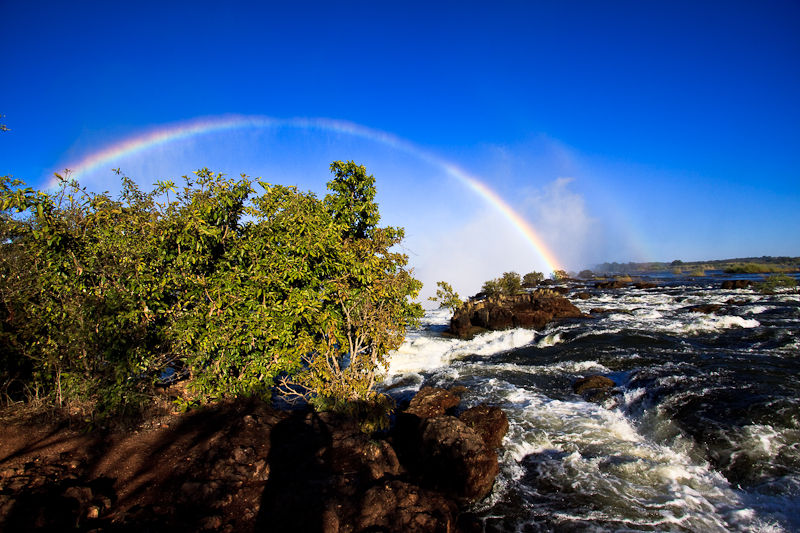
For anybody planning on visiting the falls in Zambia when the water level is high - get there early in the morning and follow the upstream path for some great rainbow shots.

vicfallls002.jpg


I've just bought an Acer Aspire One, though I'm having a bit of trouble sorting out a RAW viewer for Linux. I'm told Gimp is included in Ubuntu but it isn't in Linpus.

what OS have you got on the AAO?

Ah, I got the XP version because I wasn't sure about Linpus image viewers.
 
One of the reasons for going at this time of year was because I was so disappointed with them in Oct 2005. But I did do the helicopter trip then. Didn't bother this time as the spray blocks the view of the falls.

Our trip was timed for the whales, though worked out well for sharks and wildlife. Great shot of the rainbow. We did walk into Zambia over the border but only to take pictures from the bridge.


Ah, I got the XP version because I wasn't sure about Linpus image viewers.

Oh, I might be forced to change to XP but I hope not.
 
google for linux raw viewer there will be one, as far as I know won't need to a linpus specific ap but just a linux one ;)
 
google for linux raw viewer there will be one, as far as I know won't need to a linpus specific ap but just a linux one ;)

yes, there are a number, I haven't managed to get any of them to install yet but I've been trying to use a stick as I don't have wireless. Just got back from maplins with a router, hopefully once I can download them directly to the netbook things will improve.
 
yes, there are a number, I haven't managed to get any of them to install yet but I've been trying to use a stick as I don't have wireless. Just got back from maplins with a router, hopefully once I can download them directly to the netbook things will improve.

should do, a lot of the linux stuff I have done is through the add/remove programs panel which found the programs I wanted online
 
should do, a lot of the linux stuff I have done is through the add/remove programs panel which found the programs I wanted online

Yes, I've found that and now I have Gimp.

However now I have it I can't seem to do much with it. Came up with loads of error messages about the raw files I'd put on there and didn't seem able to do anything at all. I've no experience of RAW though so no idea what I'm doing. I'll keep trying to see if I can get anywhere.
 
Back
Top