RAW image processing - updated with pictures

kabooi

Suspended / Banned
Messages
284
Edit My Images
Yes
After my job interview today I decided to wander through the park with my camera and take some shots in raw for the first time.

After a bit of hassle i've uploaded them and I am about to edit them in my Nikon free software - viewNX2, and then edit them again in photoshop elements 10? Is that what I do? Any tips etc, and what do I do when I've finished with it...just....save? :cuckoo:
 
Last edited:
Take a look at lightroom. Its an editor and organiser all one, for jpeags and raw files. You can get a time limited demo from adobe, and they have lots of video tutorials. Also plenty of tutorials on youtube. You will be saving yourself a lot of hassle by trying out lightroom. If you are on a mac there's also Aperture.
 
I want lightroom but sadly cant affford it at the moment. I tried to download the free lightroom 4 trail, but when I click the download button NOTHING happens. :(:(:(
 
After my job interview today I decided to wander through the park with my camera and take some shots in raw for the first time.

After a bit of hassle i've uploaded them and I am about to edit them in my Nikon free software - viewNX2, and then edit them again in photoshop elements 10? Is that what I do? Any tips etc, and what do I do when I've finished with it...just....save? :cuckoo:

If you're going to edit them in ViewNX2 then you won't need to use Elements as well unless you're trying to do some really technical changes. NVX2 is a very good RAW editor.

If you do decide to finish your editing in Elements then I find it best to save your VNX2 edited image as a TIFF and open that in Elements. This is because Elements won't be able to see what changes you made to the RAW file and you'll be starting over from the beginning. TIFF is better than JPG as it retains more of the image data.

Of course, you could just open your RAW file in Elements and go from there :)

Hope that helps.
 
I'd suggest you stick to one or the other to begin with, rather than using two systems. Learning to edit is tricky enough without building in extra complications!
 
Thanks guys. Decided Viewnx thingy is WAY too slow and laggy so I've abandoned that and am on my elements 10 as we speak. It came up with camera raw 6. something and I'm doing okayish, except for the whole sharpening thing. I cant get it just right and my images look over sharpened, LOL.

When I save this file in elements when I am done, what do I save it as?
 
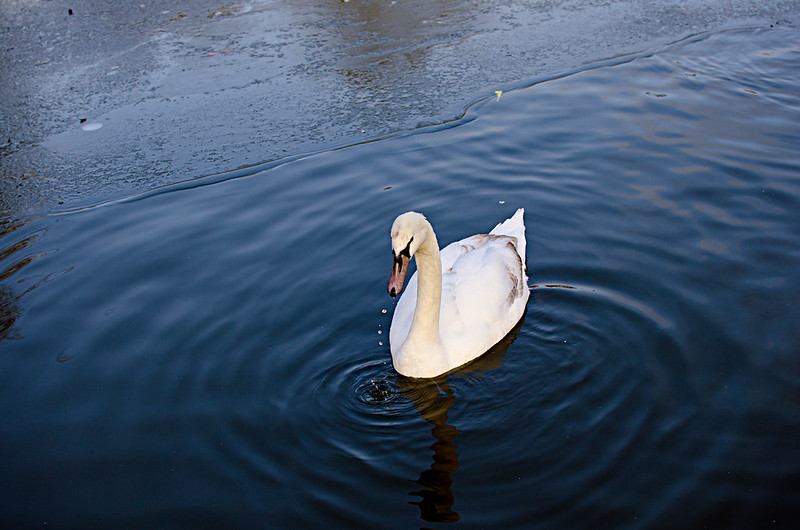
Okay, I've finished editing my first image and I'm not so happy with the results. I've wacked it on flickr so I can put it on the forum. The focus point was the swans head, but the clearest part of the picture is the water ripples just after the swan. The swan itself seems unclear (?) and maybe soft out of focus or is it just me? It also doesnt seem clear even though my iso was 320 or something simular? Complete noobie with this so any help loved.


Swan Lake by kabooi, on Flickr
 
Last edited:
The swan is over-exposed a bit. White object on a dark background, easily done. Try pulling the exposure slide back - about 1/2 to 1 stop - or using the Recovery slide, or the Clarity slide. Actually, try a combination of these. Fiddle until it looks OK. How much sharpening are you adding? Hard to say if it's too much from a small image (I'm on a laptop).
 
The swan is over-exposed a bit. White object on a dark background, easily done. Try pulling the exposure slide back - about 1/2 to 1 stop - or using the Recovery slide, or the Clarity slide. Actually, try a combination of these. Fiddle until it looks OK. How much sharpening are you adding? Hard to say if it's too much from a small image (I'm on a laptop).

Thank you for your helpful reply :) I saved the image as a jpeg (?) to upload to flickr, but the elements 10 is still open. I dont know how to get the camera raw editor back up. Or am I just stuck with it how it is?

Oh, and if you go to my flickr, you can view him larger. :)
 
You need to go back to the original image: In Elements go to File> Open, and navigate to wherever the original is held. It'll automatically open in RAW. When you save, as jpeg or tiff or whatever, this makes a duplicate, leaving the original. Keeping the original RAWs is a good habit to get into as you never known when you may want another copy.
 
Back
Top