

You are using an out of date browser. It may not display this or other websites correctly.
You should upgrade or use an alternative browser.
You should upgrade or use an alternative browser.
Raw as a novice?
- Thread starter Koolpc
- Start date


hockeyboy150
Suspended / Banned
- Messages
- 1,293
- Name
- Vince
- Edit My Images
- No
You can even edit most RAW files with picasa which is free.
There are better (and more expensive) software options though, personally I use and like Bibble 5 pro.
There are better (and more expensive) software options though, personally I use and like Bibble 5 pro.
It's as easy as eating coal and crapping diamonds.. Well a bit easier maybe 
Most software will provide you with a set of reasonable defaults, giving you similar results to in-camera JPEG without any fiddling. Try it out with DPP, it comes on the Canon CD.
Most software will provide you with a set of reasonable defaults, giving you similar results to in-camera JPEG without any fiddling. Try it out with DPP, it comes on the Canon CD.

Grendel
Suspended / Banned
- Messages
- 9,005
- Name
- Paul
- Edit My Images
- No
Consider RAW as a digital negative that will need processing to turn it into your finished photo, whereas JPG "can" be the finished photo straight out of the camera.
I think most would say, once they start shooting RAW they never look back, as it gives you so much flexibility and control over your shots. It can be a bit daunting when you start out. I would highly recommend taking out a subscription to Digital Photo magazine (or similar), it specialises in photo manipulation and has a cover CD with each issue containing video tutorial from basic level up to some quite advance stuff .
.
I think most would say, once they start shooting RAW they never look back, as it gives you so much flexibility and control over your shots. It can be a bit daunting when you start out. I would highly recommend taking out a subscription to Digital Photo magazine (or similar), it specialises in photo manipulation and has a cover CD with each issue containing video tutorial from basic level up to some quite advance stuff
.
tdodd
Suspended / Banned
- Messages
- 6,481
- Name
- Tim
- Edit My Images
- No
Since you have a Canon camera you can use the DPP software that was supplied with it to convert your raw files to JPEG. There is no need to do any editing at all, if you don't want to, since DPP will process the raw files with the same parameters your camera would have used if you were shooting to JPEG.
However, the beauty of raw is that you have far more flexibility available if you do want to make edits. e.g. you can freely change picture styles after you've taken the shot. You can increase or decrease, or disable noise reduction. You can try out ALO, LPIC if you want, all without prejudice to your original file. If you were to shoot to JPEG only then these settings are baked into the file and cannot be changed or undone.
Of course, there is further versatility on raw files too, but this is just the basics. And the basics are remarkably powerful.
If you want to shoot to raw and decide simply to produce JPEG files without edits it is as easy as this.....
- Open up DPP and navigate to the folder containing your raw files.
- Select the files you wish to convert - CTRL-A will select them all.
- Press CTRL-B to bring up the batch conversion dialogue.
- Choose your output destination folder, conversion quality (I usually use 7) and an output size if you don't need full size, and away you go.
The PC may take a while to chug through them, but in terms of human effort it amounts to about 30 seconds, and you still have the option to go back and make significant adjustments and then output them again, but with no compounded losses due to JPEG compression.
p.s. I switched from JPEG to raw within a week of getting my first DSLR and I too have never looked back.
However, the beauty of raw is that you have far more flexibility available if you do want to make edits. e.g. you can freely change picture styles after you've taken the shot. You can increase or decrease, or disable noise reduction. You can try out ALO, LPIC if you want, all without prejudice to your original file. If you were to shoot to JPEG only then these settings are baked into the file and cannot be changed or undone.
Of course, there is further versatility on raw files too, but this is just the basics. And the basics are remarkably powerful.
If you want to shoot to raw and decide simply to produce JPEG files without edits it is as easy as this.....
- Open up DPP and navigate to the folder containing your raw files.
- Select the files you wish to convert - CTRL-A will select them all.
- Press CTRL-B to bring up the batch conversion dialogue.
- Choose your output destination folder, conversion quality (I usually use 7) and an output size if you don't need full size, and away you go.
The PC may take a while to chug through them, but in terms of human effort it amounts to about 30 seconds, and you still have the option to go back and make significant adjustments and then output them again, but with no compounded losses due to JPEG compression.
p.s. I switched from JPEG to raw within a week of getting my first DSLR and I too have never looked back.
Last edited:
trencheel303
Suspended / Banned
- Messages
- 4,888
- Edit My Images
- No
I have never ever shot in JPG - just because you're an amateur doesn't forbid you from using the raw, and it gives you much more headroom on your exposure correction. Although, how much headroom does seem to depend on your camera; I 'only' have a grace of about +- 1 EV before the image starts looking like it's been played with too much, but that's probably because my camera is as old as the sun; newer cameras can probably take a lot more. It's also good using raw with Canon DPP as you can correct abberations in the lens, if you have used a Canon lens. Removing barrel distortion, chromatic abberation, etc.

CaptainPenguin
Suspended / Banned
- Messages
- 5,161
- Name
- Nigel Cliff
- Edit My Images
- Yes
Yes Raw does take a lot more effort re the PP but the final results will more than make up for it,I always shoot Raw even if its just a few family snapshots
tdodd
Suspended / Banned
- Messages
- 6,481
- Name
- Tim
- Edit My Images
- No
Yes Raw does take a lot more effort re the PP
I'm not sure I follow that argument. Raw needn't take any more effort at all, other than running your files through a conversion to JPEG. Surely the amount of effort depends on how well you shot in the first place and how much you want to perfect (or completely alter) the image.
As I already mentioned, DPP will apply all your camera's shooting parameters to your raw file automatically. There is certainly no more need to edit a raw file in DPP than there would be to edit the equivalent JPEG from the camera. I don't actually use DPP any more, prefering Lightroom for my workflow, but again the default results are very good and if I shoot well there is no particular need to apply any additional adjustments. Of course, if I choose to make adjustments then I can do so with more data to play with and less (possibly no) impact on IQ. Shooting raw facilitates editing, I would not say that it necessitates it.

BandyQuill
Suspended / Banned
- Messages
- 1,839
- Name
- Chris
- Edit My Images
- Yes
i dont think raw takes anymore effort than a JPEG especialy with software like lightroom its very easy to adjust, and often gives better results than JPEG (i still shoot jpeg when im just snapping away)
RAW has given me a few images that if in JPEG would have been done for...
RAW has given me a few images that if in JPEG would have been done for...
BandyQuill
Suspended / Banned
- Messages
- 1,839
- Name
- Chris
- Edit My Images
- Yes
yeah light room will open the RAW files ok
matt2martin
Suspended / Banned
- Messages
- 182
- Name
- Matt
- Edit My Images
- Yes
yeah light room will open the RAW files ok
Doesn't that depend on what lightroom version / camera combo is in use? I thought some of the earlier editions of lightroom had problems with the 7D raw files?

Pete Bird
Suspended / Banned
- Messages
- 110
- Name
- Pete
- Edit My Images
- Yes
A cheaper way it to buy Photoshop Elements instead of Lightroom. You get Adobe Camera Raw and a DNG converter for free. Adobe Camera Raw has the same editing engine as Lightroom. For editing its fine as they are both non-distructive.
BandyQuill
Suspended / Banned
- Messages
- 1,839
- Name
- Chris
- Edit My Images
- Yes
Doesn't that depend on what lightroom version / camera combo is in use? I thought some of the earlier editions of lightroom had problems with the 7D raw files?
ahhhh i was under the impression that was fixed with updates ?
tdodd
Suspended / Banned
- Messages
- 6,481
- Name
- Tim
- Edit My Images
- No
Lightroom 2 and 3 will open 7D files just fine. Lightroom 1.x will not. But who, from a standing start in August 2010, would go and get themselves a copy of Lightroom 1.x intead of the latest release?
If you're on an early copy of 2.x (before support for the 7D was added) it is free to update it to 2.7, so you're good to go from release 2.0 onwards.
If you're on an early copy of 2.x (before support for the 7D was added) it is free to update it to 2.7, so you're good to go from release 2.0 onwards.

HoppyUK
Suspended / Banned
- Messages
- 23,200
- Name
- Richard
- Edit My Images
- No
Isn't the simple answer to shoot both JPEG and Raw? Then you've got all options - output straight to JPEG for speed and convenience if the image is good (usually because you've set the camera pre-sets properly) or use the Raw if you want to tweak. The extra memory needed for both, if you're opting for Raw anyway, is negligible.
Tim, interesting comment Tim re Lightroom. What do you think of the new LR3? I've never used LR but thinking of dropping DPP and PSE and just using LR3. What you've said is quite persuasive! Thanks
I'm not sure I follow that argument. Raw needn't take any more effort at all, other than running your files through a conversion to JPEG. Surely the amount of effort depends on how well you shot in the first place and how much you want to perfect (or completely alter) the image.
As I already mentioned, DPP will apply all your camera's shooting parameters to your raw file automatically. There is certainly no more need to edit a raw file in DPP than there would be to edit the equivalent JPEG from the camera. I don't actually use DPP any more, prefering Lightroom for my workflow, but again the default results are very good and if I shoot well there is no particular need to apply any additional adjustments. Of course, if I choose to make adjustments then I can do so with more data to play with and less (possibly no) impact on IQ. Shooting raw facilitates editing, I would not say that it necessitates it.
Tim, interesting comment Tim re Lightroom. What do you think of the new LR3? I've never used LR but thinking of dropping DPP and PSE and just using LR3. What you've said is quite persuasive! Thanks

maninsuitcase
Suspended / Banned
- Messages
- 1,675
- Name
- Chris
- Edit My Images
- No
Hoppy I was going to do that but I can only do RAW+jpeg basic on my D50 so that's not that great an option. That said it will make initial selection easier as I can scan trhough the jpegs and have the intial kull.
I plan to go to RAW as soon as I get UFRaw working on my mac which is proving to be a bit of a PITA at the moment. I went for UFRaw as it's free and while I did like elements it's £50 I could spend on a used lens, or even a tank of diesel and then just use GIMP and UFRaw. My only remaining issue with the transfer to RAW is how to I manage/store the RAW and jpeg files once done?
I plan to go to RAW as soon as I get UFRaw working on my mac which is proving to be a bit of a PITA at the moment. I went for UFRaw as it's free and while I did like elements it's £50 I could spend on a used lens, or even a tank of diesel and then just use GIMP and UFRaw. My only remaining issue with the transfer to RAW is how to I manage/store the RAW and jpeg files once done?

Suvv
Suspended / Banned
- Messages
- 2,955
- Name
- Kev
- Edit My Images
- No
Hoppy I was going to do that but I can only do RAW+jpeg basic on my D50 so that's not that great an option. That said it will make initial selection easier as I can scan trhough the jpegs and have the intial kull.
I plan to go to RAW as soon as I get UFRaw working on my mac which is proving to be a bit of a PITA at the moment. I went for UFRaw as it's free and while I did like elements it's £50 I could spend on a used lens, or even a tank of diesel and then just use GIMP and UFRaw. My only remaining issue with the transfer to RAW is how to I manage/store the RAW and jpeg files once done?
Nikon View NX2 has just been released. It will open and do limited editing of Nikon NEF files and it can read all the camera settings.
Free download from Nikon's site.
http://nikoneurope-en.custhelp.com/app/answers/detail/a_id/47071
More Info here
http://www.nikon.com/about/news/2010/0817_viewnx2_03.htm
Last edited:
tdodd
Suspended / Banned
- Messages
- 6,481
- Name
- Tim
- Edit My Images
- No
Tim, interesting comment Tim re Lightroom. What do you think of the new LR3? I've never used LR but thinking of dropping DPP and PSE and just using LR3. What you've said is quite persuasive! Thanks
Brain dump alert- apologies for random structure to the following :
I stopped using DPP when Lightroom 1 was released. It's not that I was ever unhappy with the IQ produced by DPP but the software was so limited in some areas - no workflow features at all, not even a simple straightening tool, highlight recovery very poor. It's caught up a tiny amount in terms of features, but does restrict one's ability to finesse an image. There's no local adjustment brush, no fine tuning of sharpening, no graduated adjustment filter, no perspective adjustment control. Lightroom 2 introduced some of those things and Lightroom 3 took them further, with refinements to the demosaicing algorithms and better noise control.
Lightroom lets you easily compare two images in detail, or a whole bunch of images, although not zoomed in. Selecting the best images from a large shoot is so much easier than with DPP and you have so many more ways to classify/categorise/keyword images. You can pull out all the images you took with a particular body, or lens, or combination, and there's lots of other metadata you can filter by. It has immense power to cut and dice your images, and walks all over DPP for fine tuning. There are also some really nifty presets available for Lightroom, which allow you to do amazing things with a single click.
I've tried Photoshop and I hate it. I don't have the patience for it, and I've tried learning it but it just won't stick. Lightroom is fast and powerful. It has features I don't even use, like generating an HTML or flash website, and facilities for setting up printing well beyond DPP, but they will only add further to the value for some people.
You want to remove or add a vignette, no problem. Ditto a watermark. It doesn't have the pixel editing power of Photoshop, and you can't cut and paste images together, but it is a great tool for editing PHOTOGRAPHS. If you want to do graphic art and pixel level edits then look elsewhere.
Another strong point for Lightroom (as with DPP) - non destructive editing, even of JPEGs. Unlike Potoshop you don't have to fuss around deciding which format to save your edits in, or worrying about converting from 16 bit to 8 bit before you save as a JPEG. It is extremely friendly and quick, and pretty much idiot proof (in so far as you can't screw up your original files). You never have to remember to save your edits, because they are saved as you go, and you can revert back to any stage in your editing, including the original file, whenever you like. You can creat virtual copies without actually duplicating entire files, so you could for example have a colour and black and white verion of the same image, or a subtle version and an extreme one. You can have as many virtual copies as you like for each image.
I'm sure the list goes on and on.
Regarding the need or not to edit a file, I find the Lightroom defaults to be a great starting point, but you can create your own default settings for each camera body, or even each body and ISO combination, and these will be applied when you import, saving you the need to edit further. There are differnet camera profiles provided, so you can simulate Canon's standard picture style, or neutral, or landscape etc..
You can also develop your own presets that can be saved and applied whenever you like.
Here are just a couple of examples of the power of Lightroom, with remarkably litle effort involved. Let's see DPP do this....
A bit of a crop and vignette would finish this off, but as a one click edit this is a good start :

And another. This is a JPEG from my point and shoot :

Last edited:
BandyQuill
Suspended / Banned
- Messages
- 1,839
- Name
- Chris
- Edit My Images
- Yes
gosh that was a quick write up!
tdodd
Suspended / Banned
- Messages
- 6,481
- Name
- Tim
- Edit My Images
- No
gosh that was a quick write up!
Hence the typos and unstructured presentation.
Another screen shot - one original and two virtual copies with different processing, presented in the "survey" view to compare all three on one screen....

By the way, these are just one click edits, applying presets. I'm not suggesting these look good. I just knocked them up in a couple of seconds as an example.
You want to compare two images at 100% for sharpness, or anything else - not a problem....

Here is a file edited and converted in DPP and in Lightroom. In both products I set the picture style to "standard", white balance to "flash" and added 1/3 stop to the exposure. There is a difference in colour balance, but one which I'm sure could be tuned out easily.


Last edited:

timbo_bobcat
Suspended / Banned
- Messages
- 10
- Name
- Tim
- Edit My Images
- Yes
I agree with the comments that RAW is just as easy, if not easier, for a beginner.
JPG outputs a file with the settings used on the camera built-in, and to change them you have to make further "destructive" changes to an already lossy file. As stated, software like DPP (FREE!) lets you do that on the PC, by simply coverting to JPG, but crucially also lets you sit back and improve your photos in a non-destructive way.
Or, do both.
I was a novice 2 years ago, and am no expert. So, as an example, I took about 200 photos on our recent summer holiday, and on my return spent about 3 evenings going through them all in DPP and improving the RAWs individually or in groups, including cropping, the odd bit of cloning to remove stuff, and improving exposure, white balance, sharpness, etc where necessary. Then, and only then, did I save them to JPG format and announce "the photos are ready" and show them to the family. The results were immeasureably better than the originals would have been in JPG. If you can't face doing this, you might as well sell your DSLR and buy a compact.
As the OP is a "complete novice", Lightroom just isn't an issue here - it's very expensive and best left to more serious experts or professionals, unless you are made of money. (That said, I've never tried it.) DPP is free. Just view the YouTube tutorials to see how to use it effectively. If you then also want a really good photo organiser (tags, ratings, etc) and a more advanced photo editor, the next step up is Photoshop Elements, which I have, for under £60, or rivals to it.
JPG outputs a file with the settings used on the camera built-in, and to change them you have to make further "destructive" changes to an already lossy file. As stated, software like DPP (FREE!) lets you do that on the PC, by simply coverting to JPG, but crucially also lets you sit back and improve your photos in a non-destructive way.
Or, do both.
I was a novice 2 years ago, and am no expert. So, as an example, I took about 200 photos on our recent summer holiday, and on my return spent about 3 evenings going through them all in DPP and improving the RAWs individually or in groups, including cropping, the odd bit of cloning to remove stuff, and improving exposure, white balance, sharpness, etc where necessary. Then, and only then, did I save them to JPG format and announce "the photos are ready" and show them to the family. The results were immeasureably better than the originals would have been in JPG. If you can't face doing this, you might as well sell your DSLR and buy a compact.
As the OP is a "complete novice", Lightroom just isn't an issue here - it's very expensive and best left to more serious experts or professionals, unless you are made of money. (That said, I've never tried it.) DPP is free. Just view the YouTube tutorials to see how to use it effectively. If you then also want a really good photo organiser (tags, ratings, etc) and a more advanced photo editor, the next step up is Photoshop Elements, which I have, for under £60, or rivals to it.
Last edited:
I agree with the comments that RAW is just as easy, if not easier, for a beginner.
JPG outputs a file with the settings used on the camera built-in, and to change them you have to make further "destructive" changes to an already lossy file. As stated, software like DPP (FREE!) lets you do that on the PC, by simply coverting to JPG, but crucially also lets you sit back and improve your photos in a non-destructive way.
Or, do both.
I was a novice 2 years ago, and am no expert. So, as an example, I took about 200 photos on our recent summer holiday, and on my return spent about 3 evenings going through them all in DPP and improving the RAWs individually or in groups, including cropping, the odd bit of cloning to remove stuff, and improving exposure, white balance, sharpness, etc where necessary. Then, and only then, did I save them to JPG format and announce "the photos are ready" and show them to the family. The results were immeasureably better than the originals would have been in JPG. If you can't face doing this, you might as well sell your DSLR and buy a compact.
As the OP is a "complete novice", Lightroom just isn't an issue here - it's very expensive and best left to more serious experts or professionals, unless you are made of money. (That said, I've never tried it.) DPP is free. Just view the YouTube tutorials to see how to use it effectively. If you then also want a really good photo organiser (tags, ratings, etc) and a more advanced photo editor, the next step up is Photoshop Elements, which I have, for under £60, or rivals to it.
Great post. Thanks.

timbo_bobcat
Suspended / Banned
- Messages
- 10
- Name
- Tim
- Edit My Images
- Yes
PS On a lighter note, if you shoot in RAW+JPG, and have teenage kids, don't put the original JPGs somewhere obvious on the family PC, otherwise before you've had a chance to work on your photos they'll have been uploaded to Facebook in all their unadjusted glory! :razz:
I learned this the hard way...
I learned this the hard way...
maninsuitcase
Suspended / Banned
- Messages
- 1,675
- Name
- Chris
- Edit My Images
- No
Nikon View NX2 has just been released. It will open and do limited editing of Nikon NEF files and it can read all the camera settings.
Free download from Nikon's site.
http://nikoneurope-en.custhelp.com/app/answers/detail/a_id/47071
More Info here
http://www.nikon.com/about/news/2010/0817_viewnx2_03.htm
Ta, I am downloading now for a play. Will also have a go at ACR as I have the elements trial installed.
maninsuitcase
Suspended / Banned
- Messages
- 1,675
- Name
- Chris
- Edit My Images
- No
I have had a quite go on NX I think I understand the basics of it all. Now I just need to work out how I am going to store of the RAW files once I am done and have my processed jpegs. I was thinking of putting them into iPhoto with the jpegs but if I do this accessing the RAW for a re edit proved to be a pain. Looking like I will have to manually create a folder and put them in there.
HoppyUK
Suspended / Banned
- Messages
- 23,200
- Name
- Richard
- Edit My Images
- No
Brain dump alert...
<snip>
Thank you so much for that Tim
I hope others also found it useful.
- Messages
- 18,695
- Name
- LongLensPhotography
- Edit My Images
- No
LR3 makes photos so much cleaner and better than ever before. Now I can shoot ISO 1600 with 40D and get just as clean files as ISO 400, or something like the best top cameras do. If you switch to JPEG, or use an old converter, there is only noise and blur to be seen. I am impressed.
I wouldn't have attempted this shot a year ago considering how low the light was.
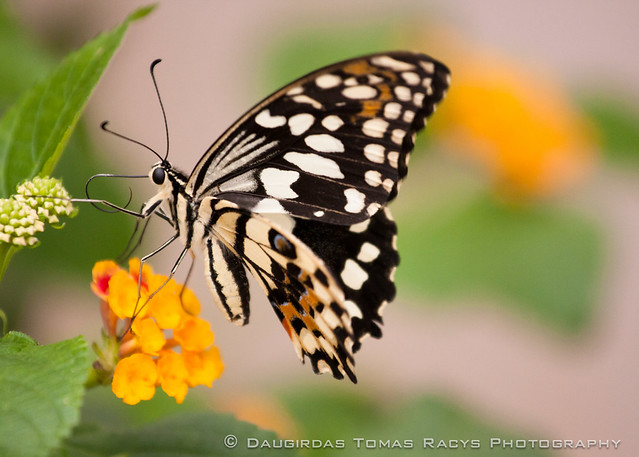
I wouldn't have attempted this shot a year ago considering how low the light was.
LR3 makes photos so much cleaner and better than ever before. Now I can shoot ISO 1600 with 40D and get just as clean files as ISO 400, or something like the best top cameras do. If you switch to JPEG, or use an old converter, there is only noise and blur to be seen. I am impressed.
I wouldn't have attempted this shot a year ago considering how low the light was.
Fantastic shot. Also, just looked at your website. Stunning shots there!