
and the site receives a small commission
You are using an out of date browser. It may not display this or other websites correctly.
You should upgrade or use an alternative browser.
You should upgrade or use an alternative browser.
Quick idiots guide to remove these two...
- Thread starter Hertsman
- Start date

 0361
0361
jonbeeza
Suspended / Banned
- Messages
- 9,388
- Name
- Jon
- Edit My Images
- Yes
Oh and while you are at it, you might remove the bearded head that seems to be resting on the tail fin .

mickledore
Suspended / Banned
- Messages
- 9,372
- Edit My Images
- Yes
Pretty easy really though you'd cropped it quite heavily to start with so there is quite a bit of pixellation in there.

4158 by mickledore on Talk Photography
4158 by mickledore on Talk Photography

mickledore
Suspended / Banned
- Messages
- 9,372
- Edit My Images
- Yes

4159 by mickledore on Talk Photography
Damn. Thought it was too easy. Just didn't recognise it as a leg!!!

- Messages
- 8,501
- Name
- I'm not a Misery Guts and Monica is not my Moniker
- Edit My Images
- Yes
4159 by mickledore on Talk Photography
Damn. Thought it was too easy. Just didn't recognise it as a leg!!!
That's because it's a bum, arm and jacket!


mickledore
Suspended / Banned
- Messages
- 9,372
- Edit My Images
- Yes
I used the lassoo tool to mark out the areas to be worked on. Just so as not to over shoot. Then as Nod says just the clone tool, with practice it becomes easier. As I said earlier the original image was very small - either through cropping or reduction to fit on here. When I zoomed in to work on it I got lots of pixellation which made life hard.
Then I forgot about the window - basic error!
Then I forgot about the window - basic error!

Pookeyhead
Suspended / Banned
- Messages
- 11,746
- Name
- David
- Edit My Images
- No
While all good advice, waiting for them to move would have been the preferable method 

Winkyphoto
Suspended / Banned
- Messages
- 354
- Name
- Neil
- Edit My Images
- Yes
While all good advice, waiting for them to move would have been the preferable method
There is a better technique that works to remove people from a crowded but static scene where somebody is always in the way/background, but the people are at least moving. Set up on a tripod and take a series of photos as the people move around. You need to take enough shots to get at least one shot of every bit of the scene you're interested in. Best to use manual exposure to keep it consistent.
Line the shots up as transparent layer masks in PS and then systematically paint your way through the layers, using only the people-free pieces. Use the one with fewest annoying people as your base layer, and then paint over the people with the corresponding pieces of image from the other layers (which were taken after they moved). Better than cloning them out as you eventually get all the detail that is intermittently hidden.
Another way to do this to use a HD filter and very long exposure to effectively just blur them away (provided they are moving enough)
Last edited:
Pookeyhead
Suspended / Banned
- Messages
- 11,746
- Name
- David
- Edit My Images
- No
There is a better technique that works to remove people from a crowded but static scene where somebody is always in the way/background, but the people are at least moving. Set up on a tripod and take a series of photos as the people move around. You need to take enough shots to get at least one shot of every bit of the scene you're interested in. Best to use manual exposure to keep it consistent.
Line the shots up as transparent layer masks in PS and then systematically paint your way through the layers, using only the people-free pieces. Use the one with fewest annoying people as your base layer, and then paint over the people with the corresponding pieces of image from the other layers (which were taken after they moved). Better than cloning them out as you eventually get all the detail that is intermittently hidden.
Another way to do this to use a HD filter and very long exposure to effectively just blur them away (provided they are moving enough)
....or just wait for them to move
Winkyphoto
Suspended / Banned
- Messages
- 354
- Name
- Neil
- Edit My Images
- Yes
....or just wait for them to move
No, I'm talking about dealing with a scene when there are a lot of people. So some move, only to replaced with others, but the whole scene is never fully clear at a single point in time. Think of trying to photograph the Trevi Fountain or Nelson's Column with no people (or pigeons) in the foreground or background. I'll do a demo when I get a chance.
Last edited:
Pookeyhead
Suspended / Banned
- Messages
- 11,746
- Name
- David
- Edit My Images
- No
I understand what you mean.
On a sunny day though.. like that one, you'd need a 10stop filter at least, and even then there's bound to be at least one person who will be static for the 10 seconds max you'd be able to get, so the ND filter is out for a start. While the other method will work, it's a bit of a faff for a shot that's essentially a snapshot don't you think?
On a sunny day though.. like that one, you'd need a 10stop filter at least, and even then there's bound to be at least one person who will be static for the 10 seconds max you'd be able to get, so the ND filter is out for a start. While the other method will work, it's a bit of a faff for a shot that's essentially a snapshot don't you think?

Andrew Davies Photography
Suspended / Banned
- Messages
- 761
- Name
- Andrew
- Edit My Images
- No
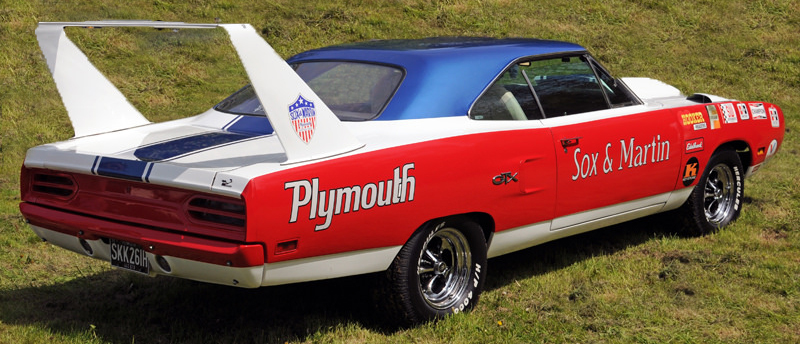
Given the amount of clutter in that shot this would be my approach ( this took a total of 3 minutes less time than filters or waiting )
Use the magic wand and select the whole car - select inverse - clone all the grass back in - slight crop
Job Done - you could take a little longer with the full image but you wont be left with the tell tale signs of cloning doing it this way
www.andrew-davies.com
Use the magic wand and select the whole car - select inverse - clone all the grass back in - slight crop
Job Done - you could take a little longer with the full image but you wont be left with the tell tale signs of cloning doing it this way
www.andrew-davies.com
Winkyphoto
Suspended / Banned
- Messages
- 354
- Name
- Neil
- Edit My Images
- Yes
I understand what you mean.
On a sunny day though.. like that one, you'd need a 10stop filter at least, and even then there's bound to be at least one person who will be static for the 10 seconds max you'd be able to get, so the ND filter is out for a start. While the other method will work, it's a bit of a faff for a shot that's essentially a snapshot don't you think?
The ND filter maybe wouldn't be perfect, You might still have to touch up some blurs. Depends on how the people were moving. If they were walking past, it might be OK. The multi layer it isn't that much of a faff, but yes, you'd want to make sure the shot was worth it.

techguyone
Suspended / Banned
- Messages
- 142
- Name
- TGO
- Edit My Images
- Yes
That last pic looks good, except for the noticeable editing underside of the rear fin and under the front bumper looks a bit blurry
Andrew Davies Photography
Suspended / Banned
- Messages
- 761
- Name
- Andrew
- Edit My Images
- No
That last pic looks good, except for the noticeable editing underside of the rear fin and under the front bumper looks a bit blurry
It is , was just a fast example of what can be done , if it was my own photo at high res i would spend a lot more time on it