Quality of a home-scan vs a commercial scan

abdoujaparov

Suspended / Banned
Messages
1,717
Name
Keith
Edit My Images
Yes
I got my first roll of 120 dev'ed and scanned by AG, and I was super-happy with the quality of the medium scan. However, with a dev at £2.99 and a medium dev+scan at £6.99, the costs are going to mount up quite quickly.

So, I was wondering what the quality of a home scan of a 120 neg (or indeed a 35mm) on a V500 would be like compared to the normal or medium scans from AG?

(And yes, I'm also thinking of trying out home developing of B&W, which would make the scanner rather more necessary)
 
Medium format is pretty good as its a big neg to start with 35mm is ok but the V500 is budget country.
I picked up mine for £65 used.
 
Ok, I've tried scanning the same neg on my V500 that was scanned by AG. Home scan was alright but obviously not up to their pro standard. I found that I couldn't match the colour even after doing my best in PhotoShop. And the V500 won't compete on resolution.
So..all my colour stuff is processed and scanned by AG.
I home develop Black and White and scan my 120 on the V500 and 35mm on a plustek 7300.
I get results that are acceptable to me. I'm sure I save a bit of cash on BW develop and scan, and I even enjoy it. Nothing beats lifting the negs from a spiral and seeing that you've got something.

So, it's a mixture of both. But I shoot mostly Black and White.
 
Ok, I've tried scanning the same neg on my V500 that was scanned by AG. Home scan was alright but obviously not up to their pro standard. I found that I couldn't match the colour even after doing my best in PhotoShop. And the V500 won't compete on resolution.
So..all my colour stuff is processed and scanned by AG.

Thanks, Trevor, that's exactly what I wanted to know. I think I'll hold off on the scanner until I decide to get into B&W developing.

(Been deciding what my Xmas present to myself is going to be. I'm leaning towards an IPS monitor now)
 
Well I don't know about the V500, but the V750 is good for MF and this home scan would make a nice 8X10" print even though I got the eyes slightly OOF......ETRs camera:-


That is a very nice scan, Brian. Just a leeeetle bit out of my price range though :D I think it'd take about 20 years to pay for itself.
 
You'd be surprised. Good quality scans are expensive, 8 to 10 decent res scans will pay for a v500.
 
You'd be surprised. Good quality scans are expensive, 8 to 10 decent res scans will pay for a v500.

But not the V7500 that Brian used :D (AG's medium scan is £4, which is the comparison point I'm using)
 
What resolution are those, just out of interest, I'm too lazy to look it up.
 
That is a very nice scan, Brian. Just a leeeetle bit out of my price range though :D I think it'd take about 20 years to pay for itself.

But I've seen some good MF scans from the V500 on this and other forums......anyway I bought my V750 used, with all attachments in the original box, for £90 off gumtree about 3 years ago so there are bargains around....and it wasn't knocked off as the name and address of the owner checked out on the box etc.
 
@abdoujaparov You can check my results with V500 on the show us your films shots thread. Just posted a couple.
 
For me, the benefits of home scanning are more than just the cost saving over time (although that helps massively).
  • Ability to scan losslessly - why shoot medium format, only to have it in a lossy format?
  • Ability to choose how it is post-processed - I chose the level of appropriate sharpening, colour changes, white balance changes, rather than an automated programme
  • Ability to scan it again if I want - if I'm not happy with the scan, I just adjust the negative and press scan again. No need to send it back, incur costs, get in contact with the lab. There have been several duff lab scans that have been the point of discussion recently on this forum, and the hassle of having to get them repeated sounds awful.
  • No chance of the negatives being lost in the post.
  • Less chance of scratching - if they are badly handled by someone, they are scratched permanently.
  • Can scan using higher resolutions without incurring any additional cost.
  • Scanners tend to hold their second-hand value well.
 
For me, the benefits of home scanning are more than just the cost saving over time (although that helps massively).
  • Ability to scan losslessly - why shoot medium format, only to have it in a lossy format?
  • Ability to choose how it is post-processed - I chose the level of appropriate sharpening, colour changes, white balance changes, rather than an automated programme
  • Ability to scan it again if I want - if I'm not happy with the scan, I just adjust the negative and press scan again. No need to send it back, incur costs, get in contact with the lab. There have been several duff lab scans that have been the point of discussion recently on this forum, and the hassle of having to get them repeated sounds awful.
  • No chance of the negatives being lost in the post.
  • Less chance of scratching - if they are badly handled by someone, they are scratched permanently.
  • Can scan using higher resolutions without incurring any additional cost.
  • Scanners tend to hold their second-hand value well.

Jeez freecom2....I had to look up what "lossy format" meant :dummy:
 
What resolution are those, just out of interest, I'm too lazy to look it up.

My 6x6 120 scans are 2079x2048. Hmm. Is that right? (Edit: yes, it is. "low" is 1020x1020, high is 4800x4800)

Some really good points about the other benefits of home scanning. I'd just hate it if I found that I'd be disappointed by the quality - as much down to my inexperience as the inherent qualities of the v500. (Also, the idea of colour matching on a non-calibrated monitor is a bit off-putting, which is another reason to get the monitor first, do you think?

Cheers, everybody. A lot to think about.
 
Last edited:
Do commercial scans only come as 8 bit jpgs? I wouldn't be happy with that for black and white.
 
Unless you're making prints, a calibrated monitor won't really make any difference so don't worry about it.
 
My 6x6 120 scans are 2079x2048. Hmm. Is that right? (Edit: yes, it is. "low" is 1020x1020, high is 4800x4800)

Some really good points about the other benefits of home scanning. I'd just hate it if I found that I'd be disappointed by the quality - as much down to my inexperience as the inherent qualities of the v500. (Also, the idea of colour matching on a non-calibrated monitor is a bit off-putting, which is another reason to get the monitor first, do you think?

Cheers, everybody. A lot to think about.

Also keep your eye open for older scanners like Epson 3200 and 4990

http://www.photo-i.co.uk/Reviews/scanners_page.htm
 
For me, the benefits of home scanning are more than just the cost saving over time (although that helps massively).
  • Ability to scan losslessly - why shoot medium format, only to have it in a lossy format?

Just noticed that AG can supply TIFFs instead of JPGs if you order the medium size. I'll do that next time I think.
 
For me, the benefits of home scanning are more than just the cost saving over time (although that helps massively).
  • Ability to scan losslessly - why shoot medium format, only to have it in a lossy format?

its easy to open a scanned jpeg and resave it as a tiff if that pulls your plonker - although jpegs take between 8 and 10 resaves for any artifacting to become visually apparent so its difficult to see this being an issue in the real world
 
For me, the benefits of home scanning are more than just the cost saving over time (although that helps massively).
  • Ability to scan losslessly - why shoot medium format, only to have it in a lossy format?
  • Ability to choose how it is post-processed - I chose the level of appropriate sharpening, colour changes, white balance changes, rather than an automated programme
  • Ability to scan it again if I want - if I'm not happy with the scan, I just adjust the negative and press scan again. No need to send it back, incur costs, get in contact with the lab. There have been several duff lab scans that have been the point of discussion recently on this forum, and the hassle of having to get them repeated sounds awful.
  • No chance of the negatives being lost in the post.
  • Less chance of scratching - if they are badly handled by someone, they are scratched permanently.
  • Can scan using higher resolutions without incurring any additional cost.
  • Scanners tend to hold their second-hand value well.

Couldn't have put it better myself!
I use a Canon 9000 for what little scanning I do. I have a dedicated film scanner but no OS that it's compatible with (ScanDual 4). No MF neg carrier for either (dedicated one is 35mm only anyway) but I only have Dad's old 1/4" square slides anyway! I can't say that scanning is my favourite chore but I do like to be in control of as much of the process as possible, although I have to admit that I now rarely shoot film and no longer have any processing kit (having donated all my tanks and trays to a local college.)
 
its easy to open a scanned jpeg and resave it as a tiff if that pulls your plonker - although jpegs take between 8 and 10 resaves for any artifacting to become visually apparent so its difficult to see this being an issue in the real world

With all due respect, that's completely and utterly not the point. There's a loss of detail at the initial point the file is saved to JPEG, and the last thing that should ever be done is a conversion from a lossy format (JPEG) to a lossless format (TIFF) - it's an absolute no-no, because you can't re-gain the information lost when it was initially saved as a lossy file.

I want the lossless/TIFF because that represents all the data that the scanner could get from the negative, which won't happen if I convert a JPEG to TIFF.
 
With all due respect, that's completely and utterly not the point. There's a loss of detail at the initial point the file is saved to JPEG, and the last thing that should ever be done is a conversion from a lossy format (JPEG) to a lossless format (TIFF) - it's an absolute no-no, because you can't re-gain the information lost when it was initially saved as a lossy file.

I want the lossless/TIFF because that represents all the data that the scanner could get from the negative, which won't happen if I convert a JPEG to TIFF.

If you're talking to me, then I meant that AG will supply a TIFF straight out of the scanner without there having been an intermediate JPG.
 
but with the utmost respect there isn't any significant loss of quality when the scan is saved as a jpeg - there may be some, but nothing that is apparent to someone viewing a picture on the wall, or on a forum etc - only as a pixel peeping level

also with the utmost respect conversion from lossy to lossless is normal practice - if you shoot (or scan) a jpeg and then work on it in photoshop , intermediate stages are saved as a .psd or as a .tiff to avoid any artifacting from repeated jpeg saves.
 
I have an Epson 4490 (the predecessor to the V500) and I think it's a decent scanner and it's more than capable of good 8x8 and maybe even 12x12 prints in terms of resolution.

In terms of colour, however, I just cannot consistently get the look I want with colour negative film, if I scan it myself.

I don't know if my difficulties result from my scanning technique, the scanner itself, etc., but I just don't have the spare time to devote to figuring it out between my PhD, sport, and work commitments, so I'm now more than happy to farm out the developing and scanning of my colour work.

I get better results and more time to shoot (which is really my favourite part of the process anyway).

If I want to control everything from start to finish, I'll just shoot some B&W.

I don't worry too much about lossless format, because I trust the lab I've been using to produce good scans that don't need much, if any, additional work.

If I were using Snappy Snaps or something similar, I'd probably insist on TIFFS or ask for dev only, so that I could scan them later myself.
 
If you're talking to me, then I meant that AG will supply a TIFF straight out of the scanner without there having been an intermediate JPG.

It was in reference to Pete's post (big soft moose).

but with the utmost respect there isn't any significant loss of quality when the scan is saved as a jpeg - there may be some, but nothing that is apparent to someone viewing a picture on the wall, or on a forum etc - only as a pixel peeping level

also with the utmost respect conversion from lossy to lossless is normal practice - if you shoot (or scan) a jpeg and then work on it in photoshop , intermediate stages are saved as a .psd or as a .tiff to avoid any artifacting from repeated jpeg saves.

I tend to modify the shadows and highlights a lot when post-processing my scans - that detail is all contained in a lossless file, but is quickly shed in the conversion to JPEG. As a result, the only shadow/highlights are what are retained anyway, which isn't going to any use at all. It's not so much about pixel peeping - it's about recovery of information during post-processing. Lossless files obviously have their uses - I send prints off, upload on flickr, upload on forums using JPEG, it's an excellent compression tool. But the desire for a lossless file can't just be me... after all, professional labs offer it as an additional service, so there must be some benefit to it that they recognise.

It's only a normal practice if you have no choice (when your starting file is a JPEG). What I'm saying is, if I have the option of having a lossless file in the first place, that's my preference. Obviously if I've only got a JPEG to work with, that's all I've got to work with!
 
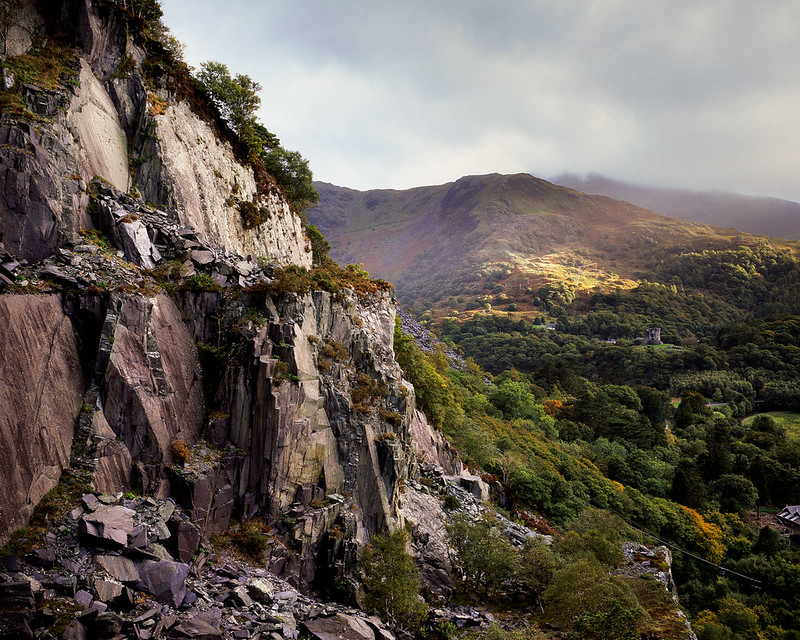
I use a V500 and have had transparencies drum scanned and scanned with an Imacon as well as lab scans. My impressions are that whereas the Imacon and drum scans are noticeably better than the V500 (at high resolutions) the lab scans really aren't very good, especially considering how much they cost. Accordingly, I just scan with the V500, which is fine for web use etc and send off anything I want printing to be professionally scanned.

Here's an example of a V500 scan (2048 pixels wide):


Vivian Quarry
by osh rees, on Flickr
 
Couldn't have put it better myself!
I use a Canon 9000 for what little scanning I do. I have a dedicated film scanner but no OS that it's compatible with (ScanDual 4). No MF neg carrier for either (dedicated one is 35mm only anyway) but I only have Dad's old 1/4" square slides anyway! I can't say that scanning is my favourite chore but I do like to be in control of as much of the process as possible, although I have to admit that I now rarely shoot film and no longer have any processing kit (having donated all my tanks and trays to a local college.)

I don't know what OS you are using but Vuescan is compatible with Windows, Mac OS X and Linux with a Minolta Dual Scan IV http://www.hamrick.com/vuescan/minolta_scan_dual_iv.html
 
Home scanning colour negatives can be a bit of a minefield because of the orange substrate colour masks. Most of the scanning software seems to have incomplete sets of presets, but the two I've tried (Silverfast and Vuescan) seem to give quite different results for the same frame. ColorPerfect claims to do a better job (and the TIFF I scanned and sent of to someone on the forum, MR T I think, came back really well), but it's still not the sort of plugin process for a mug like me (ie it requires more knowledge and skill). So I have been getting my 35mm colour negs processed and scanned (by Photo Express), and my black and whte processed and home scanned. Transparencies I also scan at home mostly, and the results are variable, but usually better than colour negs...
 
But the desire for a lossless file can't just be me...


Its not just you.

If you're gonna go to the trouble of scanning something, in a home scan scenario, scan it @ max practical res and save as tif, and by practical I mean the real optical limit of your scanner.

There's plenty of time for crop chop and file shrinkage when you know what you wanna do with it.
 
but with the utmost respect there isn't any significant loss of quality when the scan is saved as a jpeg - there may be some, but nothing that is apparent to someone viewing a picture on the wall, or on a forum etc - only as a pixel peeping level

There's no real difference if you're converting an edited TIFF to JPEG as the final stage in your workflow but there's a massive difference between that and scanning as JPEG and trying to edit a little 8 bit file!
 
I don't know what OS you are using but Vuescan is compatible with Windows, Mac OS X and Linux with a Minolta Dual Scan IV http://www.hamrick.com/vuescan/minolta_scan_dual_iv.html

Cheers for that David. I'm sure I've tried a 3rd party driver (? Silverfast ?) with no success. Will try vuescan, although the Canon flatbed is almost as good for my needs. As I said, I don't do much film scanning these days (although I possibly will do in the future) so may end up selling the dedicated film scanner.
 
Back
Top