
PS Help with Image Appreciated

5thumbs

Suspended / Banned
Messages
66
Edit My Images
Yes
I'm pretty new here so pardon me for taking liberties but I wonder if anyone can help with this image please? This is an out of camera jpeg without any PP. I have basic skills in Photoshop and I have tried to make this better but not with much success. This version is the original i.e. 'clean'.

This was taken with a Lumix LX5 in fairly challenging conditions as you can see. I'm not looking for perfection here by any means - I'd like to keep the 'live' atmosphere but perhaps give a bit more definition to the main figure. I've posted this after seeing some amazing results on this forum on someone's image posted from a karaoke evening. having see that I figured its worth a shot to see what someone more talented than me can do! I'd really appreciate it if you can tell me how you may have tweaked it as I'm keen to improve my basic knowledge.

Thanks in advance.

Hopefully this link works.

http://i648.photobucket.com/albums/uu205/5thumbz/P1010960_zps9a57bc19.jpg
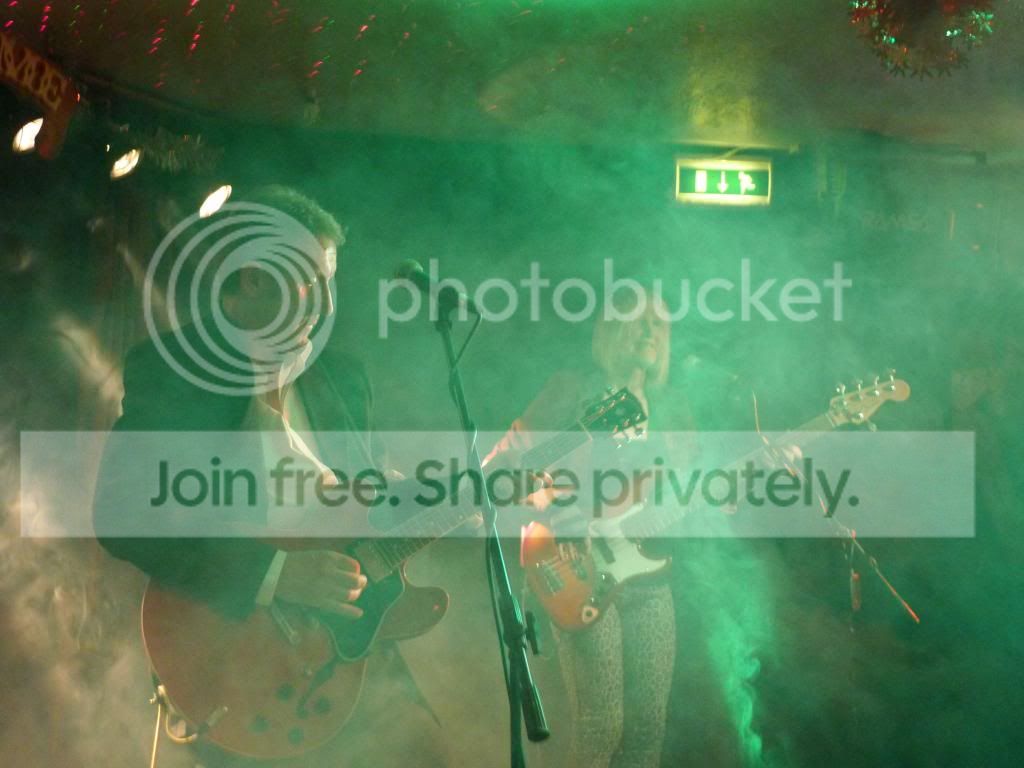
 
Not easy to edit due to all the green haze and i'm only a beginner with Lightroom.....heres a quick edit though the image is not very large in resolution to start with.
The best way to edit an image is using the raw file but i guess you don't have one.


Edit for 5thumbs
by martyndt, on Flickr
 
Last edited:
No point fixing it wihtout telling him how Martyn :)
 
That's certainly an improvement - thanks! No sorry don't have RAW.

I'd really appreciate it if you could give me some tips as to how you've fixed it - thanks
 
No point fixing it wihtout telling him how Martyn :)

hold on...i find it hard enough to do...let alone explain it :LOL:

here goes Mr Thumbs...
in Lightroom the main thing for me was way to much green haze so the main thing i did was to reduce the green and aqua on the saturation sliders and a bit on the orange (though maybe a bit much as lost it on the guitars as the guy had an orange face)
also upped the shadow slider and reduced the highlight, upped the clarity and reduced the vibrance, added a tad of white and took down a bit more of the blacks.
Are you using photoshop or lightroom
 
Last edited:
That's certainly an improvement - thanks! No sorry don't have RAW.

I'd really appreciate it if you could give me some tips as to how you've fixed it - thanks

explained a bit above, bit rushed as i have to go out and pick the daughter up, the only thing i'll add is if i can use lightroom i'd say you can as i'm far from the best with computers and editing, why not download the trial version and give it a go, thats wat i did and was so impressed bought the full version.
 
Ah - you saw my other post about possibly switching to lightroom......! I use PS CS2 at the mo. I assume the shadow slider and highlights adjustments are similar to levels? Don't know what the clarity and vibrance equivalents are in PS but I'd say the image is clearer and more vibrant so it obviously works!
 
Quick and dirty using lightroom:

Fill in the shadows a bit
Push the blacks down
Increase the contrast
Radial filter around bass player to push her back a bit
Radial filter around the lead to bring him forward.
Bit of a vignette
Get rid of that exit sign light !
Solve the colour problem by the lazy solution - convert to b/w ! Just used the auto in Lightroom.

Edit: tidied up the random little lights at the top of the image and burned in the edges.


TP3
by Zambog, on Flickr
 
Last edited:
Brilliant thanks! A question is the radial filter a Lightroom tool?
 
Ah - you saw my other post about possibly switching to lightroom......! I use PS CS2 at the mo. I assume the shadow slider and highlights adjustments are similar to levels? Don't know what the clarity and vibrance equivalents are in PS but I'd say the image is clearer and more vibrant so it obviously works!

I didn't actually see your other post, was more of my own experiences with struggling with photoshop elements so thought would try Lightroom.
It's quite different and took me a few days to get my head round it but now elements is virtually redundant.
 
Hi guys - one more question pls. How do I down load the images above? Do I just right click and save or will this give me a lower resolution image?

thanks

p.s. just to be clear - this isnt for any kind of commercial use though I'm sure you guessed that anyway :) !!!
 
Brilliant thanks! A question is the radial filter a Lightroom tool?

Yes. It's a circular filter which you can stretch into an ellipse and rotate. You can change settings either inside or outside the filter at your choice. I put a long thin ellipse round the bass player and reduced the exposure slightly with a high feathering. The same with the lead but a slight increase in exposure.

If you want to download the full size edit click through the picture to my Flickr account. Select the three little dots at the bottom right. In the menu choose "view all sizes". You can download from there.
 
Martyn - would you mind if I also downloaded your version please? I don't seem to be able to access it on Flickr - says its private.

Ta
 
No problem, i'll send you a link to click, via pm, so you can download it.
 
You can use the RAW dialogue in PS or whatever on jpegs by opening an image in Camera RAW. Then have a bit of a twiddle. Don't be afraid to shove the sliders around just to see what happens.This is called 'learning' ;)

Here, I used these RAW settings:

View attachment 4150


...and pulled back green luminance & saturation. In Photoshop, I used this curve:

View attachment 4153


...to bring out the contrast a bit more, a touch of noise reduction using Imagenomic, then used high Pass sharpen (rad 2.5, soft light blend) to finish off. Higher res original will, as always, give better results. And RAW is always going to give more lattitude in post, so it's a good idea to use this if circumstances allow.

View attachment 4152
 
Back
Top