sk66
Suspended / Banned
- Messages
- 9,557
- Name
- Steven
- Edit My Images
- Yes
Sure, particularly if you have a camera that will do it automatically and output the combined image (e.g. Olympus).Can’t this easily be solved using focus stacking?

Sure, particularly if you have a camera that will do it automatically and output the combined image (e.g. Olympus).Can’t this easily be solved using focus stacking?
Not sure which part you are replying to... but if you use a smaller sensor the DOF increases. Either because you are using a wider FL from the same distance, or because you are using the same FL from a longer distance. There is no "cropping in" because the composition is as-recorded.As soon as you use a shorter focal length and crop in, the DOF changes.

Focus stacking can be done automatically in Affinity Photo really easily although I haven’t tried it with the new free version. Sometimes it’s not perfect and you have to tweak the masks, but it may work with very little effort.damn - long winded but guess there's no other way!
I have not used affinity beofre, easy in photoshop?? Just using masks?

You don't think it'd need looking at my image? This is for Amazon, and will be up for a long time, years hopefully.Very easy, but time-consuming in PS, which is my only personal experience of it.
Time matters when doing a large number of product listings on eBay, especially with low-cost items. But what's relevant here is that it simply isn't needed
Well, all I can say is that I've photographed a lot of dog collars and have never come anywhere near needing to stack images.You don't think it'd need looking at my image? This is for Amazon, and will be up for a long time, years hopefully.
I will..Well, all I can say is that I've photographed a lot of dog collars and have never come anywhere near needing to stack images.
I've already told you what to do:
1. Use a smaller aperture (larger f/)
2. Focus manually, about 1/3 into the subject, not on the point nearest to you.
3. If necessary (but I don't think that it will be) raise the camera slightly and point it down slightly.
Rather than worry about it, why not just try my suggestions and see for yourself?
BTW, you mentioned earlier that you're not using a tripod. You must, to ensure consistency between shots of similar products
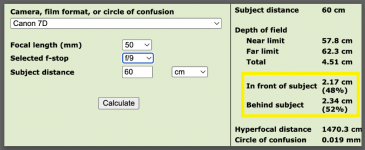
Point 2 is important to maximise the DOF - if you use a DOF calculator (smartphone app or online) it may well give you the DOF both front and back (as well as total).Well, all I can say is that I've photographed a lot of dog collars and have never come anywhere near needing to stack images.
I've already told you what to do:
1. Use a smaller aperture (larger f/)
2. Focus manually, about 1/3 into the subject, not on the point nearest to you.
3. If necessary (but I don't think that it will be) raise the camera slightly and point it down slightly.
Rather than worry about it, why not just try my suggestions and see for yourself?
BTW, you mentioned earlier that you're not using a tripod. You must, to ensure consistency between shots of similar products
Noted thanks.Point 2 is important to maximise the DOF - if you use a DOF calculator (smartphone app or online) it may well give you the DOF both front and back (as well as total).
If you focus on the closest part of the object, you are 'loosing' a significant proportion of the DOF.
At short focus distances which cause extremely shallow DOF the division is closer to 50/50 instead of 33/66.Point 2 is important to maximise the DOF - if you use a DOF calculator (smartphone app or online) it may well give you the DOF both front and back (as well as total).
If you focus on the closest part of the object, you are 'loosing' a significant proportion of the DOF.