Hi..If you've got a longer lens, try shooting from further away: as others have said, DoF decreases with the distance from the lens.
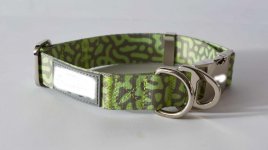
Hi, Canon 5dmk3, With the 50mm... I thought going smaller at f16 would have the reverse effect.. I was probaby about 2ft from the item, which as you can see is a dog collar.I'm not going to guess what camera you took that with, how big that item is or what the camera to subject distance is but I think it's safe to assume that your DoF is thin at f9.
Googling your way to a DoF table might be an idea.
Hi, Canon 5dmk3, With the 50mm... I thought going smaller at f16 would have the reverse effect.. I was probaby about 2ft from the item, which as you can see is a dog collar.
I know this.. But from f9 to f22 would not mean suddenly everything in focus - I am lef to believe at a certain point going even higher would have more destructive effects on the imageThe bigger the f number the smaller the physical aperture and the deeper the depth of field. ie. f16 gives you a deeper depth of field than f9.
I know this.. But from f9 to f22 would not mean suddenly everything in focus - I am lef to believe at a certain point going even higher would have more destructive effects on the image
Shouldn't really be posting someone else's image but to my eye that looks focus stacked.I was looking at a competitor image, and it's focussed from front to back...?
Hi. I blanked their logo plus this is a stock product that many brands use, they just added their logo (which is blocked out).Shouldn't really be posting someone else's image but to my eye that looks focus stacked.
Not difficult using something like Affinity (free).
Yes, I aim for a 20%ish overlap between shots normally and use a tripod to avoid changing perspective.Hi. I blanked their logo plus this is a stock product that many brands use, they just added their logo (which is blocked out).
So taking 2 or 3 images and just adjusting the focus (front, middle, back) and then blending in affinity (or Photoshop)?
damn - long winded but guess there's no other way!Yes, I aim for a 20%ish overlap between shots normally and use a tripod to avoid changing perspective.
Ha, long winded is when you bracket for extreme macro and shoot hundreds of frames to cover a couple mm.damn - long winded but guess there's no other way!
I have not used affinity beofre, easy in photoshop?? Just using masks?
That may or may not be focus-stacked, it's always an option but pretty time-consuming.I was looking at a competitor image, and it's focussed from front to back...? View attachment 476299
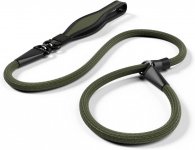
Yes as it's a lead, mine is a collar and needs shooting from the angle I have, their collars are the same angle as mine and focussed front to backThat may or may not be focus-stacked, it's always an option but pretty time-consuming.
But can't you see that the competitor's shot was taken with the camera much higher, which dramatically reduced the effective depth of the subject?
yes for web sales.. hmm... moving back is an option yes.What is the purpose of the image? If it is just white BG web sales then just stand much farther away and crop in post. Or, I often use small sensor cameras instead (Nikon 1, Fuji X20).
I will try f16 first as it would be the least amount of work... Manual focus too?f/16 will be fine with a full-frame camera, f/11 will be fine with a crop-frame camera, each step down results in the need for a larger aperture (smaller f/No) because the smaller the f/No relative to the sensor size will increase the effect of diffraction limitation, which is a general loss of sharpness.
But, it's usually more or less OK to go at least 1 stop smaller than the ideal, because the loss of overall sharpness is gradual - not a cliff edge - and the result is usually much better than the alternative![]()
Unfortunately I am limited to one flash, so I have been bouncing it off of a white wall to try spread the light as evenly as possible. What would you suggest?Yes, definitely manual focus, your focus point needs to be about 1/3rd in, as I said before.
And when you've sorted this issue out you need to improve the lighting, which doesn't flatter your product
That 'white label' is white brush in photoshop! To mask the brand out. also it is the RAW image, nothing in C1 or PS yet.You only need one light, but it needs to be positioned so that it doesn't amplify that horrible overlit white label, which is distracting to say the least. Your light is coming from the left, it should be much better from the right. If push comes to shove you can create an extra light simply by putting a piece of folded white paper on the other side, to reflect spare light at the angle that's needed.
If you look in the "Resources" tab you'll find lots of tutorials on lighting, and then there are the various lighting challenges, some of which will be more useful to you in this context than others, but you can learn from all of them.
The simple fact of the matter is that when we sell generic products on-line, the same as those sold by our competitors, our photos need to be better than theirs![]()
To be fair, that's a poorly edited out label...You only need one light, but it needs to be positioned so that it doesn't amplify that horrible overlit white label, which is distracting to say the least.
I would make sure the flash is zoomed out and bounce it off the ceiling/wall corner over your right shoulder (assuming it's not too far away).Unfortunately I am limited to one flash, so I have been bouncing it off of a white wall to try spread the light as evenly as possible. What would you suggest?
That 'white label' is white brush in photoshop! To mask the brand out. also it is the RAW image, nothing in C1 or PS yet.
yes the label is badly edited out, it was never meant to be nice.. It took me 2 seconds... was just to upload it here.To be fair, that's a poorly edited out label...
I would make sure the flash is zoomed out and bounce it off the ceiling/wall corner over your right shoulder (assuming it's not too far away).
Another solution, not mentioned previously, is to use a tilt-shift lens. That can allow the focus plane to be at an angle to the sensor plane.
That could be how your competitor achieved their result in a single frame (and I too agree you shouldn't post someone else's shot).
Of course, you would need to buy the tilt-shift lens, at which point the "long winded" focus stack may become an attractive solution.
Not got £3000 spareThis was my first thought, especially if you have a lot of these to do and don’t want to be bothered stacking in pp.
‘Tilt’ is the critical part of the name for this application; the ‘shift’ part is more for perspective correction, such as for architectural photography. Some Chinese lens makers are doing tilt-only lenses that could be a bit cheaper
.
Yeah but for the same framing and aperture, DOF at the subject is pretty much the same no matter what focal length you use (>35mm, this doesn't work on wide angles). The reduction in DOF from a longer focal length gets cancelled out by the increase in DOF as you move away to make the same picture. DOF at the background does change, with the background getting blurrier with longer focal lengths.If you've got a longer lens, try shooting from further away: as others have said, DoF decreases with the distance from the lens.
The difference it makes is very small, but when you are starting with very little it can be notable.Yeah but for the same framing and aperture, DOF at the subject is pretty much the same no matter what focal length you use (>35mm, this doesn't work on wide angles). The reduction in DOF from a longer focal length gets cancelled out by the increase in DOF as you move away to make the same picture. DOF at the background does change, with the background getting blurrier with longer focal lengths.
Got to make the aperture smaller to increase the DOF.
As soon as you use a shorter focal length and crop in, the DOF changes.The difference it makes is very small, but when you are starting with very little it can be notable.
That's why my preference is to use a smaller sensor; even though I do have a tilt-shift lens.