Processing raw files nightmare

Jasonmc1989

Suspended / Banned
Messages
32
Name
Jason
Edit My Images
Yes
Hello everyone, I'm not necessarily new to photography but I am fairly new to shooting in raw and post processing.

My problem is this:

No matter how much time I spend on an image, I am NEVER happy with the end result! I'll spend hours and hours processing, only to look at them the next day and think "they look crap.."

I can't seem to get anything right, wether it's a white balance issue where I'm constantly looking at images with a pink or green tint or the colour temperature looks off or they look too contrasty or too dark or whatever...

I use a Canon 70d with a few different lenses, use Canon's DPP for processing and an Asus pro art monitor. I know how to work with a histogram and everything and I know I need to properly calibrate my screen but I think it's pretty accurate (I know it sounds kind of stupid but if I google a photo and compare it to the same photo in one of my books the colours and contrast look pretty similar. Is that a trustworthy thing to do!?)

If anyone could give me any advice or tips I'd be very greatful!

Honestly, I've processed the same set of photos about 30 times now...

Cheers!
 
Jason without seeing an example it's really hard to comment tbh....

what don't u like about the finished files?
 
Welcome to the forum. It can be frustrating. There are a fair number of YouTube videos around on processing. Serge Ramelli was the one that really got me going and learning what to do.

If you pop one or two images up on here we can probably give you some pointers.
 
image.jpg image.jpg image.jpg Yes sorry everyone, I should have thought about uploading a few images.

I'll try and upload a few..
 
Last edited:
Something else that might help is to allow editing of your images. The reason is to aid with things like processing, not to nick them :) Sometimes it's easier to show by example than typing out paragraphs. Your choice though and don't feel pressurised into saying Yes.
 
The allow editing of images thing could be a good idea. I didn't really know what that was at first so I just put "no" for now.
 
I've uploaded a few images to one of my previous comments. Let me know if you can see them.
 
I've uploaded a few images to one of my previous comments. Let me know if you can see them.
Loud and clear!! :)

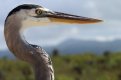
The heron head - what's not to like about that one?!! Great shot and good processing
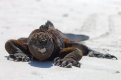
The lizard - good for me too but if you're wanting yellow sand, I can see the point of your opening post
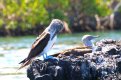
The last one looks as if it was taken in harsh sunlight and will be more difficult to sort out. Usually lowering the highlights works quite well.

Do you use Photoshop? If so then in the second you can do things like select the subject (the lizard), invert the selection and work on the background (or just select the background) then work on it.

The first shot honestly is a great shot and doesn't require further processing in my opinion.
 
Thanks everyone, you know a lot of it probably is in my head. I used to think the same when I used to record music too. The three I uploaded there just look a little dull to me. Like they have got more to give? I dunno. If I click on my own Flickr link too, to me, they all look too colourful I think. Like I've been a bit too saturation slider happy!

No I don't use photoshop, can't afford it! Hah.

The sand in the iguana picture is pretty accurate. I think it's the contrast of the actual lizard that I'm unhappy with, but maybe that's all I can get out of that image?
 
There is no "right." What specifically are you having trouble with?

To me, they either always look too colour sturated or the white balance is off / colour tinted.
 
Last edited:
The first two look very good but the last one was obviously taken in very bright light probably at near midday which accounts for the blue tint in the shaded parts (but it also looks like possibly wrong or over processing) and the burnt out highlights.

Don't forget that colour temperature will vary greatly during the day and even from minute to minute (clouds covering the sun) etc.

Usually a digital camera will make a pretty good job of dealing with this except in unusual circumstances when learning to use a white card could help a little possibly to set the white balance.
 
The first two look very good but the last one was obviously taken in very bright light probably at near midday which accounts for the blue tint in the shaded parts (but it also looks like possibly wrong or over processing) and the burnt out highlights.

Don't forget that colour temperature will vary greatly during the day and even from minute to minute (clouds covering the sun) etc.

Usually a digital camera will make a pretty good job of dealing with this except in unusual circumstances when learning to use a white card could help a little possibly to set the white balance.


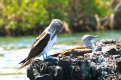
Thanks for the feedback. Here's another version of the last one. Would you say this looks better? image.jpg
 
The highlights are blown, the composition rather crap - & the bokeh is dreadful, so that lens is for the bin. Funny, the first image posted is so strong, & the second one amusing ...
 
The saturation does look a bit high to me in general.
Does the Canon software apply the camera jpeg settings to the raw image? (some programs do)

Yes, it shows jpeg settings by default.
Get it right in camera and all that's really needed is a bit of sharpening and maybe a slight contrast adjustment.
The further you move the sliders, the further you are moving from the original shot.
 
I don't think you have particular problems with your post production - at least not to my eyes. As others have said, the first heron shot is good - sensible choice of DOF, generally pleasing lighting and PP is not over the top at all. Maybe a touch more shadow detail but that's it.

The iguana is presumably on greyish (rather than yellow) sand? I think the bigger challenge with this is the fairly strong directional light you have from the sun - as evidenced by the hard shadow under his head. This also leads to dark shadow areas which are harder to recover - oddly given your comment on contrast, it generally gives very (too?) contrasty images which can be better suited to B&W conversion.

The third shot isn't as strong as the other two for me and definitely not as good as the headshot (#1). DOF is too narrow leading to the back of the rock being distractingly OOF, as well as the further away bird. Blown highlights from (again?) direct sun can't really be fixed in post.

I think this is the key - if you're looking to tweak a well lit shot (your first one is a good example of that) then PP can work well. But it is nigh on impossible to radically change the lighting quality with processing, which is what you might be subconsciously looking for with #2 and especially #3?
 
hi i see that you are using dpp which for a freebie is a good program and to be honest i used it when i first started. but i wasn't getting the results i wanted and i went on to apples aperture this improved things greatly for me. unfortunatley that program is now dead so i have switched to lightroom and i find this really good. what i would suggest is doing a trial of lightroom its free and see if you can see the difference you may want to save up then and get it. good luck
 
One way to avoid blowing the highlights is to turn on the "blinkies" option which will show you when you have a problem.

But as already said that pic is probably good for learning about the difficulties involved in processing difficult pics, but aesthetically is a non starter.
 
I think that may be my problem really. I think I'm expecting to be able to fix everything in post production, when all I can really do is get the most I can out of an image and if the final product looks s***, then it was probably a s*** photo to begin with!
 
Back
Top