Processing Help Please

Seajay

Suspended / Banned
Messages
1,493
Name
Cathy
Edit My Images
Yes
Hi all,
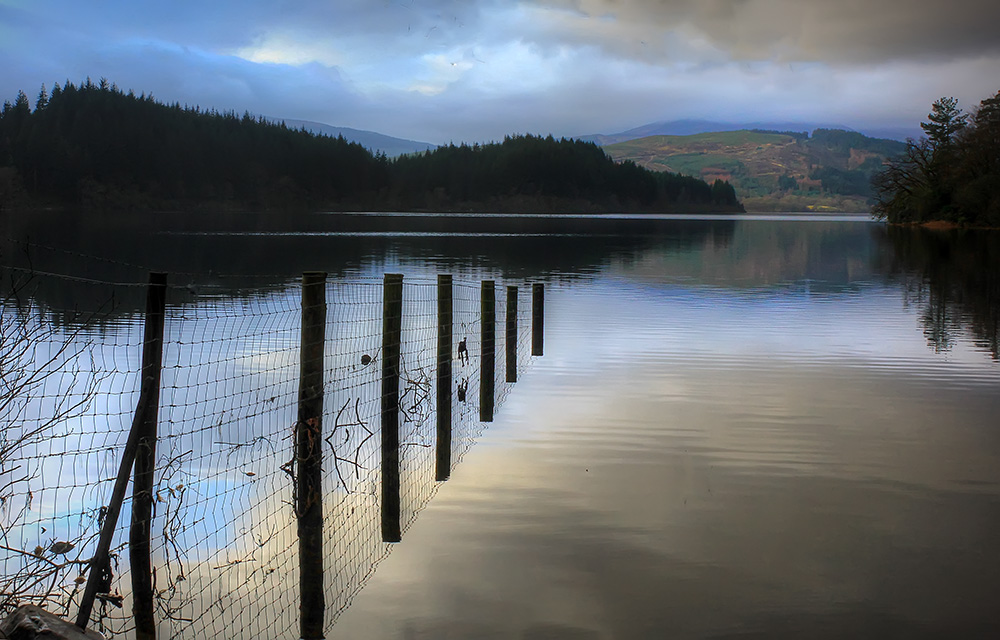
Today I have been going through my trip to Loch Ard pics.

As i am new to landscapes and still learning and trying to put into practice all I learn here I still have loads that look like the picture below.

This was taken very early as the sun was coming up.

I did take a few at different exposures but they are not all that different from what you see here.

My question is do i delete them all or can I save them using layers in photoshop?
My thought was to darken the sky on one layer and lighten the bottom on another and then blend?

Any help will be great even if it is bin them :(


Loch1 by cooriedoon, on Flickr
 
There's plenty of detail left, Camera Raw/Lightroom would be a good place to start, If I can pull this from the Jpeg there should be loads more left in the RAW.

No need for layers try using the highlights and shadows sliders in Camera raw or LR....Lighten the shadows to make them brighter, reduce the highlights to make them darker...should get you most of the way there, especially if you shot in raw.

1111.jpg
 
Last edited:
Shaun thanks I will pop back onto Lightroom and try this. You have allowed me to see that I need to save my raw files as what you have achieved with the jpg is a huge difference . I have some some jetty ones that I love but they too need a little work well maybe a lot! but I am up for it.
 
Chaz that looks really nice too it just goes to show dont dump your Raw files :)

Well I have been on most of the afternoon playing with Lightroom i am not that great yet but I will continue over the next few days to see if i can get them looking the way I remember taking them.

Don't Laugh! but this was a good as I got so far I will try again tomorrow as i am Light roomed out!
i had forgotten how misty it was that morning,but so beautiful!


Lochside by cooriedoon, on Flickr
 
I would have put my camera on a tripod and taken 3 or 4 images with +or_ 1stop between each one. I shoot in RAW, and might have chosen to do a few things.

I use Photoshop CS6 & LR4. Use several of the images to make a composit image, or take the seperate images to make an HDR image.

I used your image from Flickr, and adjusted the levels etc in Bridge, then I used HDR FxPro2 to tone map the image. I also did some very quick tweaking (well the whole thing was done very quickly) but I have never deleted any image I have shot, and do go back to images again, perhaps several years after I have shot them.

It may also interest you Cathy, that I too hail from Ayrshire, although I have spent more time outside Scotland than I have lived there.

On the image I have edited, I would have spent more time on the left hand side to bring out some more detail and lighten it a bit.

[URL="I would have put my camera on a tripod and taken 3 or 4 images with +or_ 1stop between each one. I shoot in RAW, and might have chosen to do a few things. I use Photoshop CS6 & LR4. Use several of the images to make a composit image, or take the seperate images to make an HDR image. I used your image from Flickr, and adjusted the levels etc in Bridge, then I used HDR FxPro2 to tone map the image. I also did some very quick tweaking (well the whole thing was done very quickly) but I have never deleted any image I have shot, and do go back to images again, perhaps several years after I have shot them. It may also interest you Cathy, that I too hail from Ayrshire, although I have spent more time outside Scotland than I have lived there. On the image I have edited, I would have spent more time on the left hand side to bring out some more detail and lighten it a bit.

LochArd.jpg
 
Last edited:
Hi Scott nice to hear from you and I am glad you had a play with the image and managed to get something worthwhile from it. I have been following Julieann Kost's tutorials today she is so easy to listen to but I do have a long way to go yet.

Scott a quick edit here I never saw the image yesterday as I had not fully opened the post. Well done I can now see what you were able to achieve and where you would gave lightened the image. I have been trying to do tat in Lightroom but not sure yet how I on,y select tat area, I will have to google it.

At the loch's I did have my very cheap useless tripod with me but it was better than nothing and I will invest in a strong one later my one is like a kids toy:)

I went along armed with all my info that I took from the group and did set up best I could but still got the horizon a little squint but I put that down to my cheap tripod lol!

I took about 8 different exposures of each place I was trying to capture and to be honest although I was doing it I forgot to point to the sky then the ground I just changed the dials :(

I have some very dark ones and also some very light ones and the one I posted is the sort of middle I seemed to have taken a few of these. As I forgot to point to the sky and land and expose on the day most of my pictures need a bit of work. However I am not complaining I had a super day and have learned from it.. Exposé for the sky and the land,

IAll my land pics of dog ,friend etc were all great I am just struggling with my land sky and water ones, but it will come with practice. It was a very misty morning but so beautiful and I was hoping to capture it but hey! next time .

I have just booked my 4 hour work shop for the end of January so along with this forum the workshop and my few free meetings at the camera club I should improve before my next landscape shoot.
 
Last edited:
Had another go today with this one but used Photoshop just for a change.Scott Kelby's book arrived so i am hoping that will guide me with Lightroom.


Jetty by cooriedoon, on Flickr
 
Last edited:
Alan this is great and I will pop over right now for a look at the link.
Thank you for your kind comments on the pics they could have been so much better but all js not lost it has given me some to play around with :)

Cathy
 
Hi Cathy

I did an edit which is a lot different to everyone else's, of the shot I would have gone for, being a lot cleaner ie no clutter, I can see you tried to use the tree left as a stopper, which may have worked, and I would also have, but iId have included more as it is, for me doesnt quite do it , I dont like the over hanging branches if you had squatted down more you would most likely eliminated, the horizon slopes up to the right, the whole image is just slightly lacking punch but that a PP thing rather than, the previous prob of composition, Im not saying my edit is the right shot for the scene, but my idea of what it could have been, I did lot of editing to it including bumping up the vib, tone, contrast, colour adjustment, levelling, cloning, to try to get near the shot I would have gone for Im not saying its getting the best from the scene, rather getting the best from what we have to wortk with from your shot hope you like my edit and reasons behind my edit, here goes :lol: Probably more like what you envisaged :) and is the shot I would have taken :thumbs: and hopefully wow factor :)

8389978919_f7d02e0cfe_o.jpg


8382686137_e65379f1b7_c.jpg
 
Last edited:
AWH! Dave very well done and yes it looks great!
I do understand what you mean about the composition and it does look much better. You got it about it having no punch! This is what I feel when I am working with it and trying to get it how I saw and felt on that morning . I think I have been trying to make it like daylight and actually the sun was just rising and the light was not very bright . I have a few where you can see the cars along the side of the road and their lights were still on.
I have now watched a couple of tutorials posted from the last reply and the one that shows how to make HDR might be good for me to try as I have under , over, and med shots that I could take into photoshop . Once again everyone many thanks!
Oh! Went along to my local camera club last night it was a presentation about people and places very good! I have one more free session and then I get added to the waiting list. Yeah!:)
 
Ok nosy now what is it that you see ?

Off to play at lighthouse again wrong time of day I know but going with dogs so might as well get some practice while there.
 
Dave you are too kind.
What a laugh this morning.
I decided to try the other side of the lighthouse and thank the Lord the hubby was with me as i had to treck through about 3ft deep wet soggy seaweed!! well actually maybe about 18 inches.
Gads I was squealing like a little piglet it was horrid.The things we do!
 
Last edited:
Dave you are too kind.
What a laugh this morning.
I decided to try the other side of the lighthouse and thank the Lord the hubby was with me as i had to treck through about 3ft deep wet soggy seaweed!! well actually maybe about 18 inches.
Gads I was squealing like a little piglet it was horrid.The things we do!

Gotta suffer for our art :D did you get the shots thats what matters, please say yes :)
 
Well yes I think I did! They need a wee tweak but will do that later. I did remember to expose for land and sky this time and it made such a difference.


Not perfect yet but at least I have sky this time.


Turnberry LIghthouse by cooriedoon, on Flickr


First go at HDR I am trying but practice will get me there.


First HDR by cooriedoon, on Flickr
 
Last edited:
Back
Top