Problem with Flikr

Galaxy66

Jeremy Beadle
Suspended / Banned
Messages
9,190
Name
My name is Mal not Jeremy :)
Edit My Images
Yes
:help:I was about to post a set of images but when I previewed the post the last 4 were just clickable links, I have since tried again and Flikr will only give me a clickable link url as in the screen shot via my Photobucket account.
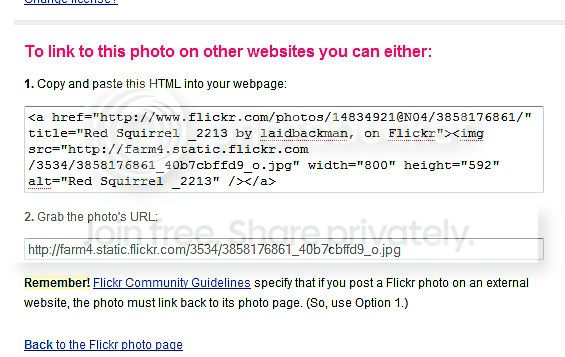
Fullscreencapture26082009151232.jpg


Have I a problem?, have I accidentally altered a setting? or am I getting mixed up with using Photobucket and doing something obviously wrong? :thinking:.

It more than likely me as I am having one of those days...........again:D
 
Chaz, that does not post the image in the actual thread for me it only posts a "clickable Link":shrug:
 
Right click on the image in Flikr, go to 'Properties' and click. Look for 'Address (URL)' highlight it, copy then paste onto pop-up box after 'Insert Image' is clicked. Easy Peasy!
 
You need to insert the URL address into the pop-up box after clicking the small icon above with the little mountains in it.
 
Right click on the image in Flikr, go to 'Properties' and click. Look for 'Address (URL)' highlight it, copy then paste onto pop-up box after 'Insert Image' is clicked. Easy Peasy!

I have always clicked on "All sizes" then "Grab the url", copy and paste, and then followed on with what you say in your second post:thinking:

You need to insert the URL address into the pop-up box after clicking the small icon above with the little mountains in it.

I works your way but I have never clicked "properties" for the url before on flikr:thinking: the is now missing from what I used to copy and paste.

Test using your method.......

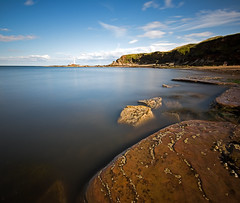
[IMG]http://farm3.static.flickr.com/2664/3846789172_c18ed2b8e9.jpg
 
There you go! Glad to be of help!

Like the pic too! Worth the agro!!
 
There you go! Glad to be of help!

Like the pic too! Worth the agro!!

Cheers Barry for showing me a different way but I can not get my head around why
 
This is doing my head in:bang: :runaway:I have never posted using the Method Barry suggests apart from in this thread.

Ahh......:) I think i know what i have been doing wrong, just going to try it again:D
 
I'm off for a coffee, just tried using the exact same method in my original post and the image now appears in the trial thread :thinking: unlike before when it was just a link :suspect:


Gremlins....glitches....
 
This is doing my head in:bang: :runaway:I have never posted using the Method Barry suggests apart from in this thread.

Ahh......:) I think i know what i have been doing wrong, just going to try it again:D

I'm off for a coffee, just tried using the exact same method in my original post and the image now appears in the trial thread :thinking: unlike before when it was just a link :suspect:


Gremlins....glitches....

HAHAAAA! don't worry, took me quite a while to get my head round it!!
It works though so just use it!!

mmm coffee! good idea!
 
Darn, I'm too late, I made little video on this a while ago:

[YOUTUBE]<object width="560" height="340"><param name="movie" value="http://www.youtube.com/v/pu7OwJV7Xnk&hl=en&fs=1&"></param><param name="allowFullScreen" value="true"></param><param name="allowscriptaccess" value="always"></param><embed src="http://www.youtube.com/v/pu7OwJV7Xnk&hl=en&fs=1&" type="application/x-shockwave-flash" allowscriptaccess="always" allowfullscreen="true" width="560" height="340"></embed></object>[/YOUTUBE]
 
T&C.s of Flickr - you need to link back to its site when posting to other forums.

I use click all sizes, choose box 1, paste link into here

<a href="http://www.flickr.com/photos/tontoshorse/3736920598/"title="200_8541 by 'horse is now putting his pc back together, on Flickr"><img src="http://farm3.static.flickr.com/2474/3736920598_66eb3db348_m.jpg" width="240" height="203" alt="200_8541" /></a>

edit out the <a href and replace with [url
Delete everything in blue and replace with
[/url].

 
Darn, I'm too late, I made little video on this a while ago:

[YOUTUBE]<object width="560" height="340"><param name="movie" value="http://www.youtube.com/v/pu7OwJV7Xnk&hl=en&fs=1&"></param><param name="allowFullScreen" value="true"></param><param name="allowscriptaccess" value="always"></param><embed src="http://www.youtube.com/v/pu7OwJV7Xnk&hl=en&fs=1&" type="application/x-shockwave-flash" allowscriptaccess="always" allowfullscreen="true" width="560" height="340"></embed></object>[/YOUTUBE]

That is exactly what I have been doing Tomas, the same as I have always done but today halfway through posting a set of images the url was appearing in my post without the which was just a link to the image on my Flikr.

Tried it again and again, it would not work, then began thinking it was something I had done wrong, or altered, posted the query on here, then it just suddenly worked for me using the same method as always.:thinking:
I blame gremlins and glitches!.
 
You can always just add this text and it will make the pictures clickable and take you to the original on flickr.

[URL=http://www.flickr.com/photos/14834921@N04/3846789172/in/set-72157622113440044/][IMG]http://farm3.static.flickr.com/2664/3846789172_c18ed2b8e9.jpg[/IMG][/URL]

As explained here http://www.talkphotography.co.uk/forums/showthread.php?t=146470


Cheers Richard, I was planning on doing that with a bigger image on flikr but did not know how, now I know:):thumbs:
 
That is exactly what I have been doing Tomas, the same as I have always done but today halfway through posting a set of images the url was appearing in my post without the which was just a link to the image on my Flikr.

Tried it again and again, it would not work, then began thinking it was something I had done wrong, or altered, posted the query on here, then it just suddenly worked for me using the same method as always.:thinking:
I blame gremlins and glitches!.[/QUOTE]

Mate, I know exactly what you mean! I've had the same problems recently but with signing in to my business bank account :bang:

Gremlins indeed!
 
Back
Top