
Printing with options...

ChrisR

I'm a well known grump...
Suspended / Banned
Messages
11,730
Name
Chris
Edit My Images
Yes
I'm not at all sure that's the right thread title, but the best I could come up with!

I started printing using Apple Aperture (of sainted memory!). Over the years I explored more and more of the range of options available. I'm in a local U3A Photography Group, and for a U3A Open Day we put on a display of photos; I printed a bunch of black and white images of fairly local scenes, eg like this...
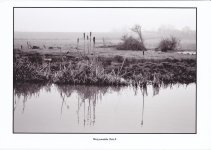
Aperture print.jpg

(This is a scan of the actual print, which has greatly exaggerated the slight colour cast from my totally inadequate printer!)

Since the demise of Aperture (which I kept going for as long as I decently could) I've been using Capture One Pro; currently on version 21. I really like C1Pro (obviously not as much as Aperture), but the printing part seems considerably weaker. [EDIT} There may of course be options in C1Pro that I'm missing, but I can't find them.

I don't use LR/CS, so I tried in Affinity, but it too seems to have a very basic print module.

Now I guess in Affinity Photo (or maybe Designer) I could probably manipulate the image to add a border and caption, and then straight print that, but it would be a LOT of faff.

So, what I'm coming round to asking is: are there specific print programs that will take an edited JPEG and print it with borders, caption, potentially other effects (that run on a Mac and will tolerate an old manky Canon printer)?

[Edited to simplify]
 
Last edited:
My Internet searches are bringing up nothing useful. I'm beginning to think I'll need to make it by hand!
 
It would be very simple and quick to do with Affinity using layers, and very flexible.
 
My (admittedly very brief) Internet searches show that only the Develop Module and the Map module cease working when you stop your LR sub, so if you get a Lightroom Classic trial, then cancel it but keep the program you should be able to print from the Print module inside it.

The LR Print module is quite powerful for printing - allows you to save paper profiles and templates so that each print becomes much quicker. It also allows placement of a caption and borders (of varying colours & thicknesses)
 
You can't go wrong with Qimage One.
I use LR and still send my prints to this app which seems to handle upscaling and sharpending much better than LR.


-20% at the moment for Black Friday.
Also a 14 day trial should you prefer to try it first.

Edit: Here is another link from a youtuber which gives you a further 10%

 
Last edited:
How about an older standalone version of LR?
Pretty sure it was only LR6 that required online authentication.
 
You can't go wrong with Qimage One.
I use LR and still send my prints to this app which seems to handle upscaling and sharpending much better than LR.


-20% at the moment for Black Friday.
Also a 14 day trial should you prefer to try it first.
Didn’t realise that Qimage now worked on Mac. I used to use it in the bad old days of Widows and it was the only thing I missed.
 
Didn’t realise that Qimage now worked on Mac. I used to use it in the bad old days of Widows and it was the only thing I missed.

The original Qimage is still Windows only which I believe does have a few more features which are aimed more at professional printers who run large print runs.

Qimage One is a slightly cut down version but does everything you need for small scale / home printing
 
Just found the link I used to buy Qimage One. This gives a further 10% off.

 
It would be very simple and quick to do with Affinity using layers, and very flexible.
You can't go wrong with Qimage One.
I use LR and still send my prints to this app which seems to handle upscaling and sharpening much better than LR.
Holy thread revival after almost 3 years, but I finally got round to trying these.

I followed the Affinity video at
View: https://www.youtube.com/watch?v=8VXq09JZo4A
. I only have a laptop, so switching context was tricky. I spent most of the afternoon watching, trying, rewinding, watching again, and ended up with an unsatisfactory result. So in the end I downloaded the Qimage One trial and tried that. Had to watch their video on borders as well (the UI is clunky, ancient Windows 7 vibe), but I did manage to make a couple of prints with borders, neither quite what I want but getting closer.

However, in the process, I think I understood a bit more about what the Affinity bloke was trying to do (there's a fair bit of do this, select that etc where I'm scanning across the video trying to see what he actually did). I haven't quite decided yet, but I think the Affinity route might fit my workflow better, and the print image would be accessible in C1Pro alongside the original, better than being stashed away somewhere else. EDIT: And I can then print with Epson Print Layout, that I've got used to.
 
Last edited:
Turns out that Affinity video was a lot more complicated than my current needs. I've watched a couple more videos and now have a workflow that goes roughly like: expand the canvas by 50 pixels all round, make that extra bit white, and add a black inner outline on it, then print on white photo paper. Seems to work and gives me an image that looks OK in 5x7!
 
Last edited:
Hmmm. After making multiple attempts at printing 6 images with border and label, I was successful. However, in the process of C1Pro -> Affinity [adjustments for print] -> C1Pro, I seem to have ended up with the "print" versions apparently having the same name as the original. I needed to get rid of the unsuccessful print images, and in the process I've managed to delete the originals of some of the images. Yes, C1Pro, I really do mean delete this horrible print image from disk! Then, later, where on earth has my original gone???

Well at least I've tested out my Time Machine backup!
 
Just found the link I used to buy Qimage One. This gives a further 10% off.

Hi, I used Qimage Ultimate when I had a Windows PC and what a great piece of software it was but after moving over to MAC I purchased Qimage One and have to say what a disappointment I found it to be compared to Ultimate, now use Canon's own software Professional Print & Layout only works on certain printers. Russ
 
Is it worth mentioning the Canon DPP program? I have no idea whether it will [a] run with your printer or give you the features you require; it does a great job with my printing albeit on a Canon 300.

Anthony
 
Last edited:
... now use Canon's own software Professional Print & Layout only works on certain printers. Russ
Is it worth mentioning the Canon DPP program? I have no idea whether it will [a] run with your printer...
AFAICS Canon PPL will not work with my Epson ET-8550. I don't have a Canon camera either, so I don't think DPP applies. But thank you for the suggestions.
 
AFAICS Canon PPL will not work with my Epson ET-8550. I don't have a Canon camera either, so I don't think DPP applies. But thank you for the suggestions.
My error Chris, I meant the Professional Print & Layout program.

A
 
Back
Top