

You are using an out of date browser. It may not display this or other websites correctly.
You should upgrade or use an alternative browser.
You should upgrade or use an alternative browser.
printing large photographs
- Thread starter just jon
- Start date
hyeongsoong
Suspended / Banned
- Messages
- 205
- Name
- Edit My Images
- Yes
It all depends on what you mean by clear. If you want 300dpi then then it is about 34 MP you need.  . but It all depends on the viewing distance etc....
. but It all depends on the viewing distance etc....
OP

just jon
Suspended / Banned
- Messages
- 75
- Name
- Jonathon
- Edit My Images
- No
It all depends on what you mean by clear. If you want 300dpi then then it is about 34 MP you need.
what i mean by clear the picture is sharp . When the picture is printed on A4 it is sharp and clear and would like it as sharp and clear when its printed on A2 paper

Willid1
Suspended / Banned
- Messages
- 1,969
- Name
- David Williams
- Edit My Images
- No
I've printed to A2 from my 10MP Canon 40D and they did benefit from being at 300dpi - make them bigger in Photoshop before you upload them if you haven't already got 300dpi
There is a limit to what you can do here, you are after all enlarging the image a lot going from A4 to A2. Of course the further away you stand the better they look if they are not 300dpi.
HTH
David
what i mean by clear the picture is sharp . When the picture is printed on A4 it is sharp and clear and would like it as sharp and clear when its printed on A2 paper
There is a limit to what you can do here, you are after all enlarging the image a lot going from A4 to A2. Of course the further away you stand the better they look if they are not 300dpi.
HTH
David
Last edited:

artyman
Suspended / Banned
- Messages
- 10,659
- Name
- Ken
- Edit My Images
- Yes
Normally 300dpi is considered suitable for viewing at normal distance, as you move further away it is less critical, with an A2 image you are not likely to be looking at it at 8"-10". Constables painting The Haywain looks great at normal viewing distances, not half so impressive from 20" away. So consider where you are looking at it from probably a seat somewhere across your living room so stop fretting.

Pookeyhead
Suspended / Banned
- Messages
- 11,746
- Name
- David
- Edit My Images
- No
make them bigger in Photoshop before you upload them if you haven't already got 300dpi


Major Eazy
Suspended / Banned
- Messages
- 1,150
- Name
- John 'Jack'
- Edit My Images
- No
I like that! That's a good one.
No way you can make an image any bigger in Photoshop without losing more details.
Pookeyhead
Suspended / Banned
- Messages
- 11,746
- Name
- David
- Edit My Images
- No
You won't lose any detail.... but you won't gain any either. You can't create what's not there. The DPI settings are irrelevant... they just dictate the document size. It's the actual pixel resolution that matters, and if the original doesn't have the required resolution, making it bigger will do just that... make it bigger... the quality will remain the same however.
Major Eazy
Suspended / Banned
- Messages
- 1,150
- Name
- John 'Jack'
- Edit My Images
- No
I current own a Sony alpha a390 Dslr 16 MP mega pixels . I print some of my photos in A2 size they are clear . I am thinking of getting a new camera , Will I need camera with 16 mp mega pixels or higher to print a 2 clear .
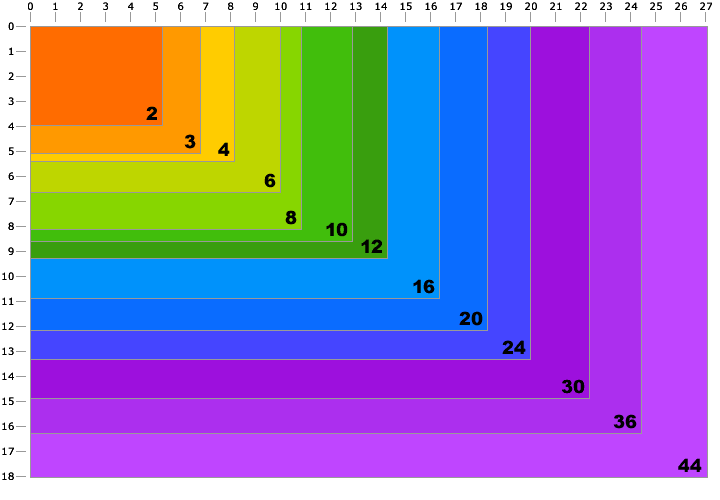
You can find more details all over the Internet, I found this chart for example, it may help you get ideas.
Major Eazy
Suspended / Banned
- Messages
- 1,150
- Name
- John 'Jack'
- Edit My Images
- No
You won't lose any detail.... but you won't gain any either. You can't create what's not there. The DPI settings are irrelevant... they just dictate the document size. It's the actual pixel resolution that matters, and if the original doesn't have the required resolution, making it bigger will do just that... make it bigger... the quality will remain the same however.
If you try to turn a photo into much larger photo on any bitmapped programmes, for example Corel Photo-Paint, the software needs to expand the pixels and try to fill in the surrounding pixels with similar colours, it makes the image looks kind of burred, outlines would show blocky lines, the quality lose.
When doing graphic design work with CorelDRAW I tend to import largest pictures then scale them down, not import smallest pictures then scale them up because doing so makes small pictures lose its details and look kind of blurry when enlarged.

- Messages
- 3,582
- Name
- Rob
- Edit My Images
- Yes
?Hi Major Eazy, what is the chart for? I think it would help if the Y and X axis had an indicator as well as the number totals?
Major Eazy
Suspended / Banned
- Messages
- 1,150
- Name
- John 'Jack'
- Edit My Images
- No
Hi Major Eazy, what is the chart for? I think it would help if the Y and X axis had an indicator as well as the number totals?
Don't take those charts for grant, those should only be used as a rule of a thumb and gives you some ideas, but of course, there will be different charts you can find anywhere. In this chart I found off the Internet, and example would be to have a print size of say 5"x4" you need a camera of 2MP, for 11"x8" you need 8MP, say 18"x12", you need 20MP, and so on, the numbers on the lines are size, the bold numbers are MP. There are different charts like those that could gives some ideas.
Pookeyhead
Suspended / Banned
- Messages
- 11,746
- Name
- David
- Edit My Images
- No
I assume the axis are size in inches, and the coloured sections are megapixel recommendations. I'd be inclined to agree with that chart.
Not really.. most interpolation software would smooth teh aliasing... not increase it. It would not look blocky. If you merely resized it with no interpolation routines, it would not be MORE blocky.. the blockiness would just be more obvious because you've enlarged it.
If you try to turn a photo into much larger photo on any bitmapped programmes, for example Corel Photo-Paint, the software needs to expand the pixels and try to fill in the surrounding pixels with similar colours, it makes the image looks kind of burred, outlines would show blocky lines, the quality lose.
Not really.. most interpolation software would smooth teh aliasing... not increase it. It would not look blocky. If you merely resized it with no interpolation routines, it would not be MORE blocky.. the blockiness would just be more obvious because you've enlarged it.
Last edited:
Major Eazy
Suspended / Banned
- Messages
- 1,150
- Name
- John 'Jack'
- Edit My Images
- No
Here's another chart, but still haven't found what they say is suitable MP size for A2.

Major Eazy
Suspended / Banned
- Messages
- 1,150
- Name
- John 'Jack'
- Edit My Images
- No
A2 size would be roughly 23" x 16" or so I think, so look for that size in inches or if in cm, then roughly 60cm x 40cm. I don't have A2 paper, I only got A3 and had to figure out rough maths based on joining two A3 together.
Jon, I would say a minimum of 6 or 7 MP would be good enough, your 16MP camera is just good enough anyway.
Jon, I would say a minimum of 6 or 7 MP would be good enough, your 16MP camera is just good enough anyway.
Last edited:
Pookeyhead
Suspended / Banned
- Messages
- 11,746
- Name
- David
- Edit My Images
- No
Here's another chart, but still haven't found what they say is suitable MP size for A2.
Around 24MP approx.
BTW that chart you posted is nonsense. It says you can print a 12MP image one and a half metres across. You CAN if you want, but it will look rough.
I can tell you from practical experience, that a A2 image needs around a 24MP image.... or around a 75MB 8bit TIFF.
Last edited:

David Stallard
Suspended / Banned
- Messages
- 1,279
- Name
- David
- Edit My Images
- No
Never could work all this out so went the old way - sent a file to the printers to see what it was like. Bottom photo was taken with the Sony a700 12mp print size is 45" x 30" and even close up it looks superb with no pixalation.
Try it and see, what have you got to lose other than a few quid?
.DAVID.

Try it and see, what have you got to lose other than a few quid?
.DAVID.
Major Eazy
Suspended / Banned
- Messages
- 1,150
- Name
- John 'Jack'
- Edit My Images
- No
Around 24MP approx.
BTW that chart you posted is nonsense. It says you can print a 12MP image one and a half metres across. You CAN if you want, but it will look rough.
I can tell you from practical experience, that a A2 image needs around a 24MP image.... or around a 75MB 8bit TIFF.
I used to had a page I torn out of a photography magazine that gives better details, so that if my friends wants to know, I would show them, but I lost the page, and most of the charts I find off Google are not really that good or give mixed details. I tend to only use them as a rule of a thumb.

dalegt4
Suspended / Banned
- Messages
- 755
- Edit My Images
- Yes
Never could work all this out so went the old way - sent a file to the printers to see what it was like. Bottom photo was taken with the Sony a700 12mp print size is 45" x 30" and even close up it looks superb with no pixalation.
Try it and see, what have you got to lose other than a few quid?
.DAVID.
I agree, I have printed 30x20 on a 12mp camera before and they look great, the only shot where you can see it is loosing detail is of a robin... and thats only if you press your nose 2 inches from the print.

StewartR
Suspended / Banned
- Messages
- 11,513
- Name
- Stewart
- Edit My Images
- Yes
There's a lot of disinformation in this thread.
I saw photograph on a billboard the other day which measured about 10m x 3m. How many pixels? Well, if you apply the kind of reasoning that we've seen in this thread (300 pixels per inch) , you come up with a figure of about 4,200 megapixels. Wow! What on earth kind of camera were they using that has 4,200 megapixels?
Obviously they weren't. So obviously you don't need 4,200 megapixels to print an image that big. So obviously the logic is faulty. But where?
The key issue you need to take account of, when you're thinking about a print - and which most people haven't mentioned so far in this thread - is this: how far away from the print do you want to look at it?
People talk about 300 pixels per inch because that's roughly the maximum resolution the human eye can handle. But you need to be really close to the picture to do that. On the Cambridge In Colour web site, there's a resolution calculator. For somebody with 20/20 vision, it suggests:
- 350 ppi when viewing at 25cm
- 175 ppi when viewing at 50cm
- 87 ppi when viewing at 1m
- 18 ppi when viewing at 5m
(ppi = pixels per inch)
So that billboard can get away with far less than 300 ppi because I wasn't pressing my nose up against it. If I had been, it would have looked horribly pixellated. But if I'd been that close, I wouldn't have been able to see the whole image, so there would have been no point.
It's the same with ordinary sized prints. Research in art galleries has suggested that for most people, the optimal viewing distance for a picture is roughly the same as its diagonal measurement. Closer than that, you can't see the whole picture properly.
So if you put that fact together with the resolution calculator, and crunch the numbers, you come up with this rather surprising result:
For a picture to look sharp (i.e. no pixellation) when viewed from the optimal distance, you never need more than about 6 megapixels.
Of course, that bit I've underlined is crucial. If you want a big print that will look super-sharp even when a camera club judge looks at it closely (and then he's looking at the pixels, not the picture!), more pixels will help. The biggest print I've ever made had 72 megapixels (it was a panorama) and even on a 40" by 24" print the detail was staggering. But again, that's looking at the details, not the whole picture.
So the the OP: For A2 prints, 16 megapixels is fine - more than enough really - so long as you want to put the picture on the wall and actually look at it. If you want to inspect it with a magnifying glass, well, the more pixels the better!
I saw photograph on a billboard the other day which measured about 10m x 3m. How many pixels? Well, if you apply the kind of reasoning that we've seen in this thread (300 pixels per inch) , you come up with a figure of about 4,200 megapixels. Wow! What on earth kind of camera were they using that has 4,200 megapixels?
Obviously they weren't. So obviously you don't need 4,200 megapixels to print an image that big. So obviously the logic is faulty. But where?
The key issue you need to take account of, when you're thinking about a print - and which most people haven't mentioned so far in this thread - is this: how far away from the print do you want to look at it?
People talk about 300 pixels per inch because that's roughly the maximum resolution the human eye can handle. But you need to be really close to the picture to do that. On the Cambridge In Colour web site, there's a resolution calculator. For somebody with 20/20 vision, it suggests:
- 350 ppi when viewing at 25cm
- 175 ppi when viewing at 50cm
- 87 ppi when viewing at 1m
- 18 ppi when viewing at 5m
(ppi = pixels per inch)
So that billboard can get away with far less than 300 ppi because I wasn't pressing my nose up against it. If I had been, it would have looked horribly pixellated. But if I'd been that close, I wouldn't have been able to see the whole image, so there would have been no point.
It's the same with ordinary sized prints. Research in art galleries has suggested that for most people, the optimal viewing distance for a picture is roughly the same as its diagonal measurement. Closer than that, you can't see the whole picture properly.
So if you put that fact together with the resolution calculator, and crunch the numbers, you come up with this rather surprising result:
For a picture to look sharp (i.e. no pixellation) when viewed from the optimal distance, you never need more than about 6 megapixels.
Of course, that bit I've underlined is crucial. If you want a big print that will look super-sharp even when a camera club judge looks at it closely (and then he's looking at the pixels, not the picture!), more pixels will help. The biggest print I've ever made had 72 megapixels (it was a panorama) and even on a 40" by 24" print the detail was staggering. But again, that's looking at the details, not the whole picture.
So the the OP: For A2 prints, 16 megapixels is fine - more than enough really - so long as you want to put the picture on the wall and actually look at it. If you want to inspect it with a magnifying glass, well, the more pixels the better!
Last edited:
Pookeyhead
Suspended / Banned
- Messages
- 11,746
- Name
- David
- Edit My Images
- No
There's a lot of disinformation in this thread.
No.. there's a lot of difference of opinion over what is acceptable quality... not disinformation. If you prescribe to the "normal" viewing distances, then yeah... probably 12MP is fine for everything, but I'm sorry... when I'm in galleries (all the bloody time actually) I DO take the image in as a whole.. appreciate it for what it is.... and when I've had my fill... I'll go in close. Why? Because often, with really high quality images, like those from Crewdson or Burtinsky, you are rewarded by a raft of detail that enhances the experience further. When looking at new work, I'll do the same.. and I often end up feeling let down by the lack of quality in work these days. It's as if digital has brought a "good enough" mentality with it.
Nothing is ever good enough if it can be better than it is. There is no good enough in my vocabulary... only the best it can possibly be.
That's not to say everyone needs a 80MP camera... just print to sizes that don't show the limitations of your gear.
Seeing as ALL of this thread is based on opinions... that is mine. Yours may differ... and that's fine, but this thread does NOT contain DISinformation... it contains opinions that differ from yours... unless you think your opinions should be adhered to by everyone that is. There are words for people like that though

StewartR
Suspended / Banned
- Messages
- 11,513
- Name
- Stewart
- Edit My Images
- Yes
I agree totally.If you prescribe to the "normal" viewing distances, then yeah... probably 12MP is fine for everything, but I'm sorry... when I'm in galleries (all the bloody time actually) I DO take the image in as a whole.. appreciate it for what it is.... and when I've had my fill... I'll go in close. Why? Because often, with really high quality images, like those from Crewdson or Burtinsky, you are rewarded by a raft of detail that enhances the experience further. When looking at new work, I'll do the same.. and I often end up feeling let down by the lack of quality in work these days. It's as if digital has brought a "good enough" mentality with it.
That's totally fine. Different people have different needs and desires. My point (which I may not have made very well), was that it's pointless discussing how many megapixels you "need", or how big a print you can make with "acceptable" quality, unless you also address the issue of what you want to do with the print or what your personal standards are. Otherwise, there's a danger that the opinions come over as facts, which is what I was concerned was happening here.ALL of this thread is based on opinions... that is mine.
Well, we had one graphic which said that an A2 print requires 36 MP, and another graphic which said it requires about 5 MP. They can't both be right. If that's not DISinformation - and I accept my terminology might not be 100% correct - it's certainly BAD information.No.. there's a lot of difference of opinion over what is acceptable quality... not disinformation... this thread does NOT contain DISinformation...
Pookeyhead
Suspended / Banned
- Messages
- 11,746
- Name
- David
- Edit My Images
- No
Well, we had one graphic which said that an A2 print requires 36 MP, and another graphic which said it requires about 5 MP. They can't both be right. If that's not DISinformation - and I accept my terminology might not be 100% correct - it's certainly BAD information.
They can both be right though, if you assume that the minimum viewing distance never is less than the diagonal of the print size, or more perhaps... It all goes pear shaped when you examine the print closely.. which many (me included) do.
IMO... the minimum size of file for any given print size is the one that can withstand extreme scrutiny at the closest distance the human eye can focus... and why not? Anything less will show flaws, and technical flaws are inimical to everything I do (artistic flaws I produce plenty of
)With that in mind... FOR ME... A2 requires at least 24MP.
Others are less fussy
...but that's their problem.
Last edited:
Major Eazy
Suspended / Banned
- Messages
- 1,150
- Name
- John 'Jack'
- Edit My Images
- No
There's a lot of disinformation in this thread.
I saw photograph on a billboard the other day which measured about 10m x 3m. How many pixels? Well, if you apply the kind of reasoning that we've seen in this thread (300 pixels per inch) , you come up with a figure of about 4,200 megapixels. Wow! What on earth kind of camera were they using that has 4,200 megapixels?
Obviously they weren't. So obviously you don't need 4,200 megapixels to print an image that big. So obviously the logic is faulty. But where?
What made you think a 4200MP digital camera was used to take the photo for the billboard? Film is not dead yet, there is still some use for film, it may be getting less and less, being replaced more and more by digital, but for all we know, this billboard photo could still have been taken by a good old Hasselblad or any cameras for as long as there is still some film left.
Anyway...
Granted, there is no such thing as a 4200MP (or could you call that a 4.2GP..?) camera, but of course, most likely the photographer would have gone as high as whatever camera is highest on the market and not go any lower than a minimum number of megapixels.
By the way, there is no such thing as disinformation in a threat, the whole point of having a forum is supposed to be for everyone to give their own options, it's just options
Major Eazy
Suspended / Banned
- Messages
- 1,150
- Name
- John 'Jack'
- Edit My Images
- No
I agree totally.
Well, we had one graphic which said that an A2 print requires 36 MP, and another graphic which said it requires about 5 MP. They can't both be right. If that's not DISinformation - and I accept my terminology might not be 100% correct - it's certainly BAD information.
That is the option of two different sources, but there is nothing wrong with any of us chosing to decide to accept a range between those two figures by making it something like:
To print A2, you need a minimum of 5MP, and recommend that you should try as high as you can, if possible as high as 36MP.
I find different charts all over Google saying what kind of megapixels the camera have to be in order to print this or that size, I take those numbers as a minimum and best option.
After all, it makes senses not to worry about how high you need it to be when it would be more effect to worry about what is the minimum.
Well, then, for A2, I'll accept that 5MP is a minimum. I think the OP said his camera is something like um, 12MP or something? So I guess the OP don't have to worry about it and that printing A2 from his camera will be fine.
artyman
Suspended / Banned
- Messages
- 10,659
- Name
- Ken
- Edit My Images
- Yes
The Gadget Show did a very large blowup a few years back, so any didgital that we are using should be more than capable of producing a print for our walls.
http://gadgetshow.channel5.com/gadget-show/videos/challenge/challenge-blow-up-part-3
http://gadgetshow.channel5.com/gadget-show/videos/challenge/challenge-blow-up-part-3

- Messages
- 43,206
- Name
- Alan
- Edit My Images
- No
As producing an A2 print to decide if the resolution is acceptable could be expensive how about sizing it up on the pc and then cropping an A4 section out and printing that at the same resolution as the A2 print for evaluation? That'd be a lot cheaper.
I disagree with the first chart posted in this thread (if I'm reading it right you need 8mp for an A4 print? I'd say 2-3 will be more than adequate) and whilst I think that the second is a little cautious it is a bit more reasonable.
I disagree with the first chart posted in this thread (if I'm reading it right you need 8mp for an A4 print? I'd say 2-3 will be more than adequate) and whilst I think that the second is a little cautious it is a bit more reasonable.
Last edited:
- Messages
- 43,206
- Name
- Alan
- Edit My Images
- No
The Gadget Show did a very large blowup a few years back, so any didgital that we are using should be more than capable of producing a print for our walls.
http://gadgetshow.channel5.com/gadget-show/videos/challenge/challenge-blow-up-part-3
Interesting, and a clear win...
I think I remember the original comparison some years ago.

viewfromthenorth
Suspended / Banned
- Messages
- 3,269
- Name
- Andy
- Edit My Images
- No
I remember that comparison on the Gadget Show a few years back - I could be wrong, but from memory they were using a 5D Mk2 vs. 35mm neg film for an advertising bill board. Somewhat stilted in digitals favour IMO, especially as medium / large format tended to be the format of choice for advertising photographers.