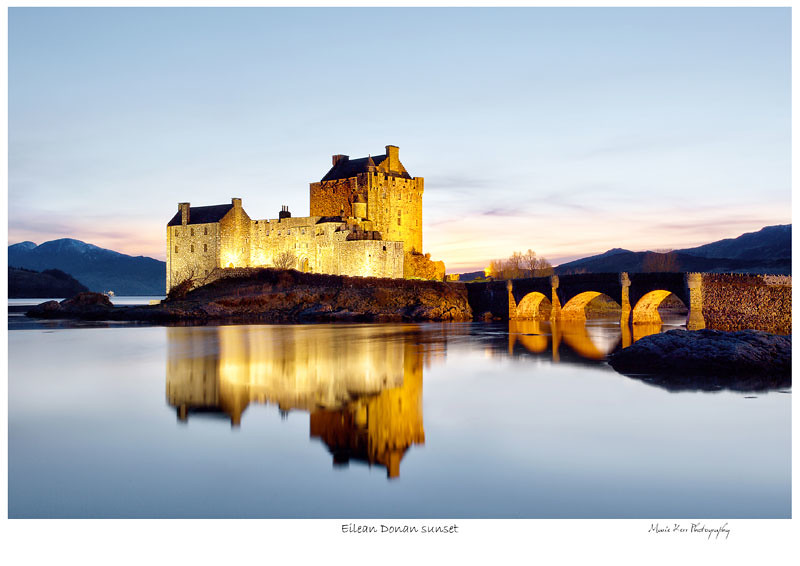
Printing image with text at bottom?

mjcombe

Suspended / Banned
Messages
193
Name
Michael
Edit My Images
Yes
I have sold a few prints recently, and although I print a sticker to put on the celly bag saying where the image was taken, once it's framed someone who hasn't seen the image may well not know where it's from.

Has anyone had their images printed with text at the bottom as per my example below.

I'm just not sure how this would look mounted and framed - has anyone done anything similar or got any good idea's for this?

Thanks,

Michael

sp001.jpg
 
Nice shot. I think personally that a nice mount with bevelled cut out under the printed image for a name/location would be best and look professional instead of printing onto the image
 
Nice shot. I think personally that a nice mount with bevelled cut out under the printed image for a name/location would be best and look professional instead of printing onto the image

Thanks.

I have seen that done before but feel it looks a bit 'outdated' or 'amateurish' but maybe that's just me..?
 
Where are they displayed generally?
I have seen some places where they place a sticker on the back of the mounted/framed image, with the place/name, perhaps supply a loose sticker with the images?
 
great image...I kind of like the text at the bottom, but there's too much white area...crop it nearer to the text and it will look spot on imo
 
You could try using a script text to give the impression of handwriting. Put the text in the right hand corner and add you name and possibly the date. Make it look like a limited edition
 
great image...I kind of like the text at the bottom, but there's too much white area...crop it nearer to the text and it will look spot on imo

Thanks, the reaosn for the 'extra' white space was that this would fit behind the mount so to speak, so only the thin band of white with the text would be visible.

I think I'll order one with my next DSCL order, for £1.10 for an A3 it's worth a go. I'll post a pic once it's done for feedback.

Thanks,

Michael
 
How much of the mount it going to cut around the image top and sides?
 
I always print them with text on the bottom and my digital signature.

An example:
5229981846_3faf748db9_b.jpg


I've set up templates in ps to simplify things.
 
Marie - could I ask what text you use to give the effect of handwriting please.....it looks good
nice photo MJ and Marie
thanks
Dave
 
Last edited:
Just checked and its bradley hand itc.
If you dont have it in your fonts you can google it and download it ;)
 
I think it looks fine with a title, but I'm not keem on the white strip just at the bottom.

I would put a border all round, thinner top and sides than the bottom, but a bit thicker than canon_togger's ;)

Just a 'personal' opinion though!

Nice images both of you.
 
As MJ has already said, you can place the mount to show as much or as little white border as suits you ;)
Its easy enough to tweak.
 
Many Thanks Marie - I have that text in CS5
Dave
 
Thanks Marie, that's the idea, nice to see someone else has been doing this - think I'll give it a go.

Michael
 
Back
Top