


Bebop
Suspended / Banned
- Messages
- 7,318
- Edit My Images
- No
I don't do a lot of printing at home, and generally it has been on standard sized A4 or A5 paper. This evening I have been driven bonkers trying to print an image onto a ready creased card.
The image is 5"x5" so the card is double that in length. I have set up a custom paper size. Initially I tried using the 5x7" size thinking I could fool it into the extra 3 " at the top. That didn't work, but it was my nearest attempt.
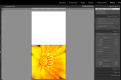
When I set up the paper size as custom 253x127mm it shows how it will be printed and it looks perfect. When I press print however it is possibly thinking it should be putting the image in the middle of an A4 piece of paper as it definitely is not printing it as it looks in Lightroom.
I have attached a screen print of how it looks in Lightroom.
Does anyone have any tips please as to where I'm going wrong? I've gone through every setting and cannot see where I'm going wrong. Am I better off not printing from Lightroom?
edit: I'm on a Mac by the way. I have a feeling I had different menu options for the printer when I was on Windows.
The image is 5"x5" so the card is double that in length. I have set up a custom paper size. Initially I tried using the 5x7" size thinking I could fool it into the extra 3 " at the top. That didn't work, but it was my nearest attempt.
When I set up the paper size as custom 253x127mm it shows how it will be printed and it looks perfect. When I press print however it is possibly thinking it should be putting the image in the middle of an A4 piece of paper as it definitely is not printing it as it looks in Lightroom.
I have attached a screen print of how it looks in Lightroom.
Does anyone have any tips please as to where I'm going wrong? I've gone through every setting and cannot see where I'm going wrong. Am I better off not printing from Lightroom?
edit: I'm on a Mac by the way. I have a feeling I had different menu options for the printer when I was on Windows.
Attachments
Last edited:
