
Printing confusion

Graham

Suspended / Banned
Messages
7,448
Name
Graham
Edit My Images
Yes
Hi all,
I have a small dilemma here, I took this photo in to be printed (top photo) and the result was a cropped version with the shop worker not pointing out that it had been cropped (thats if he noticed)
So after getting home and looking at the photo and realizing that it had been cropped in the printing, my reaction was to get back there, so thats what I done only to be told that its normal for this to happen and all the shop worker could say was, take a bigger size photo and it will be ok.
So scratching my head I nearly told her where to go with her new idea.
Whats puzzling me is, what I see on the SD card (1st shot) and what I get is two different things, isn't it normal to get what you see on the original shot no matter what size print I ask for?
I use older and free programmes for cropping and resizing (Microsoft picture it 10) as it goes.
The size of the print from the shop is 21x15cm and the photo on the SD card is 3000x1935 (w & h)
How can I get around this without upsizing the photo to the next size, ?
Did the shop get one over me? is the answer in the printing preferences? (fit to page) or something similar.
I know that the photo is not the best but the in-laws want one printed off as this cat returned home with its bottom jaw blown off with a gun and had to be put down and another cat the same night never returned home (presumed dead by the same way)
Thanks in advance for your help, sorry I cant get my head around this printing thing.
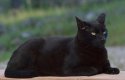
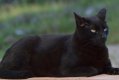
Horace.jpg Horace cropped.jpg
 
The print size from the shop and your own are approximately the same so I don't know how this could have happened, best thing to do is to open up the image and resize it to the nearest
dimensions in cm to 21x15 although you may get white boarders.
 
The print size from the shop and your own are approximately the same so I don't know how this could have happened, best thing to do is to open up the image and resize it to the nearest
dimensions in cm to 21x15 although you may get white boarders.
Ah ok, im totally clueless when it comes to this sort of thing.
Cheers
 
If i understand you correctly you're asking for your original photo to be printed onto paper with a different ratio which is why cropping is occurring. You can either revise the whole crop to a more standard photo paper ratio or add a border to increase the image size to a standard ratio where you can either accept it, trim the white borders off or frame in a suitable mount.

Hope this makes sense
 
Pure guess here but I think the print size from the shop is 8" x 6" which is a fairly standard size. If this is the size you want you need to crop your image to 2400 px x 1800 px @ 300 pixels per inch.
When you take the image to the shop tell them you want an 8x6 print.
 
Printing is all about ratio's. Your image has come out of the camera in a 3:2 ratio, well nearly 3000px x 1935px (Should really be 2000px)
So any print with a 3:2 ratio can be printed straight from the camera.
6x4
9x6
12x8 etc

To print any other size you will need to crop your image to the correct ratio
eg,
8x6 is a 4x3 ratio
10x8 is a 5x4 ratio
 
If i understand you correctly you're asking for your original photo to be printed onto paper with a different ratio which is why cropping is occurring. You can either revise the whole crop to a more standard photo paper ratio or add a border to increase the image size to a standard ratio where you can either accept it, trim the white borders off or frame in a suitable mount.

Hope this makes sense
Thanks for your time and yes it made sense. maybe I'm old fashioned and for the moment I can't get my head around this, I did say I'm clueless lol, what I see on my PC is what I want printed but like the 2nd photo shows it gets automatically cropped when printed, I didn't understand that the photo needs to be resized to be printed onto a 21x15cm paper, I thought its a simple thing, the photo gets automatically resized to fit the paper, obviously not though.
 
You can usually set your crop box to match a specific ratio- not sure about the software you are using but worth investigating going forward but remember you can always print what you want onto a big enough sheet and then use custom mount to show what you want
 
what I see on my PC is what I want printed but like the 2nd photo shows it gets automatically cropped when printed, I didn't understand that the photo needs to be resized to be printed onto a 21x15cm paper, I thought its a simple thing, the photo gets automatically resized to fit the paper, obviously not though.
The problem here is that you've asked for a 21x15cm print, but that's not the same shape as your original image. So the printers have two options:
1. use all the paper but don't print the whole image (ie crop the image to fit the paper);
2. print the whole image but don't use all the paper (ie leave white borders top and bottom).

If you didn't tell them which to do, it seems quite reasonable for them to do 1, because they'll assume you've specified that particular size and shape because you want it to fit a specific frame.

So what now? If you really do want the print to be 21x15cm (eg to fit a 21x15 frame) , ask them to print using option 2 and make sure they understand that. Or alternatively if the print isn't to be framed then ask them to make a print the same size as the image, eg 21x13.55cm or 23.25x15cm.
 
The problem here is that you've asked for a 21x15cm print, but that's not the same shape as your original image. So the printers have two options:
1. use all the paper but don't print the whole image (ie crop the image to fit the paper);
2. print the whole image but don't use all the paper (ie leave white borders top and bottom).

If you didn't tell them which to do, it seems quite reasonable for them to do 1, because they'll assume you've specified that particular size and shape because you want it to fit a specific frame.

So what now? If you really do want the print to be 21x15cm (eg to fit a 21x15 frame) , ask them to print using option 2 and make sure they understand that. Or alternatively if the print isn't to be framed then ask them to make a print the same size as the image, eg 21x13.55cm or 23.25x15cm.
That explains all, I was asked if I would like a border but I declined but nothing was explained to me about the photo may get cropped, not good customer service I'd say. seems like the shop got one over me. Thanks for your time to explain option 1 & 2 which is exactly what I was looking for.
 
Back
Top