

You are using an out of date browser. It may not display this or other websites correctly.
You should upgrade or use an alternative browser.
You should upgrade or use an alternative browser.
Printing BNW images
- Thread starter Barney
- Start date

zx9
Suspended / Banned
- Messages
- 864
- Name
- Keith
- Edit My Images
- Yes
I think you are going to get lots of contradictory advise with such an open ended question, it would be best to tell us what printer you have and your current work flow as high er end Epsons have a plug in for Photoshop and I assume Light Room which works very well with it's own dedicated B&W settings.Should I set printer to greyscale of leave set at colour?
FWIW my B&W images are all RGB and are printed as such, my Epson ET7750 can use the plug in but not the B&W part of it, the ET8750 and above can. (Sulk )
OP

Barney
Suspended / Banned
- Messages
- 3,043
- Name
- Wayne
- Edit My Images
- No
I have an old Epson stylus 1500 w
I am very happy with the printer it produces fantastic colour prints up to A3+
I currently print a 6x4 test before a large print via lightroom
My BNW samples have a cyan cast in the greys
I am probably doing everything all wrong thats why I ask the question
I am very happy with the printer it produces fantastic colour prints up to A3+
I currently print a 6x4 test before a large print via lightroom
My BNW samples have a cyan cast in the greys
I am probably doing everything all wrong thats why I ask the question


- Messages
- 11,730
- Name
- Chris
- Edit My Images
- Yes
I had a very old, cheap Canon MG5250 printer/scanner on which I printed many black and white photos. They almost universally came out with a slight colour cast, mostly using "Printer manages colour" as colour profiles were not available for that printer. It seems to be a feature of dye inks.I have an old Epson stylus 1500 w
I am very happy with the printer it produces fantastic colour prints up to A3+
I currently print a 6x4 test before a large print via lightroom
My BNW samples have a cyan cast in the greys
I am probably doing everything all wrong thats why I ask the question
I now have an Epson ET8550 (prints A3, but a cheaper version... for some value of cheaper... is available for A4 only), and can use Advanced Black and White (ABW) or profiles to get good black and white prints on good paper. Sometimes I still get a slight colour cast.
IMHO printing good black and white prints is one of the hardest things to achieve, though very rewarding!
It sounds like a double profiling problem. I print from photoshop and when I go to print, in colour handling set adobe manages colour and then in the printer dialogue box disable colour management otherwise you are likely to get colour casts. Greyscale will not get the best B&W prints.

Gav.
Suspended / Banned
- Messages
- 9,390
- Name
- Gav
- Edit My Images
- No
My BNW samples have a cyan cast in the greys
There are a few things to think about, it's tricky to fix on some set ups.
This is probably were you'd need to get a profile made, as the greys use a mix of all inks and the colour cast your seeing needs a profile to correct it, all paper types and inks (OEM vs 3rd party) need their own profile.
If it's anything more than a light tint it may be an issue with software/profiling/ double profiling - normally a Magenta tint but can be Cyan.
Printers with dedicated B&W modes normally have grey inks to work along side the black and don't use the colour inks, and avoiding the colour tints.
Light colour tints can also come from the lighting you are viewing prints under.
Not sure if this will help, Kieth has a library of videos..


- Messages
- 7,468
- Name
- Stephen
- Edit My Images
- No
Amongst other things it also depends on the paper you use. My personal favourite for this is Permajet Matt Plus 240. This, coupled with the ABW mode in Epson Print Layout for my Epson 8550, gives excellent results.
OP
Barney
Suspended / Banned
- Messages
- 3,043
- Name
- Wayne
- Edit My Images
- No
Thanks for all your assistance guys,
I use genuine Epson Premium Glossy paper, though I have changed the ink from the original (owl I think it was) to the Epson 673, which I believe is also a photo ink, but available in larger bottles.
I have not had profiles made for that combination and to be honest would not know where to start, but generally the combination is fine for colour work (to my untrained eye).
I use genuine Epson Premium Glossy paper, though I have changed the ink from the original (owl I think it was) to the Epson 673, which I believe is also a photo ink, but available in larger bottles.
I have not had profiles made for that combination and to be honest would not know where to start, but generally the combination is fine for colour work (to my untrained eye).

Bristolian
Suspended / Banned
- Messages
- 4,428
- Name
- Steve
- Edit My Images
- Yes
Something that might help with the colour cast. If you don't have it already, install Epson Print Layout (EPL) onto your computer, export the image you want (either in mono or colour) to EPL (you'll find it in the "Export To" drop down top left of the screen) and select EPL which will start up with your image loaded. In "Color Settings" select "Printer Manages Color" then select the required settings for everything else and hit "Print". I find this removed the cyan cast I used to get with my Epson 1500 and XP-900.I have an old Epson stylus 1500 w
I am very happy with the printer it produces fantastic colour prints up to A3+
I currently print a 6x4 test before a large print via lightroom
My BNW samples have a cyan cast in the greys
I am probably doing everything all wrong thats why I ask the question
I hate the print module in LrC so always print via EPL and just let the printer handle the colours based on the paper that I select. If you have papers from the likes of Marrutt then you can add them to the list of papers in EPL.
Hope that helps

14/11/25: Edited to change the required setting in the "Color Settings". Apologies for any confusion
Last edited:
OP
Barney
Suspended / Banned
- Messages
- 3,043
- Name
- Wayne
- Edit My Images
- No
Thanks Steve,Something that might help with the colour cast. If you don't have it already, install Epson Print Layout (EPL) onto your computer, export the image you want (either in mono or colour) to EPL (you'll find it in the "Export To" drop down top left of the screen) and select EPL which will start up with your image loaded. In "Color Settings" select "Grayscale" then select the required settings for everything else and hit "Print". I find this removed the cyan cast I used to get with my Epson 1500 and XP-900.
I hate the print module in LrC so always print via EPL and just let the printer handle the colours based on the paper that I select. If you have papers from the likes of Marrutt then you can add them to the list of papers in EPL.
Hope that helps
not heard of or used that software, I managed a work around based on the advice already given and produced something acceptable, tried a sepia tone to counteract the cyan amongst other things etc.
The software sounds promising and will give it a try later. Nice one.
Bristolian
Suspended / Banned
- Messages
- 4,428
- Name
- Steve
- Edit My Images
- Yes
You're right, of course. I don't know why I put that bit in; I'll edit my postYou will lose a lot of tones if you use greyscale.

PeterSpencer
Suspended / Banned
- Messages
- 1,661
- Name
- Peter
- Edit My Images
- Yes
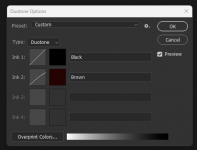
I used an Epson R800 printer for quite a while and colour casts were a problem with black and white prints. At the time I ended up converting most of my printed monochrome pictures to duotone in Photoshop and gave them a faint sepia tinge. It's easy to setup duotone presets where the extra colour is barely noticable, at least the colour cast is in keeping with the medium in a way, unlike magenta and cyan casts, for example. Presently I use a dye sub printer which gives superb black and white reproduction.

jerry12953
Suspended / Banned
- Messages
- 12,421
- Name
- Jeremy Moore
- Edit My Images
- No
Something that might help with the colour cast. If you don't have it already, install Epson Print Layout (EPL) onto your computer, export the image you want (either in mono or colour) to EPL (you'll find it in the "Export To" drop down top left of the screen) and select EPL which will start up with your image loaded. In "Color Settings" select "Printer Manages Color" then select the required settings for everything else and hit "Print". I find this removed the cyan cast I used to get with my Epson 1500 and XP-900.
I hate the print module in LrC so always print via EPL and just let the printer handle the colours based on the paper that I select. If you have papers from the likes of Marrutt then you can add them to the list of papers in EPL.
Hope that helps
14/11/25: Edited to change the required setting in the "Color Settings". Apologies for any confusion
Interesting that you don't like the LR print module. I'm starting to come to that conclusion myself. I'll have to try EPL.
Bristolian
Suspended / Banned
- Messages
- 4,428
- Name
- Steve
- Edit My Images
- Yes
I find LrC's print module both baffling and frustrating. Until I found EPL I would move images over into Photoshop to do printing but that was sometimes a bit hit and miss - EPL gets it right every timeInteresting that you don't like the LR print module. I'm starting to come to that conclusion myself. I'll have to try EPL.
- Messages
- 11,730
- Name
- Chris
- Edit My Images
- Yes
Same but for Capture One Pro. I like to print postcard sized, and like to have the image centred. Such a simple thing, you'd think. It is simple with EPL (using Edit With EPL), a total nightmare with C1Pro's print module, fiddling about with margin sizes where changing one changes another. I do find it annoying that I'm having to make yet another file, though. And I'm a bit confused about what happens when I make an edit after seeing a printed version, and print again!Since getting my 8550 I have used Epl exclusively. lR was sort of OK but counter-intuitive if you wanted anything other than basic.
OP
Barney
Suspended / Banned
- Messages
- 3,043
- Name
- Wayne
- Edit My Images
- No
Finally got round to printing a couple images with the EPL and my goodness it is effortless, print the borders and everything, @Bristolian If we ever meet up I owe you a pint.
The colours are perfect, B+W is very nice- no casts, it figures out all my orientation of paper and images totally hassle free.
It seems to print half a stop under exposed but that is probably the brightness on my monitor being slightly different.
One thing I did note which, is probably due to my lack of understanding, is that when I export a second image it does not take over the view and I have to shut it and then export so that it opens a fresh instance of the program.
The colours are perfect, B+W is very nice- no casts, it figures out all my orientation of paper and images totally hassle free.
It seems to print half a stop under exposed but that is probably the brightness on my monitor being slightly different.
One thing I did note which, is probably due to my lack of understanding, is that when I export a second image it does not take over the view and I have to shut it and then export so that it opens a fresh instance of the program.

Dave Canon
Suspended / Banned
- Messages
- 1,980
- Name
- David
- Edit My Images
- No
I have found LR print very easy to use. As I have a printer with multiple Black/grey inks I always use the Advanced B&W photo setting in the Epson print interface for B&W. Sizing, borders and importantly Colour Soft Proofing (for colour printing) is readily available in LR and easy to use.
Dave
Dave
Bristolian
Suspended / Banned
- Messages
- 4,428
- Name
- Steve
- Edit My Images
- Yes
I can't say I have had this issue. If you open a second image do you see left & right arrows plus something like 2 / 2 in the bottom right corner of the image viewing panel? If so, try clicking on the right arrow to see if your second image appears. That's how mine worksOne thing I did note which, is probably due to my lack of understanding, is that when I export a second image it does not take over the view and I have to shut it and then export so that it opens a fresh instance of the program.
Bristolian
Suspended / Banned
- Messages
- 4,428
- Name
- Steve
- Edit My Images
- Yes
It's horses for courses, I think. Personally I find the LR Print module completely counter intuitive and until I found the Epson Print Layout application I used to take images over to Photoshop for printing. As EPL can be used as a plugin for LR it's no hardship to use it.I have found LR print very easy to use. As I have a printer with multiple Black/grey inks I always use the Advanced B&W photo setting in the Epson print interface for B&W. Sizing, borders and importantly Colour Soft Proofing (for colour printing) is readily available in LR and easy to use.
Dave