PP Help Needed Please

Pads

Suspended / Banned
Messages
379
Name
Paul
Edit My Images
Yes
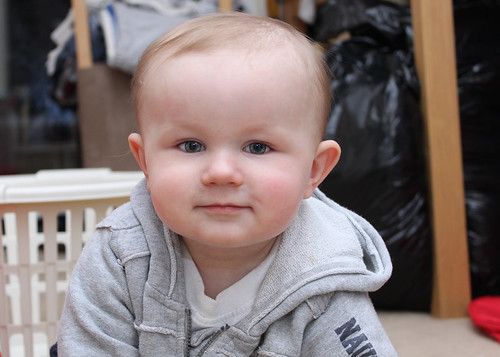
Could anyone please tell me if it is even possible to fake a reasonable plain background on this shot ? If so any links to tutorials/tips would be very much appreciated.

Many thanks for any responses.

5283522747_626c61a934.jpg
 
Keeping it simple.

Using a simple low cost program like Elements

1-Duplicate layer and run the magic extractor on the background.

2- Add one of the many ready made backgrounds in the application.

Be prepared to lose the very fine hairs ,if not you are into the area of channels and alpha masks which is to much to go into here.

Hard to do precisely on such a small image

1134806306_hHN4M-XL.jpg
 
Another method is to simply blur the background, I selected the child and added a blur.
5283685203_cb2e560351.jpg
 
Thanks for the replies. Very helpful.

Another quick question if I may?

Which selection tool / settings should I use (I seem to struggle to get a nice smooth selection on anything large)
 
Theres plenty to choose from, I used the quick selection tool (shared with the magic wand on the toolbar), quickmask is another popular one. For this the best way to go (with a full size pic) is probaly using one of the channelsl to get the fine hairs, but it's too complicated to explain in on here really.

 
Back
Top