please help

On the Huh

Little Ball of Fur
Suspended / Banned
Messages
4,405
Name
Zulfi
Edit My Images
Yes
Helped out at a wedding last Sat and about a third of the pics are disrupted.
Any advice and help appreciated.
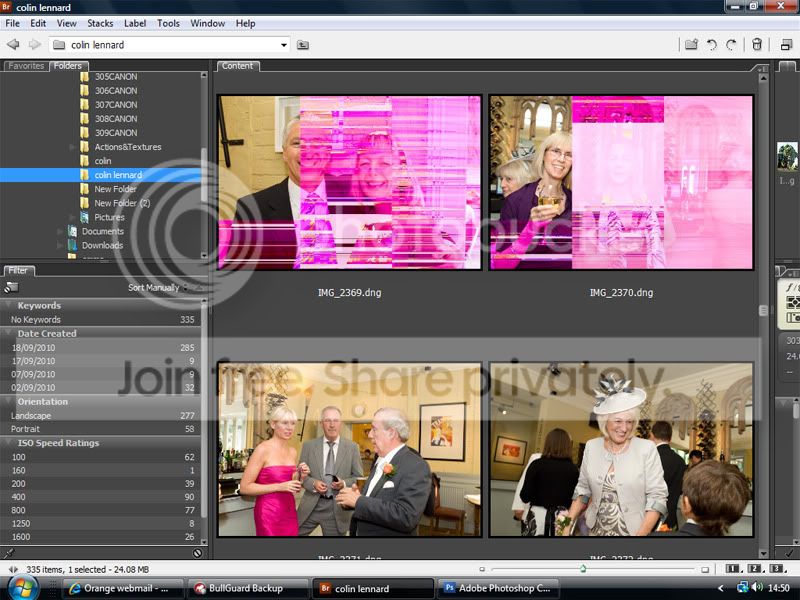
Untitled-1-2.jpg
 
That looks like a sensor fault to me. Only thing would be convert to B&W and use clone but unlikely to fix many. :'(
 
Not sure its the sensor. I got exactly the same result downloading a RAW file from a thread on here and importing into Lightroom. Tried a different browser and problem solved.
Do you have the original files on a card? If so do they display OK on the camera?
I se these are DNG files, what happens with the CR2 files in lightroom?
 
I se these are DNG files, what happens with the CR2 files in lightroom?

I'd even go one step further back and try viewing the CR2's in DPP and see what happens.

I've had some bizarre banding turn up on a couple of conversions before.
 
Yes try downloading the original pics again on a different computer preferably with a different card reader and see what happens.
 
They are corruppted in DPP as well, and these were viewing the original Raws and not the DNG's.

When I first tried to down them nothing happened. I found that the card reader had a broken pin. Downloaded them in the end with another card reader and this is the result.

I hope it's not the sensor, only shot around 3K on it.

Will set up my old computer and try Waynes idea.

Thanks for your replies everyone, much appreciated.
 
Can you view them on the camera LCD ok?
 
They look ok on the lcd, but then the thumbnails look ok in DPP (unlike bridge), but when you view them to fit to screen in DPP, either a notice comes up saying file corrupted, or colour banding appears.
 
My opinion is a corrupted RAW file. May be as a result of the pin problem. It's caused a download problem on the chip. Had a similar problem with a bad cable on a card reader.The reason you can see them on the LCD is that its the in camera jpeg you are viewing not the RAW file. The original RAW file on the chip has been damaged so I don't think it's recoverable

Don't think recovery software will cure the problem as the original data is corrupted, but if you've got it try and see if does any good.
 
If the jpg is okay (it's showing fine on the LCD) there will be a way to extract the jpg (have a quick google). This at least gives you something!
 
Cheers John and John.
Converting everything to jpegs in DPP atm. Fingers crossed!
Got a Sandisk recovery disc somewhere, which I will try later.
 
If the jpg is okay (it's showing fine on the LCD) there will be a way to extract the jpg (have a quick google). This at least gives you something!

Download instant jpeg from raw (it's free) you do have to give an email but I haven't had any spam off them. IJFR will extract the jpeg, it's quick as well, you'll get a medium size jpeg out (big enough for an normal album) well worth a go.

edit it seems you get a large jpeg off nikon and a medium off canon.
 
Last edited:
Will give that a look. Cheers Wayne. ATM DPP is doing it's thing and in the progress window it states 28 errors so far. :'(
 
Did you get sorted?
 
NO!
Been to London yesterday and met with a few TPer's. I took a brand new sandisk card and only shot jpegs. Again, a 3rd have this problem. Think Cowasaki may be right about my sensor.
 
Have you checked the pins in the card slot? these are all to easy to damage in some cameras and that may cause issues writing to the card.
 
Have you checked the pins in the card slot? these are all to easy to damage in some cameras and that may cause issues writing to the card.

The pins in the card reader I am using now are fine.

I have mislaid my receipt for my camera which was bought from Jessops just after Christmas last year. However, they have found my purchase on their computer and have agreed to swap my camera for a new one if there is a faulty sensor or camera fault. So a big thumbs up to them. Although I like an online bargain now and then, I am also a great believer of buying from a local store to keep a store such as Jessops to survive, keep people empolyed locally.....and you know the rest.

Anyway, to be fair to them, I will want to download once again, using yet another card reader and computer. Why? I just have my suspicions that it is a card reader fault tbh and will give more details after more testing.

I appreciate all the advice and will report back in a few days time. So please be prepared to offer more advice if need be. ;)

Thank you all and will report back soon. :thumbs:
 
If the thumbnails are fine then it's not the sensor.. obviously? ;)
The raws are embedded with a big'ish jpg but smaller than the actual MP of the raw.
Example: The embedded jpg on a 450D raw is 3.4MP rather than 12MP, irfanview opens the embedded jpg rather than decode the raw unless you specifically set it up to.

I suspect your card reader so I wish you luck on that!
 
Back
Top
