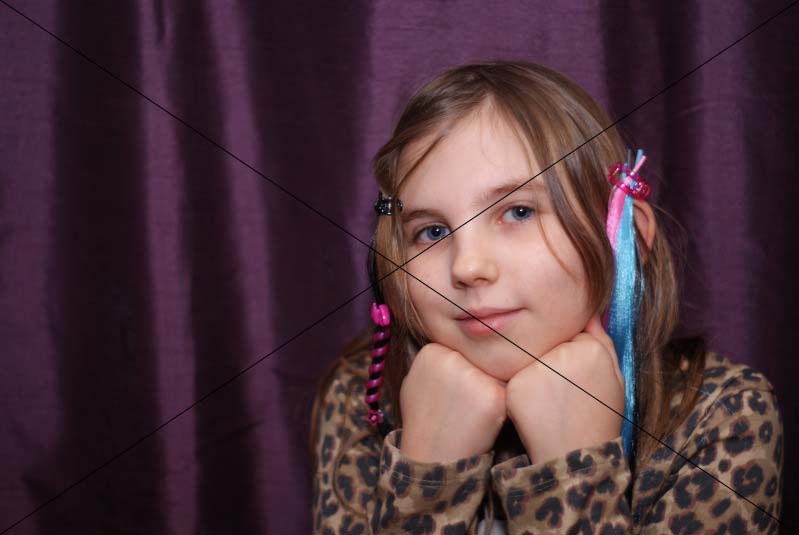
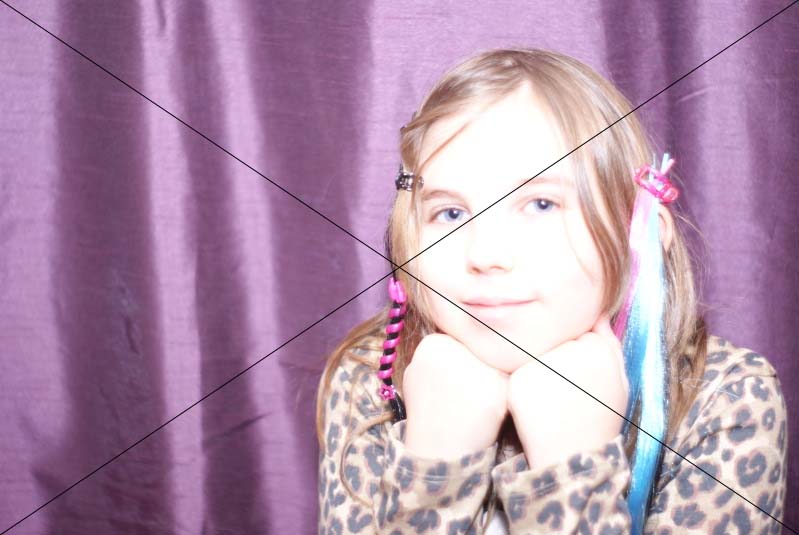
Please help, what is going on with these images?

rallying1

Suspended / Banned
Messages
232
Name
Gary
Edit My Images
Yes
I took these tonight, one after the other, all I did was move away from her slightly, same settings nothing changed at all. I did a studio session a few weks ago and some of my shots were over exposed I am presuming the same was happening but I have no idea what is going wrong, my camera is a Sony A230 any idea's folks?
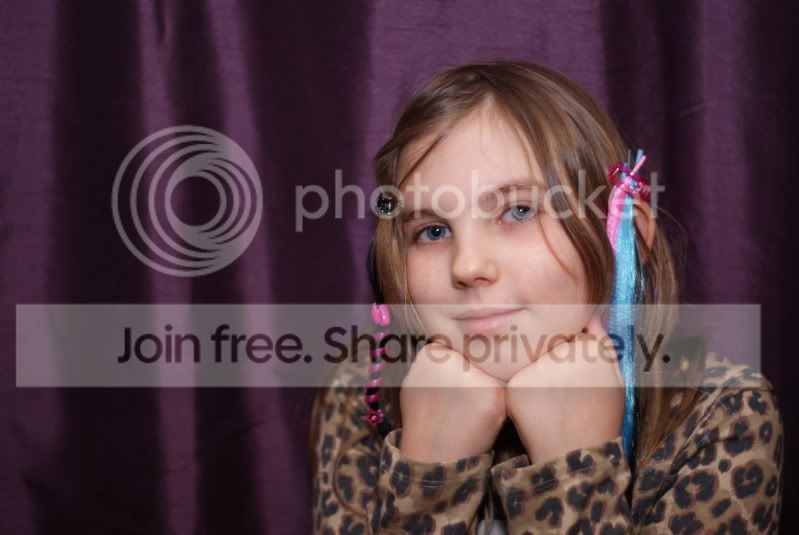
test011.jpg

test010.jpg
 
Looking at the catch lights in her eyes on the over exposed on they look a lot larger and a different shape, is a possible as you suggest you moved further back than in the first that you were blocking your flash source a little for the first one, thus when moving further away from here allowing the full power of the flash to get to her..

Matt
MWHCVT
 
spacester said:
Have you got auto-bracketing on? No idea if your camera has it, but when I fist started using it on mine, I would sometimes forget to switch it off.....

No I don't think I have it on my Sony
 
MWHCVT said:
Looking at the catch lights in her eyes on the over exposed on they look a lot larger and a different shape, is a possible as you suggest you moved further back than in the first that you were blocking your flash source a little for the first one, thus when moving further away from here allowing the full power of the flash to get to her..

Matt
MWHCVT

I am not sure Matt, but the same thing happened in the studio using the lighting there as well, I just don't get it.
 
Might it be to do with the fact you were using spot metering? I have had similar effects (albeit with flowers) when using spot metering.

I don't know what spot you were using for the metering, but let's suppose for the sake of argument it was the centre of the image (and let's also suppose these two images are full frame). You can see that in the first image, the centre spot is over the young lady's hair, which is of a middling brightness. In the second image, the centre spot is also over her hair, but very close to a very dark patch just over to the left of it. Assuming you were hand-holding the camera, is it possible that it picked up the exposure reading for the second shot from the very dark area (thus over-exposing the shot), with the camera having moved slightly by the time the shot was actually taken?


NOT MY IMAGE Gary - Spot exposure 1 by gardenersassistant, on Flickr


NOT MY IMAGE Gary - Spot exposure 2 by gardenersassistant, on Flickr

(My experience was of a poppy going from bright red when correctly exposed, with the exposure metered from a petal in bright sunlight, to bright yellow when over exposed, with the exposure metered from the shadowed outside edge of the very dark centre of the flower just millimetres away from the first metering point.)

Or it may be something completely different of course! :)
 
Last edited:
Yes I was spot metering that makes perfect sense now.thank you.
 
I took these tonight, one after the other, all I did was move away from her slightly, same settings nothing changed at all. I did a studio session a few weks ago and some of my shots were over exposed I am presuming the same was happening but I have no idea what is going wrong, my camera is a Sony A230 any idea's folks?

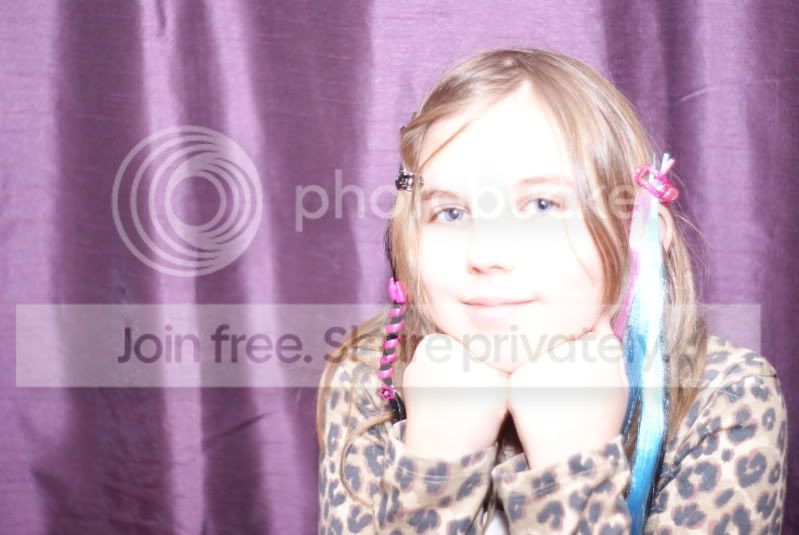
Well if nothing changed thats why you need to change your settings again, as you exposed for the 1st, so the settings for the second need changing, you need to re expose, also you well missed the focus on the 2nd
 
You have the same aperture, ISO and shutter speed on both photos, the metering (spot or otherwise) will have nothing to do with the differences surely.

Yeah dont think its the metering mode just needs, less exposure faster shutter I would have thought dunno could be wrong, plus better focus
 
Last edited:
Well if nothing changed thats why you need to change your settings again, as you exposed for the 1st, so the settings for the second need changing, you need to re expose, also you well missed the focus on the 2nd

But surely, if in a studio, the lighting is fixed. We know the settings on the camera haven't changed between to 2 shots so why would the exposure change so much?
 
But surely, if in a studio, the lighting is fixed. We know the settings on the camera haven't changed between to 2 shots so why would the exposure change so much?

well some of the exif is removed so we only the OPs word not that Im doubting it but we cant check to see if theres a difference thats what I mean Marc
 
Looking again, is it possible that one of the lights didn't fire the first time? f1.7 is extremely wide for studio and that could explain the overexposure in the 2nd shot if all lights were triggered.

Thats strange I just looked on flickr and I cant see the full settings what exif viewer are using please Marc
 
Last edited:
Just Dave said:
LOL we posted the same time

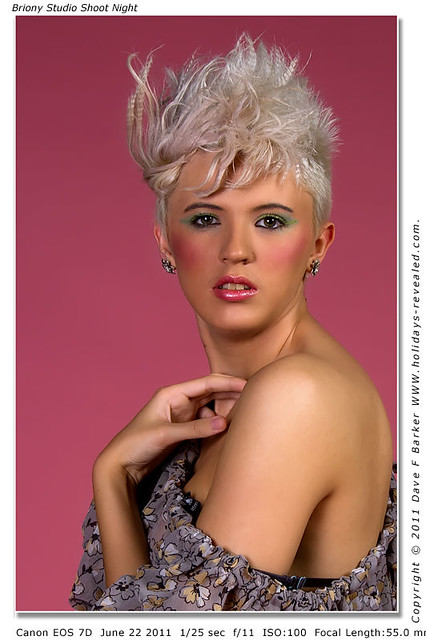
But for light settings I usually use F11, 1/25th sec or there abouts depending on the lights

http://www.flickr.com/photos/davenjulie/5863358508/
Briony at the studio night shoot at the StudioEvents.co.uk Studio Preston Lancashire by Just Daves Photos, on Flickr

Yeah they were the settings, only used a flash on camera with soft box on it no other lighting, this was taken in my living room just messing with my daughter after she tied all that junk in her hair, I do understand the focus was off it was just such a change from one to the other with no setting changes just moving back a foot I couldn't understand why it had happened?
 
thanks Marc F1.7 is way to shallow for overall sharpness also, in my opinion dunno what you think

I never use wider than f5.6 with studio lights.

Yeah they were the settings, only used a flash on camera with soft box on it no other lighting, this was taken in my living room just messing with my daughter after she tied all that junk in her hair, I do understand the focus was off it was just such a change from one to the other with no setting changes just moving back a foot I couldn't understand why it had happened?

Ah, so the distance from flash to subject changed. That could explain it.
 
Yeah they were the settings, only used a flash on camera with soft box on it no other lighting, this was taken in my living room just messing with my daughter after she tied all that junk in her hair, I do understand the focus was off it was just such a change from one to the other with no setting changes just moving back a foot I couldn't understand why it had happened?

Looking again, is it possible that one of the lights didn't fire the first time?

Well Id go along with that then, were you shooting continuous or are they single shots and distance will effect it
 
Looking at the catch lights in her eyes on the over exposed on they look a lot larger and a different shape, is a possible as you suggest you moved further back than in the first that you were blocking your flash source a little for the first one, thus when moving further away from here allowing the full power of the flash to get to her..

Matt
MWHCVT

I'm still thinking the above though it could well also be what Marc said about one flash not firing :thumbs:
 
Gary, get the flash off the camera if you can. Set it to Manual and use trial and error to get the lighting right. I usually start of with 1/16th power and adjust from there, starting your camera settings at f8 and 1/125th.

That'll give you a starting point and you can adjust until you get the desired results. If you can get the flash off-camera, try to have it above your subject and a little to one side.
 
I'm still thinking the above though it could well also be what Marc said about one flash not firing :thumbs:

From what we know now, it appears he was only using one flash so it looks like it was the distance to the subject that changed as nothing else appears to have done so.

Of course, if using the flash on ETTL, could that be where the meter could be causing problems?
 
From what we know now, it appears he was only using one flash so it looks like it was the distance to the subject that changed as nothing else appears to have done so.

Of course, if using the flash on ETTL, could that be where the meter could be causing problems?

Think theres to many variables to assess really but I do think distance and not firing is the prob

do you you use a light meter Marc? suppose each has their own preferred setting also
 
fabs said:
Gary, get the flash off the camera if you can. Set it to Manual and use trial and error to get the lighting right. I usually start of with 1/16th power and adjust from there, starting your camera settings at f8 and 1/125th.

That'll give you a starting point and you can adjust until you get the desired results. If you can get the flash off-camera, try to have it above your subject and a little to one side.

Thank you I will give it a go. :-)
 
From what we know now, it appears he was only using one flash so it looks like it was the distance to the subject that changed as nothing else appears to have done so.

Of course, if using the flash on ETTL, could that be where the meter could be causing problems?

Spot metering off the dark background with auto-TTL flash metering would throw the exposure big time.
 
Unless you've cropped one of the images, you didn't move much at all.

Was your flash on auto or manual?

Just looks like your flash has fired at a different power. Seeing as the bright shot was taken first, it could be that it has fired at full power, and then not had time to recycle fully for the second shot (as it was taken within a second of the bright one).

Missing focus could mess up the flash metering if it was set to TTL as well.

Or it could be that the flash has metered off the curtain for the bright shot, and off her face for the darker one.
 
Or it could be that the flash has metered off the curtain for the bright shot, and off her face for the darker one.

Perhaps the curtain, or perhaps the even darker areas I pointed to earlier. Either would make sense to me - the darker the area, the more radical the impact on the metering.

The Exif says of the well-exposed shot Brightness (APEX) = -22/25, Brightness = 0.54 foot-lambert. For the over-exposed shot it says Brightness (APEX) = -3/2, Brightness = 0.35 foot-lambert. I couldn't work out the significance of this from the relevant wikipedia article, but presumably someone who knows about this stuff might be able to draw a helpful conclusion from it.
 
HoppyUK said:
Spot metering off the dark background with auto-TTL flash metering would throw the exposure big time.

Thank you I am now on a mission to have a word with myself and what I am doing wrong.
 
Thank you I am now on a mission to have a word with myself and what I am doing wrong.

Spot metering is a dangerous game unless you're fully aware of exposure principles, though very useful if you are.

Basically, metering systems are calibrated to mid-grey (think elephant grey) and if that spot falls on anything significantly lighter or darker than that, it can be a long way out (unless you apply approriate correction, which is where the knowledge comes in).

For studio situations, particularly with dark backgrounds behind a light-toned subject, metering is difficult. The most reliable method is to use manual, both on the camera and flash. Set it with a few trial and error shots, then it is locked and cannot change. However, also be aware that flash exposure is very sensitive to distance - distance from flash to subject (camera to subject distance doesn't matter) - so try to keep that constant.

EDit: I'm also wondering if you were using auto exposure on the camera for those shots. In which case, it will try to set that for the ambient light level, which may explain why it's selected such a low f/number. To be safe, just set shutter speed to 1/125sec on manual, and adjust exposure using aperture and ISO. Focus carefully on the eyes.
 
Last edited:
Beginner here... so be gentle please... I think somewhere I read about lights that cycle... and that this can be a problem. Is it possible that that could be the problem here? Mind you, I think I was reading about floodlights and I can't imagine studio lights would do that.

edit: I just googled and it seems lights cycling affects white balance rather than exposure - sorry!
 
Last edited:
Beginner here... so be gentle please... I think somewhere I read about lights that cycle... and that this can be a problem. Is it possible that that could be the problem here? Mind you, I think I was reading about floodlights and I can't imagine studio lights would do that.

edit: I just googled and it seems lights cycling affects white balance rather than exposure - sorry!

That's not the problem here, but fluorescent tubes cycle, and that affects both exposure and colour.

The underlighter strips in my kitchen are spectacularly bad. Shoot a picture at a high shutter speed like 1/500sec of the actual tube, and the light flickers and flashes pink and green up and down the length.

Fortunately, in lighting situations like that we're generally having to use much longer shutter speeds and the problem disappears, just as it looks to the naked eye.
 
rallying1 said:
I took these tonight, one after the other, all I did was move away from her slightly, same settings nothing changed at all. I did a studio session a few weks ago and some of my shots were over exposed I am presuming the same was happening but I have no idea what is going wrong, my camera is a Sony A230 any idea's folks?

Just an idea I had the same thing on my Sony A200 it turned out to be the Minolta lens I was using had oil on the aperture blades. Might be worth a check see if they are free and snappy as they should be
 
Back
Top