Please give me tips on my website :)

Smithyster

Suspended / Banned
Messages
65
Name
Sam
Edit My Images
Yes
Hey Guys.

Would you be able to visit my website and tell me what you think? It's done on Wordpress, with a theme I bought from themeforest.

I have no background or knowledge of CS or HTML etc. I did a few lessons in Web Design in October last year, and then had an operation which has since left me unable to attend again. Therefore my plans to work on my own site have been hampered. It also means I haven't added that many photos etc since then.

I just set myself up with a free trial at Zenfolio, and that is where the "Online Store" menu link takes you. I also have some google ads on there, purely to hope someone may click, as I've so far been unable to sell anything, as I don't know where to start.

So would anyone be able to just take a look and let me know what you think?
Any feedback will be appreciated.

Thanks alot.

Sam
 
Why have you got Google Ads on your website? You want people to stay on your website not click on an ad.
 
Sam, afraid I have to agree with the above about the ads, looked at a few pages and they are everywhere, I hate google ads they are so annoying.

PS, you do realise how they actually work don't you.
 
I'd ditch the ads. Themeforest themes are ussually made with there own admin section added in the control panel. Should be able to turn them off there.
 
Thanks for your feedback guys.

The ads are now gone. As I said in my post, they were there just in the hope that I'd earn some pennies from clicks, as selling prints etc hasn't really taken off.

I realise that it is pretty counter intuitive though, so I haven't hesitated to remove them.

Any other feedback?
 
hope that I'd earn some pennies from clicks,

hi Sam

you really have to have a high volume of traffic hitting your site for Google Ads, they only pay a penny for about a thousand clicks (or some ridiculous figure)

also you have to bear in mind when they click on one of the ads what happens, they are leaving your site, which is not what you want.

Best of luck with your venture, its a cut throat business out there.
 
Line: 144
Char: 2
Error: Object doesn't support this property or method
Code: 0
URL: http://www.samsmithphotography.co.uk/
I'd take another look at your template - something is not running right.

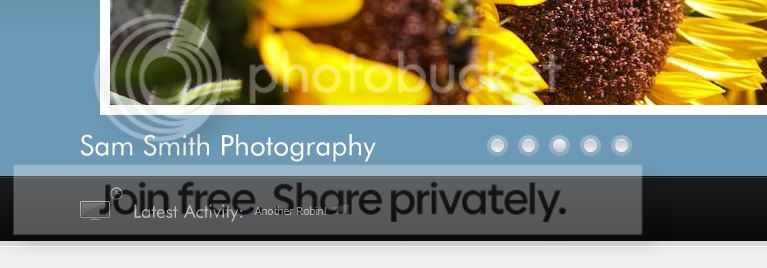
And your banner where it is showing 'latest news' is merged with 'Sam Smith Photography'.

I think the content and design is largely there, but looks like there is some template layout issues, and compatability problems with something or other (on line 144).
 
hi Sam

you really have to have a high volume of traffic hitting your site for Google Ads, they only pay a penny for about a thousand clicks (or some ridiculous figure)

also you have to bear in mind when they click on one of the ads what happens, they are leaving your site, which is not what you want.

Best of luck with your venture, its a cut throat business out there.

Ok, pretty counter productive then, I'll forget about the ads. Thanks. I'm only 19, and only been taking photos since March, but I thought I'd try my hand at website stuff at the same time. Eager to learn :P

I'd take another look at your template - something is not running right.

And your banner where it is showing 'latest news' is merged with 'Sam Smith Photography'.

I think the content and design is largely there, but looks like there is some template layout issues, and compatability problems with something or other (on line 144).

Thanks for the tips. It largely doesn't mean anything to me though. I see the "Sam Smith Photography" briefly before the slider starts, but not sure why. Can't say I know how to fix it.
 
Last edited:
The 'visit' link store from this page:
http://www.samsmithphotography.co.uk/animal-life/marmot/

goes here:
http://www.samsmithphotography.co.uk/store/

easily fixed.

Re: the banner thing, thats odd, because it appears over the 'active picture' blob on the front screen, but if you scroll to the bottom of the page it jumps? and then interferes with the latest news banner.
Personally, I don't know what that text is doing - so I'd lose it.
I can't view the source (right click is disabled) to see what line 144 character 2 is, but it's a recurring issue on every page, so would be a template/css/configuration issue rather than a page specific problem.
 
The 'visit' link store from this page:
http://www.samsmithphotography.co.uk/animal-life/marmot/

goes here:
http://www.samsmithphotography.co.uk/store/

easily fixed.

Re: the banner thing, thats odd, because it appears over the 'active picture' blob on the front screen, but if you scroll to the bottom of the page it jumps? and then interferes with the latest news banner.
Personally, I don't know what that text is doing - so I'd lose it.
I can't view the source (right click is disabled) to see what line 144 character 2 is, but it's a recurring issue on every page, so would be a template/css/configuration issue rather than a page specific problem.

Hmmm, the visit store link seems to work for me? Do you mean the 'Online Store' page link in the menu bar?

I'll see if I can remove the 'Sam Smith Photography' text.

I have also now disabled the anti right click plug in that I was using :naughty:

EDIT: Doesn't seem to be an option to remove the text. Showing my limited knowledge here lol.
 
Last edited:
from that first link, click on the shopping cart button, it expands and says 'nothing in your cart', and it also then shows 'visit store', which goes to the second link :thumbs:

Which reminds me... I'd also probably drop the 'add to cart' button from the about me page too - and infact any page which isn't a gallery or the store :thumbs:
 
from that first link, click on the shopping cart button, it expands and says 'nothing in your cart', and it also then shows 'visit store', which goes to the second link :thumbs:

Which reminds me... I'd also probably drop the 'add to cart' button from the about me page too - and infact any page which isn't a gallery or the store :thumbs:

Ahhhh yes. Sorry, I should have removed the shopping cart, since I started seeing how this Zenfolio stuff works, that cart was left over from using a WP E commerce plug in.
 
Ok, thats interesting.
the page displays correctly on my ipad... but not on my pc browser (ie7).
I have noticed in your source code that this: is coded out.
<!--[if IE 7]>
<link rel="stylesheet" type="text/css" media="all" href="http://www.samsmithphotography.co.uk/wp-content/themes/overall-v1.3/css/ie7.css" />
<![endif]-->
I'm wondering that because the stylesheet is coded out for ie7 it is not displaying properly?
 
Ok, thats interesting.
the page displays correctly on my ipad... but not on my pc browser (ie7).
I have noticed in your source code that this: is coded out.
I'm wondering that because the stylesheet is coded out for ie7 it is not displaying properly?

Hmmmm, ipad hey? :thumbs:

Yeah maybe, but again, sorry I've not got any idea on how to fix this.
I've probably tried doing all of this a bit ahead of time. But I went the Wordpress route so I could try and get into it and learn a bit as I go.

So I get that the CSS stylesheet that IE7 will use from this theme is 'coded out', but what does it mean by coding out, and how do i fix it?

(I was only after tips on how it looks, but this extra info is of great help to me, but as I'm not very clued up on it all, and haven't the money to pay for help, I don't expect anything from anyone. I really appreciate your time and help though)
 
lol
well in terms of looks, it looks much much better on my ipad than it does on my pc, but I reckon this could sort out the layout issues.
and tbh, you can't count on everyone else having ie8+.
fixing this should be simple.
I don't know wordpress specifically, but you'll have a template option in the admin back-end of the site?
probably a couple of options which are edit layout or edit template?
It will give you a page of code, the ie7 css wil lbe in the header.
do a search in the code for 'ie7' and it should take you to that code.
then delete the bits in red:

<!--[if IE 7]>
<link rel="stylesheet" type="text/css" media="all" href="http://www.samsmithphotography.co.uk/wp-content/themes/overall-v1.3/css/ie7.css" />
<![endif]-->
 
this looks like where you need to go:
http://codex.wordpress.org/Appearance_Editor_SubPanel
and have a look at the 'header.php' in the menu on the right of that screenshot :)


just so you can see what I (we) are trying to fix:
samsmithscreenshot1.jpg
 
Last edited:
and thats how it looks on the ipad (safari) - the source is still telling me it's coded out?! - the '!' turns the commant into a note instead of a code.

Can you check the main template for that ie7 code too? :thinking:

(bloomin microsoft) - can any other ie7 users confirm the same? (or ie6 as I see thats coded out too)
 
The header is showing this at the top of the page: <[if IE 7]> <[endif]>

I'll check the main template - Can't seem to find anything else I should change

It seems to look ok in my IE 8. Except for the above issue with the code at the top above the header
 
Last edited:
ah nuts.
okay, stick the code back as before - maybe a php/wordpress thing as standard.
the difficulty I have here is I can't access the advanced tab in IE (due to group policy) so I can't check other options.

As for now, put back 'as before' and I'll have a read up to see what might cause it.
 
I found this example on the wordpress site:
The correct way to do this is to use conditional comment tags in the page itself.
<!--[if IE]>
<link rel="stylesheet" type="text/css" media="screen"
href="/ie-stylesheet.css" />
<![endif]-->

Firefox and other browsers will ignore these entirely, as they're in comment tags.
Which looks like what you have set up.
I still think there is an issue with the browser detection - but it might be wise to check some other IE7 users, as well as IE8 and IE6.
The last comment on the WP site, confirms that chrome (and safari in my ipad) won't look at the alternative css files.
 
hi Sam

you really have to have a high volume of traffic hitting your site for Google Ads, they only pay a penny for about a thousand clicks (or some ridiculous figure)

I agree about ditching the ads, but this comment above is simply not true. Some clicks can pay up to several pounds if the user then goes on to sign up for a service that was being advertised. If you get a 1000 ad clicks you might make upwards of £30-40 depending on what ads were clicked and the resulting business those advertisers get. That's why Google Ads are so popular. But yes, don't have ads on your personal website. Perfect for forums etc, but not for personal portfolios.
 
I agree about ditching the ads, but this comment above is simply not true. Some clicks can pay up to several pounds if the user then goes on to sign up for a service that was being advertised. If you get a 1000 ad clicks you might make upwards of £30-40 depending on what ads were clicked and the resulting business those advertisers get. That's why Google Ads are so popular. But yes, don't have ads on your personal website. Perfect for forums etc, but not for personal portfolios.

Ok, thank you for your advice :thumbs:
 
Well done Sam,

although not 100% the same format as IE8/chrome/safari users the removal of the overlapping text looks much neater.

samsmithscreenshot2.jpg


Next thing to look at is the 'squashed' resized thumbnails in the gallery.... your marmot looks like he's been squashed! lol
 
Thanks Man!!

Ha yeah I know, I need to do that, I know how to; I either change the settings for all the thumbnails, or I upload a cropped version of ones that stretch!

Edit: Just changed the thumbnail size for that page and another, seems better for the orientation and size of them.
 
Last edited:
Back
Top