
im not sure how but i seem to have a folder on my laptop which down the left side of the list is called "holiday pics" but all of the images have the name "yps photoshoot". i have a few folders tht have 2 names like this but cant understand how it happened. can anyone help please?
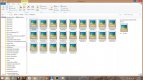
I can only guess it's to do with some naming convention you used (whether intentionally or otherwise) when importing your images from card or camera to hard drive. Did you copy directly from card to HDD using windows file manager, or use some other method involving third party software?
thanks for the reply, i usually use lightroom to import images so not sure what i did, i have been trying to work out HOW i did it but cant figure it out.
I know quite a few use LR to copy over, but I feel much more confident copying (not moving) images to hard drive using the OS file management tools and then importing & sorting. Pretty sure the rename was accidentally invoked before import, possibly as part of an import preset.
I'm confused, you've created a folder and given it a name, and then you've filled it with files, which have been given a sequential file name, seems completely normal. I don't see how the folder has two names? It has one name, 'holiday pics'.
This site uses cookies to help personalise content, tailor your experience and to keep you logged in if you register.
By continuing to use this site, you are consenting to our use of cookies.