
and help to keep the site free for all
You are using an out of date browser. It may not display this or other websites correctly.
You should upgrade or use an alternative browser.
You should upgrade or use an alternative browser.
Please can I have some help
- Thread starter Doddy1974
- Start date


swanseamale47
Suspended / Banned
- Messages
- 10,876
- Name
- wayne clarke
- Edit My Images
- Yes
I used a curves ajustment to boost the general contrast, then I used unsharp mask to boost midtone contrast and finally added a bit of selective sharpening to the animal.
Very quickly done though.
Wayne

Very quickly done though.
Wayne

Kerioak
Suspended / Banned
- Messages
- 7,245
- Name
- Christine
- Edit My Images
- Yes
Match colour, sharpen, reduce saturation a tad

Edit: Wayne and I have given two totally different methods of editing here - should give you some ideas now on where to start Cathy, look forward to seeing your new version
Edit: Wayne and I have given two totally different methods of editing here - should give you some ideas now on where to start Cathy, look forward to seeing your new version
Last edited:

chip
Suspended / Banned
- Messages
- 576
- Name
- Chris
- Edit My Images
- No
Match colour, sharpen, reduce saturation a tad
QUOTE]
Very nice. Can you give the secret of the Match Colour part of you process please, I assume it is a luminance adjustment?
Kerioak
Suspended / Banned
- Messages
- 7,245
- Name
- Christine
- Edit My Images
- Yes
Match colour, sharpen, reduce saturation a tad
QUOTE]
Very nice. Can you give the secret of the Match Colour part of you process please, I assume it is a luminance adjustment?
Thanks, yes it is under Image, Adjustments, then play with the sliders until you get the result you like, mine was initially too saturated which is why I reduced the saturation in Hue/Saturation.
There are so many options in PS that I wonder if I will ever find, and master, them all
Had a quick play, firstly I adjusted the WB slightly for a cooler look as I am sure this was not shot in the middle of summer judging by the branches in the background.
Then a slight contrast boost using channels (a bit like dodge and burn but with more detail and quicker) and finally a tiny amout of sharpening to the cat.

Then a slight contrast boost using channels (a bit like dodge and burn but with more detail and quicker) and finally a tiny amout of sharpening to the cat.

- Messages
- 6,343
- Name
- Nick
- Edit My Images
- Yes
Wayne and I have given two totally different methods of editing here.
Indeed so. There are loads of techniques to try out, and loads of different "looks" you can get for your images. Here is a "softer" look, not as dramatic as Wayne's or Christina's, using several of my favourite techniques: Levels, Defog, Curves, Saturation and Sharpen.
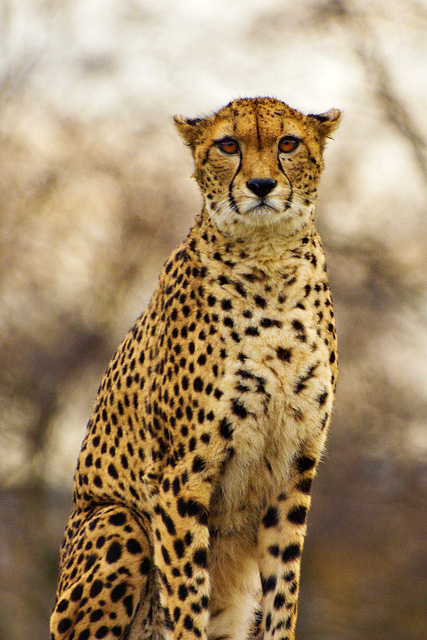
Not my image - Doddy1974 - reworked - PS2 LebmtDf10x30CuSaSS30x0.3 kh65x30o by gardenersassistant, on Flickr

Suvv
Suspended / Banned
- Messages
- 2,955
- Name
- Kev
- Edit My Images
- No
For best results see the edits above and practise with PSE8.
I use Capture NX2 so you will not learn much from my editing but take a look at what Picas3 can produce, just by selecting "I'm feeling lucky". It's what my wife uses
The results are inconsistent though, sometimes there is no change & sometimes the edit is worse.
 [/url][/IMG]
I use Capture NX2 so you will not learn much from my editing but take a look at what Picas3 can produce, just by selecting "I'm feeling lucky". It's what my wife uses
The results are inconsistent though, sometimes there is no change & sometimes the edit is worse.


Flossyrockstar
Suspended / Banned
- Messages
- 381
- Name
- Tarquin F'tang-Olé-Biscuitbarrel. Or Pete for short!
- Edit My Images
- Yes
Just for something different, levels adjust, run through fractalius plug in in photoshop

I like that!


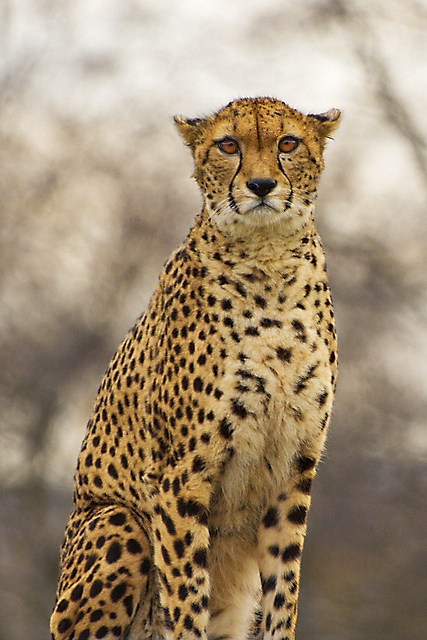
OP

Doddy1974
Suspended / Banned
- Messages
- 663
- Name
- Cathy
- Edit My Images
- Yes
Tarquin and Christina...love it!! I think it's awesome! Thankyou!
I can't have a play now as my laptop has decided to die on me, and I cannot get a new one yet So i am relying on my iPhone
PLay as much as you like....I like to see the different effects!
I can't have a play now as my laptop has decided to die on me, and I cannot get a new one yet
So i am relying on my iPhone PLay as much as you like....I like to see the different effects!

- Messages
- 13,060
- Name
- Sarah
- Edit My Images
- No
There have been some really good serious edits on this one - helped by it being a really nice photograph to start with. It just shows how much some sensitive PP can lift an image given a good starting point 
But for a bit of fun, how about the oil paint on canvas effect ?
?
(Fractalius plug-in plus a subtle canvas texture - couldn't resist joining in )
)

But for a bit of fun, how about the oil paint on canvas effect
?(Fractalius plug-in plus a subtle canvas texture - couldn't resist joining in
)
Last edited:


OP
Doddy1974
Suspended / Banned
- Messages
- 663
- Name
- Cathy
- Edit My Images
- Yes
I love all the edits with this picture...thankyou! SarahLee I am going to print ** version if thats ok!!
I really need to learn more *** editing! Sadly my laptop died on me tonight, so until i win the lottery, i am relying on my iPhone((((
I really need to learn more *** editing! Sadly my laptop died on me tonight, so until i win the lottery, i am relying on my iPhone
((((
OP
Doddy1974
Suspended / Banned
- Messages
- 663
- Name
- Cathy
- Edit My Images
- Yes
boliston said:The original does not seem too bad - just wondering if you had the white balance set too high? I might have reduced it by about 500K
Nvr adjust the white balance...this is again, something i need to learn! Me thinks i have so much to learn!!!
swanseamale47
Suspended / Banned
- Messages
- 10,876
- Name
- wayne clarke
- Edit My Images
- Yes
What about an oil painting effect??

Kerioak
Suspended / Banned
- Messages
- 7,245
- Name
- Christine
- Edit My Images
- Yes
Looks as if it is in a blizzard - love this version

admirable
Suspended / Banned
- Messages
- 11,612
- Name
- Jim
- Edit My Images
- Yes
Looks as if it is in a blizzard - love this version
Thank you,
It's one of the standard settings in Silver Efex Pro (CS5)


Since everyone else was having a play, i thought i'd join in with my take on it...

This is my favourite take on a very lovely original shot.
Out of interest what did you do? It's beautiful work, subtle yet dramatic... as in not obviously fiddled with/ fake looking but looks amazing.