Pixels and Cropping.

Plain Nev

Vincent Furnier
Suspended / Banned
Messages
2,722
Name
Neville
Edit My Images
Yes
This is something that always does my head in. I know what I think, but I don't know if I'm right. It's commonly held that if you crop an image you are losing pixels. Well, you are, insofar as you are reducing the total number of pixels by reframing the picture. But my contention is that you don't alter the density of those pixels, and those in the cropped area will remain the same as those in that area prior to the crop, if you see what I mean. So technically the quality of that image will not change. Where it will be more apparent is if you then blow up that crop, which is not losing pixels, but making the space between them more apparent. Help!
 
I suppose the only thing when cropping is that the picture is magnified more when filling the frame. That'll reveal things hidden when the image is full and uncropped but I suppose the end result of cropping is no different from viewing that section of the picture closely in a really big picture / print.

I sometimes take pictures intending to crop up to 100% and sometimes a little bit more and they're ok for whole screen viewing but I'm just a happy amateur.
 
That's pretty much as I understand it.
 
Doesn't cropping also magnify the noise inherent in all digital images?
 
Well, that's possible, I suppose. We've all seen artefacts in digital images.
It shouldn't magnify anything unless you resample the image.

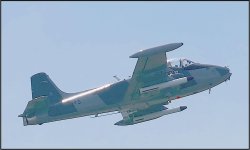
If you just reduce the area, nothing else should change, depending on your software and the chosen file type. I crop almost everything for one reason or another. This is roughly 1/8th of a Panasonic G9 20MP frame...

Strikemaster at Weston Super Mare Air Show P1010654.JPG
 
While cropping determine how much of an image you chose to show. Quality is largely determined by magnification.
And to look at a cropped image it is usual to make it bigger, to fill the space of the original.
Hence the quality loss.
Cropping of itself does not change quality, provided you do not magnify it.
Magnification affects everything, lack of focus, lack of detail, movement, artifacts and noise. As well as the image data.
 
I took this today with a 16mp MFT camera. The original picture is, says CS5, 4,592 x 3,448 or 48 x 36cm at 240px per inch.

These seem to have lost a bit of sharpness posted here, they look a bit sharper on my screen. Honest :D

JJ83eiF.jpg


A 100% crop in CS5 is 1,578 x 905 or 16.7 x 9.6cm at the same res.

NuCqlEd.jpg


This looks ok full screen on my pc in a slideshow using FastStone Image Viewer. Crops from my Sony A7 look better but even this old MFT camera is ok for me for 100% crops when viewing on screen. With higher ISO's things will be different but generally I do think that quite heavy cropping is possible if you're not hyper critical.

Just for fun, another. While we were eating our picnic we had a hungry visitor join us.

ORVetQm.jpg


SQrFl5v.jpg
 
Last edited:
If I print an image its original size, then cut an inch off 2 of the sides with scissors the image doesnt get smaller (less magnified) or need to be viewed closer. Digital is no diferent.
If I take an uncropped image on the screen and magnify the same area as the cropped image it will have the same effect. In this respect there is no detail lost.

What often happens is what woof woof has illustrated, he has produced the crop to teh same dimension as the orriginal so has magnified the image and effectively" stretched" the cropped part equally on all sides to make the subject bigger. so naturally detail is lost
In the example Id argue that the crop was too severe and a crop including more of the wall and some of the headland would be a lot less likely to show reduced sharpness
 
If I print an image its original size, then cut an inch off 2 of the sides with scissors the image doesnt get smaller (less magnified) or need to be viewed closer. Digital is no diferent.
If I take an uncropped image on the screen and magnify the same area as the cropped image it will have the same effect. In this respect there is no detail lost.

What often happens is what woof woof has illustrated, he has produced the crop to teh same dimension as the orriginal so has magnified the image and effectively" stretched" the cropped part equally on all sides to make the subject bigger. so naturally detail is lost
In the example Id argue that the crop was too severe and a crop including more of the wall and some of the headland would be a lot less likely to show reduced sharpness

A cropped image has to be a reasonable size as determined by the person cropping it so it probably needs to be sized or enlarged to fill all or a good portion of whatever screen or piece of paper is to be used.

I'd guess that most people don't view a modern digital image at its full size. They probably only do so when pixel peeping at 100%. I'd guess that most people look at digital pictures on smartphones and tablets with large pc monitors and TV's and the like maybe coming in in a distant 3rd place and even then some or even many could be smaller than the full image coming out of a recent high mp count camera. That's my guess but I could be wrong. I'd guess that most pictures aren't printed to their full size either, if they're printed at all. Many pictures could well be viewed at less and maybe even much less than full size so a lot of the time there's probably some scope for cropping without too much of a price to pay unless we're going to start printing the crops really big and / or pixel peeping and obsessing over it all.

As I'd guess that many people when cropping a picture want it to fill the same screen or a good proportion of it as a whole image would hence my examples above which were not cropped with any composition in mind but were just cropped to show the effect of cropping to 100% and how big a picture we'd end up with in this case with pictures taken with a rather old 16mp MFT camera. I made these crops by zooming in to 100% in CS5 and then cropping the section that filled the frame. The theory being that these cropped pictures would be the same as looking closely at the whole picture in CS5.

I have A3 prints which are whole images, at least I think they all are full images or maybe some could be very light crops after straightening maybe. Some are 6 and 8mp APS-C DSLR prints at A3. I have a lot more A4 prints and even more smaller sized prints some from 3mp or even less mp count cameras. Most of the heavy crops I do are of flowers and the like, pictures that I take when out and about when I haven't got a macro lens with me or can't get closer to the subject or have deliberately stood back for perspective. The vast majority will only be viewed on screens but many will very possibly look good enough to be printed to either fill an A4 sheet or a bit less with a border.

I do think that people are maybe a bit too frightened of cropping but as I've said many times I like to start at the end product and work back from that to decide the kit and the settings I need. As I'm pretty sure that a crop or even a heavy crop will often be good enough for me most of the time I just use a 24, 35 or 50mm lens and crop if I want to. If I think I'm going to want to fill a sheet of A3 then obviously I'll do something different :D

Hope all that helped :D
 
Last edited:
Worth remembering that it's not merely a loss of pixels that will cause problems. Where lenses have been used that can out-resolve the camera sensor then one can get away with cropping much harder than with a lens of weaker performance. And it's not just sharpness/detail, but problems with CA, fringing, halos etc become much more noticeable.
 
tools like topaz gigapixel and adobe super resolution can be useful but should be treated with a bit of caution as results are good but not always perfect
 
but not always perfect
That's a mild way to put. Gigapixel can improve some and it is better with some images than others. It seems to like lines .. I am yet to see a single good example from Adobe
 
That's a mild way to put. Gigapixel can improve some and it is better with some images than others. It seems to like lines .. I am yet to see a single good example from Adobe
yes true i havent had any success with adobe product - reasonable with gigapixel for real estate work
 
Back
Top