

- Messages
- 10,606
- Name
- Lynton (yes really!)
- Edit My Images
- No
Hi there,
We were recently up in North Yorks / Lakes / Teesdale - so the camera went on holiday. Took what I thought was a really nice picture of AIra Force by Ullswater, with ND4 and ND2 filters, to get a 4 second exposure.............
Printed it out 12 x 8 and there is (to me) a huge glaring spot on the picture - not dust as is transparent, but is significantly darker.........than the rest of the pic............ and yep - it draws your eye straight to it!
Here's a link to the pic (I hope)
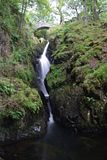
As you can see - halfway down between the bottom of the bridge, and the jutting out rock on the right....... on the left is an elliptical dark spot - where rock and waterfall meet...........
I've had a go at photoshopping (with my limited self taught experience)... and have tried to clone out the blob............
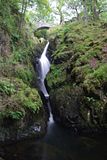
However, is there a better and easier way to do this and retain the original detail.... i.e. can i lighten up just that one part of the picture? Or what is the best way to do it?
Thanks
Lynton
We were recently up in North Yorks / Lakes / Teesdale - so the camera went on holiday. Took what I thought was a really nice picture of AIra Force by Ullswater, with ND4 and ND2 filters, to get a 4 second exposure.............
Printed it out 12 x 8 and there is (to me) a huge glaring spot on the picture - not dust as is transparent, but is significantly darker.........than the rest of the pic............ and yep - it draws your eye straight to it!
Here's a link to the pic (I hope)

As you can see - halfway down between the bottom of the bridge, and the jutting out rock on the right....... on the left is an elliptical dark spot - where rock and waterfall meet...........
I've had a go at photoshopping (with my limited self taught experience)... and have tried to clone out the blob............

However, is there a better and easier way to do this and retain the original detail.... i.e. can i lighten up just that one part of the picture? Or what is the best way to do it?
Thanks
Lynton


