Photoshop 'script' Question

Kryptix

Suspended / Banned
Messages
1,730
Edit My Images
Yes
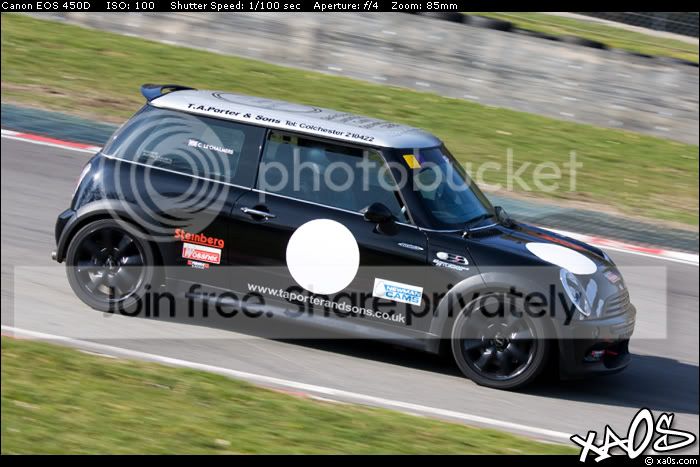
For example, I have layer 1 with a text box, and layer 2 with an image I've just copied and pasted directly from opening it from the camera, still with the EXIF information attached.

Is it possible to get the text box to show EXIF information?

For example, something like 'ISO: <ISO-Speed>' is replaced with 'ISO: 100'

Hopefully I've explained myself.
 
This should do it...
Code:
var exifData = activeDocument.info.exif.toString().split(","); 

for(var a= 0; a < exifData.length; a++ ) {  
	if(exifData[a]=="ISO Speed Ratings"){ 
	var ISONum = exifData[a+1]; 
	break;
	} 
}
for(var a =0 ;a<activeDocument.artLayers.length;a++){
	activeDocument.activeLayer = activeDocument.artLayers.getByName(activeDocument.artLayers[a].name);
	if(activeDocument.activeLayer.kind == LayerKind.TEXT){
		activeDocument.activeLayer.textItem.contents = "ISO: " + ISONum;
		}
	
}
 
Where does that go? I haven't ever scripted in Photoshop before...
 
Copy and paste the code into ExtendScript Toolkit
(this is installed with Photoshop)
This utility can be found in the relevant folder:-
PC: C:\Program Files\Adobe\Adobe Utilities
MAC: <hard drive>/Applications/Utilities/Adobe Utilities

Save the script to:-
PC: C:\Program Files\Adobe\Adobe Photoshop CS#\Presets\Scripts
MAC: <hard drive>/Applications/Adobe Photoshop CS#/ Presets/Scripts

To run:
File – Scripts and select your script
You could create an action to run your script (Tip use "Insert Menu Item").
Hope that helps.
 
Not working.

Will the EXIF information still be there if I copy and paste an image into another document? The image I copy and paste has the EXIF information. I then resize it and run the script but no luck.

How do I change the layer? For example...

activeDocument.activeLayer.textItem.contents = "ISO: " + ISONum;

activeDocument.Layer1.textItem.contents = "ISO: " + ISONum;
 
Right, the script works but only when I run it on the original document. I can't copy the EXIF information by copying and pasting the image, thus making it completely pointless.

I have a 'template' that has my logo on it, and the design with the EXIF information. I want to open the photo in Photoshop, then copy and paste the image onto the template and then run the script...
 
Can you also give me an example of how to get another result? I've tried a few things but I'm unable to get any further...

The following script just changes the text to: ISO: 200

var exifData = activeDocument.info.exif.toString().split(",");

for(var a= 0; a < exifData.length; a++ ) {
if(exifData[a]=="ISO Speed Ratings"){
var ISO = exifData[a+1];
break;
}
}
for(var a= 0; a < exifData.length; a++ ) {
if(exifData[a]=="Shutter Speed"){
var Shutter = exifData[a+1];
break;
}
}
for(var a =0 ;a<activeDocument.artLayers.length;a++){
activeDocument.activeLayer = activeDocument.artLayers.getByName(activeDocument.artLayers[a].name);
if(activeDocument.activeLayer.kind == LayerKind.TEXT){
activeDocument.activeLayer.textItem.contents = "ISO: " + ISO + " - Shutter: " + Shutter;
}

}
 
No exif information will exists if you cop and paste.
Using a template is not the way to go.
Just off the top of my head, try this..
Open a document, File - Place -select your logo file and double click, now ctrl/a to select all, Layer - Align Layers to Selection, use whichever ones you like to Position the logo. Now Create your text layer and move it to the place you want as with the logo, now you can call the script.
Once you have this action it could then be batched.
 
Could you fix the above script for me please?
 
Id be interested to see a finished image :thinking: just dont get it
I'll show you in a bit... It shouldn't take me long. I just need help with one more bit!

Nothing to fix, it works. check the file info for your ISO.
With the above script, it edits the text to say "ISO: 100" instead of "ISO: 100 - Shutter: 1/100 sec"

Code:
var exifData = activeDocument.info.exif.toString().split(","); 

for(var a= 0; a < exifData.length; a++ ) {  
	if(exifData[a]=="ISO Speed Ratings"){ 
	var ISO = exifData[a+1]; 
	break;
	} 
}
for(var a= 0; a < exifData.length; a++ ) {  
	if(exifData[a]=="Shutter Speed"){ 
	var Shutter = exifData[a+1]; 
	break;
	} 
}
for(var a =0 ;a<activeDocument.artLayers.length;a++){
	activeDocument.activeLayer = activeDocument.artLayers.getByName(activeDocument.artLayers[a].name);
	if(activeDocument.activeLayer.kind == LayerKind.TEXT){
		activeDocument.activeLayer.textItem.contents = "ISO: " + ISO + " - Shutter: " + Shutter;
		}
	
}
 
I'm with this now:

var exifData = activeDocument.info.exif.toString().split(",");

for(var a= 0; a < exifData.length; a++ ) {
if(exifData[a]=="ISO Speed Ratings"){
var ISO = exifData[a+1];
break;
}
if(exifData[a]=="Shutter Speed"){
var Shutter = exifData[a+1];
break;
}
}
for(var a =0 ;a<activeDocument.artLayers.length;a++){
activeDocument.activeLayer = activeDocument.artLayers.getByName(activeDocument.artLayers[a].name);
if(activeDocument.activeLayer.kind == LayerKind.TEXT){
activeDocument.activeLayer.textItem.contents = "ISO: " + ISO + " - Shutter: " + Shutter;
}
}

That gives me:

ISO: 200 - Shutter: undefined
 
Ok, shutter speed added:-
Code:
var exifData = activeDocument.info.exif.toString().split(","); 

for(var a= 0; a < exifData.length; a++ ) {  
	if(exifData[a]=="ISO Speed Ratings"){ 
	var ISONum = exifData[a+1]; 
	} 
	if(exifData[a]=="Exposure Time"){ 
	var Shutter = exifData[a+1];
	}
}
for(var a =0 ;a<activeDocument.artLayers.length;a++){
	activeDocument.activeLayer = activeDocument.artLayers.getByName(activeDocument.artLayers[a].name);
	if(activeDocument.activeLayer.kind == LayerKind.TEXT){
		activeDocument.activeLayer.textItem.contents = "ISO: " + ISONum + " - Shutter: "+Shutter;
		}
}
 
I done it!

Code:
var exifData = activeDocument.info.exif.toString().split(","); 
for(var a= 0; a < exifData.length; a++ ) {  
	if(exifData[a]=="ISO Speed Ratings"){ 
	var ISO = exifData[a+1]; 
	break;
	} 
}
for(var a= 0; a < exifData.length; a++ ) {  
	if(exifData[a]=="Shutter Speed"){ 
	var Shutter = exifData[a+1]; 
	break;
	}
}
for(var a= 0; a < exifData.length; a++ ) {  
	if(exifData[a]=="F-Stop"){ 
	var Aperture = exifData[a+1]; 
	break;
	}
}

for(var a =0 ;a<activeDocument.artLayers.length;a++){
	activeDocument.activeLayer = activeDocument.artLayers.getByName(activeDocument.artLayers[a].name);
	if(activeDocument.activeLayer.kind == LayerKind.TEXT){
		activeDocument.activeLayer.textItem.contents = "ISO: " + ISO + " - Shutter: " + Shutter + " - Aperture: " + Aperture;
	}
}
 
I've read this twice and still cannot work out exactly what you are trying to do? You are saying that the image still contains EXIF data but like Paul says if you cut and paste it you loose the EXIF data. Are you trying to create a template to display EXIF data on an image? If so have you seen my Script Writer script, this might save you re-inventing the wheel (or the whole car). If you want something specific then you could always download script writer and have a look how i've done it :)
 
This is the template... I need to somehow get the EXIF data across to the template. I open the CR2 with Photoshop and then copy the image across to the template... I then resize the layer and done!

How can I get the EXIF across?

95d23165.jpg
 
You could do that with script writer by saving your template as the graphical border minus your exif data THEN getting script writer to display the EXIF data at the top rather than the bottom by modifying the code slightly as below....

change line 307 of "EXIF Border Main Section.lib" from : (and note these lines are case sensitive!)

var TopText=GetTextTopStandard();

to

var TopText=getExifData();

then edit EBS - Graphical Border so that the the only text displayed is the top border by unticking the others and set the Main/Text Border "size" field to the width of your templates top black border so maybe 32.

That would do it without too much messing about and you could change the exif data displayed by simply editing the EBS file.

I am looking at making the contents of the four borders swappable for the next release which WOULD have meant that you could have done this with script writer without any modifications. If you do use script writer then you will also be able to batch process them!
 
Well I have just added an option to swap top and bottom borders plus left and right borders which means that you could now do this with script writer without having to change anything.

Kryptix, if you want a personalised border PM me with your email address as it will now only take 10 minutes at most with these two new options and it then becomes much easier for you to modify it as and when you please.
 
Thanks for your offer, but I'm practically there in Photoshop.

I've managed to edit/write the script to exactly how I want it, but it'll only run in the script editor. When run in Photoshop, nothing happens. :shake:

Other than that, it's done... I've set it to F2 and it's extremely quick. It's perfect...

Any scripters out there that could help me just getting it to run from within Photoshop?
 
What actually happens when you try and run it from Photoshop?
 
Nothing really, the mouse just flickers a bit. Nothing happens at all. :(

I've posted on a Photoshop Script forum but no-one has answered...
 
Nothing really, the mouse just flickers a bit. Nothing happens at all. :(

I've posted on a Photoshop Script forum but no-one has answered...

the line "alert("Hello");" displays Hello on the screen and waits for a button to be pressed. Just add this to line one and see if it is displayed, then you know if it is actually running. Just try this first.....
 
Thanks. :)

Could you tell me how I can resize an image to a specific value, whilst keeping the original aspect ratio?

This is the current script... It's working, but it doesn't resize the image. When run from ExtendScript Toolkit it resized it to double the size of the template (to keep room for cropping).

Code:
activeDocument = documents[1];
var startRulerUnits = app.preferences.rulerUnits;
app.preferences.rulerUnits = Units.PIXELS;
var res = activeDocument.resolution + activeDocument.resolution;
var Width = activeDocument.width + activeDocument.width;
activeDocument = documents[1];
var exifData = activeDocument.info.exif.toString().split(","); 
for(var a= 0; a < exifData.length; a++ ) { 
	if(exifData[a]=="Model"){ 
	var Model = exifData[a+1]; 
	} 
	if(exifData[a]=="Focal Length"){ 
	var Zoom = exifData[a+1];
	var Zoom = Zoom.replace(".0 mm", "mm");
	} 
	if(exifData[a]=="ISO Speed Ratings"){ 
	var ISO = exifData[a+1]; 
	} 
	if(exifData[a]=="Exposure Time"){ 
	var Shutter = exifData[a+1];
	var Shutter = Shutter.replace(".0", "");
	}
	if(exifData[a]=="F-Stop"){ 
	var Aperture = exifData[a+1];
	var Aperture = Aperture.replace(".0", "");
	}
}
activeDocument.resizeImage(Width, undefined, res, ResampleMethod.BICUBICSHARPER);
activeDocument.selection.selectAll();
activeDocument.selection.copy();
app.activeDocument.close(SaveOptions.DONOTSAVECHANGES);
activeDocument = documents[0];
activeDocument.paste();
for(var a =0 ;a<activeDocument.artLayers.length;a++){
	activeDocument.activeLayer = activeDocument.artLayers.getByName(activeDocument.artLayers[a].name);
	if(activeDocument.activeLayer.kind == LayerKind.TEXT){	
	activeDocument.activeLayer.textItem.contents = "ISO: " + ISO + "    Exposure: " + Shutter + "    Aperture: " + Aperture + "    Zoom: " + Zoom;
	}
}
app.preferences.rulerUnits = startRulerUnits;

After that, I think that's pretty much it!
 
here you go with the modified code, you had made a few errors, but all in all you have done VERY well indeed!
Code:
activeDocument = documents[0]; 
var startRulerUnits = app.preferences.rulerUnits; 
app.preferences.rulerUnits = Units.PIXELS; 
var res = activeDocument.resolution;
var Width = activeDocument.width;
activeDocument = documents[1]; 
var exifData = activeDocument.info.exif.toString().split(","); 
for(var a= 0; a < exifData.length; a++ ) { 
   if(exifData[a]=="Model"){ 
   var Model = exifData[a+1]; 
   } 
   if(exifData[a]=="Focal Length"){ 
   var Zoom = exifData[a+1]; 
   var Zoom = Zoom.replace(".0 mm", "mm"); 
   } 
   if(exifData[a]=="ISO Speed Ratings"){ 
   var ISO = exifData[a+1]; 
   } 
   if(exifData[a]=="Exposure Time"){ 
   var Shutter = exifData[a+1]; 
   var Shutter = Shutter.replace(".0", ""); 
   } 
   if(exifData[a]=="F-Stop"){ 
   var Aperture = exifData[a+1]; 
   var Aperture = Aperture.replace(".0", ""); 
   } 
} 
activeDocument.resizeImage(Width, undefined, res, ResampleMethod.BICUBICSHARPER); 
activeDocument.selection.selectAll(); 
activeDocument.selection.copy(); 
app.activeDocument.close(SaveOptions.DONOTSAVECHANGES); 
activeDocument = documents[0]; 
activeDocument.paste(); 
for(var a =0 ;a<activeDocument.artLayers.length;a++){ 
   activeDocument.activeLayer = activeDocument.artLayers.getByName(activeDocument.artLayers[a].name); 
   if(activeDocument.activeLayer.kind == LayerKind.TEXT){    
   activeDocument.activeLayer.textItem.contents = "ISO: " + ISO + "    Exposure: " + Shutter + "    Aperture: " + Aperture + "    Zoom: " + Zoom; 
   } 
} 
app.preferences.rulerUnits = startRulerUnits;
 
I'd go with Paul's method who do you think help's me when I get stuck ;)
 
You're helping so much here mate!

I've just thought of two more things...

How would I do the following?

Code:
activeDocument.activeLayer.textItem.contents = "nly this bit is [i]italic[/i]";

I need to make a certain bit of the text italic... :(

...and the very final, last thing...

When it copies and pastes the image, it puts it onto a new, top layer, meaning all my template is hidden. I know I can just drag it to the under layer, but it's quite annoying when doing 200+ pictures... Any idea?

Thank-you so much mate.
 
By the way Darren you only need to suppy the width or the height for the resize to constrain you don't need both.
IE: Max width of 800
activeDocument.resizeImage(800, undefined, undefined, ResampleMethod.BICUBICSHARPER);
Max height of 800
activeDocument.resizeImage(undefined,800, undefined, ResampleMethod.BICUBICSHARPER);
 
By the way Darren you only need to suppy the width or the height for the resize to constrain you don't need both.
IE: Max width of 800
activeDocument.resizeImage(800, undefined, undefined, ResampleMethod.BICUBICSHARPER);
Max height of 800
activeDocument.resizeImage(undefined,800, undefined, ResampleMethod.BICUBICSHARPER);

So all my calculations all the way through script writer are pointless :bang:

Doh :)

Oh well it's done now :bonk::bonk::bonk:

I will simplify it later.
 
You cannot alter sections of a text layer in script without going into massive amounts of code, it really is not worth trying.

If you are trying to do hundreds, as I said earlier this is NOT the way to do it!
You really MUST build each one on the fly
IE: Open a new doc, resize, resize canvas, add logo, add text layer, done.
That is how it should be done!!
 
Here is an example of building it on the fly..
Change line 56 first to enter the path of your logo !!!!!!!!!!!!!!!!
All it will do is prompt for your document and the script will do the rest.

Code:
function main(){
displayDialogs = DialogModes.NO;

var myFile=null;
while (myFile == null){
	myFile =File.openDialog("Select File To Open", "*");
	}
open(myFile);
var startRulerUnits = app.preferences.rulerUnits; 
app.preferences.rulerUnits = Units.PIXELS; 
activeDocument.resizeImage(800, undefined, undefined, ResampleMethod.BICUBICSHARPER); 
var Black = new SolidColor;
Black.rgb.hexValue='000000'
var White = new SolidColor;
White.rgb.hexValue='ffffff'
app.backgroundColor = Black;
var Width = activeDocument.width;
var Height = activeDocument.height;
app.activeDocument.resizeCanvas(Width , Height+30, AnchorPosition.MIDDLECENTER);
var exifData = activeDocument.info.exif.toString().split(","); 
for(var a= 0; a < exifData.length; a++ ) { 
   if(exifData[a]=="Model"){ 
   var Model = exifData[a+1]; 
   } 
   if(exifData[a]=="Focal Length"){ 
   var Zoom = exifData[a+1]; 
   var Zoom = Zoom.replace(".0 mm", "mm"); 
   } 
   if(exifData[a]=="ISO Speed Ratings"){ 
   var ISO = exifData[a+1]; 
   } 
   if(exifData[a]=="Exposure Time"){ 
   var Shutter = exifData[a+1]; 
   var Shutter = Shutter.replace(".0", ""); 
   } 
   if(exifData[a]=="F-Stop"){ 
   var Aperture = exifData[a+1]; 
   var Aperture = Aperture.replace(".0", ""); 
   } 
} 
activeDocument.resizeImage(Width, undefined, 72, ResampleMethod.BICUBICSHARPER); 
var newTextLayer2 = activeDocument.artLayers.add(); 
newTextLayer2.kind = LayerKind.TEXT; 
newTextLayer2.textItem.kind = TextType.POINTTEXT;
newTextLayer2.textItem.color = White; 
newTextLayer2.textItem.font = "Verdana";
newTextLayer2.textItem.size = 9; 
newTextLayer2.textItem.contents = "ISO: " + ISO + "    Exposure: " + Shutter + "    Aperture: " + Aperture + "    Zoom: " + Zoom; 	
activeDocument.selection.selectAll();
align("AdLf");  
align("AdTp");   
activeDocument.activeLayer.translate(5,3);
app.activeDocument.selection.deselect();
app.preferences.rulerUnits = startRulerUnits; 
////Change filename to suit!
placeFile("c:/folderName/folderName/fileName.png");
activeDocument.selection.selectAll();
align("AdRg");  
align("AdBt");
activeDocument.activeLayer.translate(-5,-5);
app.activeDocument.selection.deselect();
activeDocument.flatten();
}
main();

function placeFile(placeFile) {
  function cTID(s) { return app.charIDToTypeID(s); };
    var desc21 = new ActionDescriptor();
    desc21.putPath( cTID('null'), new File(placeFile) );
    desc21.putEnumerated( cTID('FTcs'), cTID('QCSt'), cTID('Qcsa') );
        var desc22 = new ActionDescriptor();
        desc22.putUnitDouble( cTID('Hrzn'), cTID('#Pxl'), 0.000000 );
        desc22.putUnitDouble( cTID('Vrtc'), cTID('#Pxl'), 0.000000 );
    desc21.putObject( cTID('Ofst'), cTID('Ofst'), desc22 );
    executeAction( cTID('Plc '), desc21, DialogModes.NO );
};
 function align(method) { 
   var desc = new ActionDescriptor(); 
           var ref = new ActionReference();
           ref.putEnumerated( charIDToTypeID( "Lyr " ), charIDToTypeID( "Ordn" ), charIDToTypeID( "Trgt" ) ); 
       desc.putReference( charIDToTypeID( "null" ), ref ); 
       desc.putEnumerated( charIDToTypeID( "Usng" ), charIDToTypeID( "ADSt" ), charIDToTypeID( method ) );
   executeAction( charIDToTypeID( "Algn" ), desc, DialogModes.NO ); 
};

 
Thanks mate, but I really need to do it my way. It's no problem really. I'm very, very happy with how this is working now.

Is there anyway to do the <i>this</i> in Photoshop?

This is my code at the moment... It's working perfectly!

Code:
activeDocument = documents[1];

var exifData = activeDocument.info.exif.toString().split(","); 

for(var a= 0; a < exifData.length; a++ ) { 
	if(exifData[a]=="Model"){ 
	var Model = exifData[a+1]; 
	} 
	if(exifData[a]=="Focal Length"){ 
	var Zoom = exifData[a+1];
	var Zoom = Zoom.replace(".0 mm", "mm");
	} 
	if(exifData[a]=="ISO Speed Ratings"){ 
	var ISO = exifData[a+1]; 
	} 
	if(exifData[a]=="Exposure Time"){ 
	var Shutter = exifData[a+1];
	var Shutter = Shutter.replace(".0", "");
	var Shutter = Shutter.replace(" sec",  "");
	}
	if(exifData[a]=="F-Stop"){ 
	var Aperture = exifData[a+1];
	var Aperture = Aperture.replace(".0", "");
	}
}

activeDocument.resizeImage(1500, 1000);
activeDocument.selection.selectAll();
activeDocument.selection.copy();
app.activeDocument.close(SaveOptions.DONOTSAVECHANGES);

activeDocument = documents[0];
activeDocument.paste();

for(var a =0 ;a<activeDocument.artLayers.length;a++){
	activeDocument.activeLayer = activeDocument.artLayers.getByName(activeDocument.artLayers[a].name);
	if(activeDocument.activeLayer.kind == LayerKind.TEXT){	
	activeDocument.activeLayer.textItem.contents = "ISO: " + ISO + "    Exposure: " + Shutter + "    Aperture: " + Aperture + "    Zoom: " + Zoom;
	}
}
 
Sorry no, but you could use two text fields, one italics. The code would have to be altered so that the correct layer was selected for each text layer.
 
It's cool -- thank-you so much for your help. :)
 
Back
Top