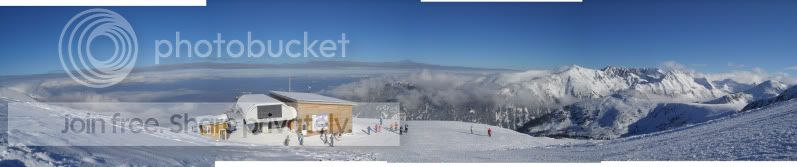
photoshop request!! please

Peter-T

Suspended / Banned
Messages
1,016
Name
Pete
Edit My Images
Yes
I have 4 shots from my holiday last week (taken with my silly P+S) that I was wondering if someone could have a go at stitching them together (i dont know the proper term). I started to have a go at this, but with very limited knowledge of photoshop its well beyond me!!

From right to left
one
two
three
four

i imagine this is not easy so I will be very gratefull if someone can do it!

Thanks in advance
Peter
 
You may need to post the actual photos, as they are being saved as links. (for me any way)
 
the image #4 (left hand one) is not on the same perspective as the others so it needs a little more work.
 
here is a very quick try but as you see the left hand image is not right.

Untitled_Panorama1.jpg


I will try and change it later.
 
ha guys beat me to it heres mine of three images
this was done in cs 4
 
fabs where is the left image?

PS does not add it as it is out of sync with the rest. I think you need a more powerful stitcher like hugin or similar.
 
cs 4 would not merge the fourth photo so just went with three as fabs said for how to
 
wow guys, thank you very much indeed!! I didnt expect a result this quickly!
I only have PS Elements 5 and could'nt find any automatic way of doing it.

The pictures are from Bansko in Bulgaria, monday morning of last week. Taken at 2600m.

I took it with the intention of merging them and having it blown up to poster size and i guessed the fourth image might not work when i looked back at them. I'll be using a website reccommended by a friend for online prints. i'm going for 150x50mm so i'll need a full res file

again thanks very much!!
 
well tried a few ways of doing this and it do not like the left photo How did you take them?
WHAT is the focal lens was it? did you pan when taking them?

The photos were taken on a P+S as my DSLR didnt come back from repair in time so i dont know what settings were used. I just took the first photo, twisted slightly, took 2nd etc.
 
Just a tip for future panos, shoot in portrait mode as you then will have more photograph to crop/trim to suit .

Nice photo.

For Fabs, I knew that way but as you say you need to change to interactive. The roof of the hut still has a slight bend on it and this could be rendered with a better/standalone program.
 
The photos were taken on a P+S as my DSLR didnt come back from repair in time so i dont know what settings were used. I just took the first photo, twisted slightly, took 2nd etc.

there is no exif so cant tell what mm the lens what as my software want to know has your got the exif?
 
Just a tip for future panos, shoot in portrait mode as you then will have more photograph to crop/trim to suit .

Nice photo.

.

I think you meaning more photos and each photo will have a smaller field of view which helps keep things in perspective.
 
Never knew that photomerge option existed.
Looks pretty accurate, nice one :thumbs:
 
looks like they have taken the interactive option out of cs4 so if anyone can point to a how to in cs4 would be appreciated
 
interactive is there in CS4, I used and so did Fabs.

Click automate>photomerge and select your shots.

Down the left hand side of the window you should have about 6 options for layout.
 
Your results can be even better if you can find the npp (no parallax point) :D but if your just using a point & shoot then its probably something your not going to bother with. As previously said try shooting in portriat orientation and take about 6-10 shots overlapping each shot by approx. 1/3

should make things better :thumbs:

There are a few good panoramic websites out there that will help

Dave:thumbs:
 
More sophisticated software needs the exiff data.
Focal length, Crop size, Field of view, sensor size. some of those can be worked out from the others.
 
A very big thank you to fabs who has done me a fantastic full res pic (12396 x 2606px).
 
Have done another version using an unusual projection recti-cylindrical hybrid.
from your pics to 15500x3437 pixels. to show one of many options.

Untitled-Project3.jpg
[/IMG]
 
A[L]C;2321238 said:

It is one of the projections available in PTAssembler. The centre is rectilinear and the two ends are cylindrical. (lines in the hut are straight And the edges of the picture are not stretched out.)
 
Back
Top