Photoshop Plug-Ins

Rockshifter

Suspended / Banned
Messages
6,229
Name
Charles
Edit My Images
No
Hi All

There seems to be quite a variety of Photoshop plug-ins available, which if you believe the hype in the ads, produce great results and are really quick and easy to use.

Questions :

1.
If you use any plug-ins and think they're tops / well worth the money, would you be good enough to comment on them ?

2.
If you know of any freebie equivalents, please share (with link if possible).

Cheers.
 
+1 for PK sharpner.
I also like Nik silver effects pro, love the B+W effects,but at $199 I can't honestly say it's good value for money, not compared to Virtual photographer (free). Wayne
 
Cheers guys.
So you both rate Photokit Sharpener. Checked it out and seems to cost just under £70.
Is it a lot easier / better than sharpening in PS ?
Anyone else use this ? How long does it take to learn to use ?

swanseamale47
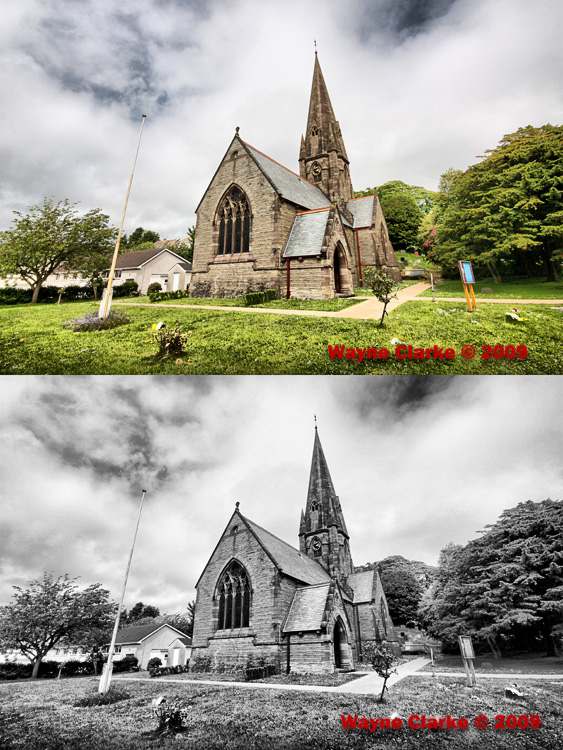
"I also like Nik silver effects pro" - any before after shots you can let us have a look at ?
At $200, I'd say would have to be brill.
 
PK sharpener is designed as a 3 stage sharpening system really.
1. capture sharpening (to replace softness of the AA filter)
2. creative sharpening (part or all of an image as required, say maybe just the eyes in a portrait)
3. output sharpening, this is size and output dependant (for print or web)
You can use any or all the stages as you wish, theres a ton of different options, and much of the sharpening is done on layers for fine tuning after.

Sliver effect pro, this has a lot of presets, but also has loads of options for fine tuning or creating your own presets, it's also about the best I have found for adding realistic grain to an image (if you want to) it's easily my favorite choice for B+W.
Heres a before and after, this is a preset I made to suit my personal tastes.
Wayne
3574112152_eb0b4913ce_o.jpg
 
Hi Wayne
Thanks for info and posting the shots.
They look good, but I'm not convinced I couldn't achieve very similar results in PS, fairly quickly, without the plug-ins.
 
Nik plugins do it all for me... top class and easy to use... watch the short tutorial vids on the website to get the best out of them. Click 'Training' and then 'Video Lessons' under the drop-down.
 
Hi Wayne
Thanks for info and posting the shots.
They look good, but I'm not convinced I couldn't achieve very similar results in PS, fairly quickly, without the plug-ins.

Yes you probably get get very similar, but as I say it's got a lot of other features as well, film simulator with choices like tri-x, stuff like that, and it's quick and easy.
I did say in my first post I thought it was expensive for what it is, works for me though, but then my business pays for it. :)
 
Nik plugins do it all for me... top class and easy to use... watch the short tutorial vids on the website to get the best out of them. Click 'Training' and then 'Video Lessons' under the drop-down.
Cheers DekHog
Had a look, still to be convinced. May download try-out when I've more time and see if I think it's worth splashing the cash.

swanseamale47
As above. When I have a go on the trial version maybe I'll feel it's a must have.
Cheers.
 
Back
Top