Photoshop motion blur query

snerkler

Suspended / Banned
Messages
26,078
Name
Toby
Edit My Images
No
I know you can set the angle of the motion blur but can you set the direction also. For example, if I wanted to add more motion to my shot below (I actually don't but just using this as and example ;)) the motion blur in photoshop would stretch the shadow out in front of the car which would be unrealistic, if anything the shadow should stretch out behind the car due to the direction of travel. So in this shot is it possible to tell photoshop that the motion wants to go left to right? Hopefully this makes sense.


A9_03528 by Toby Gunnee, on Flickr
 
Create duplicate, apply the blur and mask out the front?
Thanks, yeah I could do that I guess but depending on the ‘scene’ it might require a lot of masking. I was hoping there might be a way of making it directional within photoshop.
 
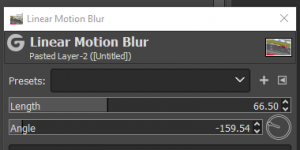
The motion blur tool in GIMP has an angle which you use to define the direction - the little clock face in the bottom right.
Does Photoshop not do something similar?

View attachment 350750
It doesn’t appear so unfotunately. It has something similar but rather than an arrow showing the direction it’s just a line to adjust the angle but not (as far as I’m aware) the direction, meaning that the blur is stretched out in both directions.
 
Very odd - I'm not a photoshop user so can't suggest anything more.
I guess if the angle goes all the way to 360 that might be a clue.
You could probably take the PSD (or whatever the file format is thses days) into GIMP as it's free - but probably too much of an interruption in your workflow?
 
Very odd - I'm not a photoshop user so can't suggest anything more.
I guess if the angle goes all the way to 360 that might be a clue.
You could probably take the PSD (or whatever the file format is thses days) into GIMP as it's free - but probably too much of an interruption in your workflow?
Thanks, it is odd that the angle line goes through a full 360, but when you look at the figure in the angle section that doesn’t it just repeats the previous +/- 90 degrees. I’ve been on the PS forum and it’s definitely not directional. People are suggesting workarounds but they’re a bit of a faff tbh. Not the end of the world as I prefer to get the motion in camera, it’s just the odd time I want to use it. I can’t find any way of submitting feedback to adobe which is a shame.
 
Very odd - I'm not a photoshop user so can't suggest anything more.
I guess if the angle goes all the way to 360 that might be a clue.
You could probably take the PSD (or whatever the file format is thses days) into GIMP as it's free - but probably too much of an interruption in your workflow?
I've discovered something called path blur and this appears to be able to get the effect I'm after. I'm not sure why you have both motion blur and path blur as they both appear to me to do the same thing, however path blur has far more options such as directional blur, curved blur, blur in different directions etc etc. I just need to figure out how to do it without causing feathering/ghosting.
 
Photoshop often has several different ways of getting a similar effect. (Theres at least 5 different ways of getting a black and white type shot if I remember rightly,) usually though theres a slight variation in the effect thats makes one method "better" in one way or another depending on the needs.
 
Back
Top