Photoshop magic help :)

Alladin121

Suspended / Banned
Messages
709
Name
Louise
Edit My Images
Yes
Hey I was out and about with my godchildren yesterday and took a couple of shots, the lighting isnt the best, but their mum really liked the shot and would love one of them smiling together, can anyone of you amazing people do anything with these two images....

This one is the bag in the way but she is smiling and

IMG_54252.JPG


In this one he has a beautiful smile..

IMG_54252.JPG


Would appreciate any help :)
 
:lol::lol: I haven't a clue :D

Cut out the little boy from 'smiling shot' and pasted as new layer over the other picture. Cloned out the bag (very roughly) slightly sharpened the whole image. I am sure with the higher res file and somebody who is far more aquainted with PS could do a 'proper job'. :thumbs:

Personally, I would do it the other way around. Cut the girl out of the first shot, paste her as a layer into the second shot and the clone/heal the bag handle.

Less messing around then, the shots seem to be almost the same perspective so I don't think it would notice too much.


If I were to use the first shot as the 'base', then I suspect all I would take is the mouth+1" (on his face, not the photo) from shot 2, then paste as a new layer into shot 1.
Then go to edit->transform, free transform. Use the tool slowly and adjust the area and shape of the mouth until the wrinkles fit.
 
You do not say what software you have but as everyone else has given you some ideas using Photo shop I thought I'd show you a way if you have Elements 6 onwards.:)

Use the group merge tool and select the two images and draw round the one you want to transfer and Elements will do the rest like so.

Merge%20Picture0001.jpg

Merge%20Picture0002.jpg


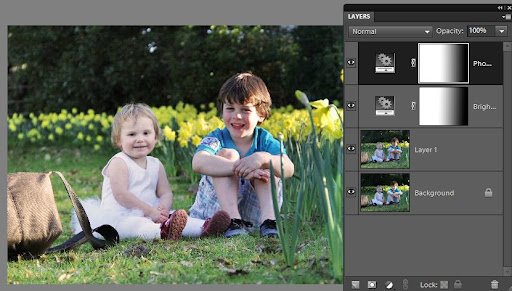
I then adjusted the image using the shadow & highlight tool

And finaly I used a contrast and brightness adjustment layer and a warm up filter layer in conjunction with a gradient on the layer mask to alter the contrast, brightness and warmth of just the little girl to match the boy.

Cloning out the handbag is optional.:)

Merge%20Picture0003.jpg
 
Last edited:
quick one, quite hard to get the skin tones and reds to look similar

ErS71.jpg
 
Last edited:
Back
Top