photoshop display problems

artona

Suspended / Banned
Messages
2,683
Name
stewart
Edit My Images
Yes
Hi

I don't know if anyone can help with this. I am using a 22inch widescreen monitor and vista. If I open an image in photoshop which is say a portrait shot and then rotate it onto its side it becomes very stretched out and is not in proportion. Any ideas please?

stew
 
Are you running Vista at the native resolution of your monitor? I suspect 22" is probably 1680x1050 but it might be higher.

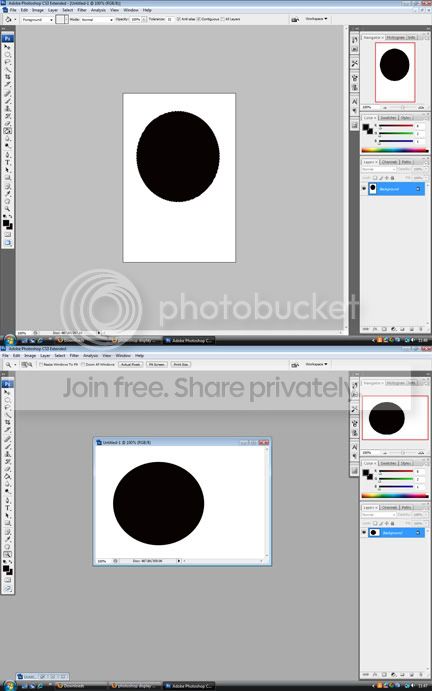
Also, are you sure it's not just a trick of the eye? Check by creating a new doc, make a circle and then rotate it -is it still a circle?
 
Hi

Is there any other way of setting the screen resolution than display settings. The higest setting there is 1600x1200.

display.jpg


this is what I get from making a circle. There are two screen grabs there

Thanks for the assistance
 
You do know that it isn't a circle to start with. And you have your resolution set to a 4:3 ratio, that is not wide screen. Set the resolution to the appropriate setting!
 
You do know that it isn't a circle to start with. And you have your resolution set to a 4:3 ratio, that is not wide screen. Set the resolution to the appropriate setting!

thanks, can you explain a bit further please. Why is it not a circle? How can you tell its set to 4:3 and how do I set the appropriate setting and what would you advise?

cheers
 
1600:1200 is a 4:3 ratio.

The "circle" just from looking at it doesn't look like a circle and it doesn't look to be any more deformed than when in portrait or landscape. I believe the problem stems from the inappropriate resolution of your monitor. I am not sure what your monitor should be set to. But I am pretty sure it shouldn't be 1600 x 1200
 
Interesting. On this monitor the top screen grab looks like a circle and on the bottom one it looks like an egg. I have seen mention of a stretching mode within vista but I am darned if I can find it.

Incidently my monitor is not set to 1600x1200 and I have tried the test in all resolution sizes and it happens in all of them
 
What IS your monitor set to?
 
currently 1280x1024 because it looks the best. The problem appears at all resolutions so I amI am not sure that is the problem but I might well be wrong
 
That is your problem. a 22" widescreen will have a native resolution of 1680x1050 - you need to set your display to that.
If the option is not available then you will need to obtain the correct drivers for your monitor and install them - that will make the option available.
And also 1680x1050 will look even better and give a crisper image.
 
thanks, no its not available. Have been searching for the drivers, the monitor is a Mirai DML-522W100
 
I have a 22" set at 1680 x 1050. The setting which it displays best at

how did you set it to 1680x1050?
 
You'll need the drivers for the graphics card not the monitor - if its an older card it may not support 1680 x 1050
 
thanks, no its not available. Have been searching for the drivers, the monitor is a Mirai DML-522W100
The Mirai DML-522W100 has a native resolution of 1680x1050 so it's a problem with Vista not being able to 'send' that resolution to the monitor, not the monitor being unable to display it.

Start > Settings > Control Panel > Personalisation > Display Settings

Starting from the 'High' end and working to the left, what are your Resolution options?

It could very well be that Vista hasn't loaded suitably advanced drivers for your graphics card and you'll need to visit the manufacturers site to get the latest and greatest.
 
to find out which graphics card you have installed and the driver version click start and in the search box type dxdiag
 
Right click on the desktop > Personalize
Display Settings
Advanced Settings
Monitor Tab
Untick "Hide mode that this monitor can't display"

Click ok/apply until you get back to Display settings and see if you can now get 1680x1025
 
Right click on the desktop > Personalize
Display Settings
Advanced Settings
Monitor Tab
Untick "Hide mode that this monitor can't display"

Click ok/apply until you get back to Display settings and see if you can now get 1680x1025


thats done it thanks.....

and thanks to everyone else for the help

stew
 
Back
Top