Photoshop CS5

Padman400

Suspended / Banned
Messages
302
Edit My Images
Yes
Not used this programme for a very long time as I am only just getting back into my photography. I have been watching a few utube videos on starting up again with layer masks.

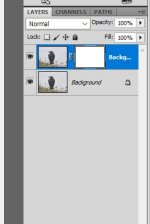
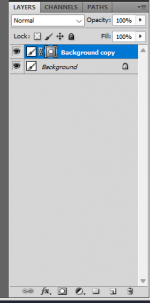
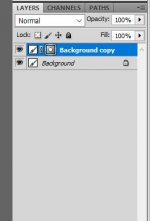
Now my layer mask looks nothing like the ones I have watched, which are all plain white, mine has a circle in it. Tried all the setting but no good.

What do I need to do to sort this please. All help appreciated.
Untitled.jpg
 
Hello,
I know this isn't answering your question, but I really wouldn't use Photoshop CS5, it's from 2010. Old programs like this will likely have lots of security vulnerabilities, you likely will also experience performance issues since it will be using old technology.
I understand you may not want to pay for the new PhotoShop (especially since they just killed the 20gb photography plan, I am still annoyed about that since it's the one I recommended to everybody) but Affinity Photo could work (https://affinity.serif.com/en-gb/photo/) I haven't personally used it (I still use PhotoShop, even though I hate how much it costs I am just so used to it now) I know lots of friends who have.
 
Agree with above, it’s 15 years old. Also depending on the sort of work you are doing, Photoshop is way overkill and complicated when something like Lightroom, CaptureOne or On1 actually does all that you need, and catalogs your images as well. I do like 99% of my post processing in Capture One and use Affinity Photo for the odd bit of compositing that C1 can’t handle.
 
Agree with above, it’s 15 years old. Also depending on the sort of work you are doing, Photoshop is way overkill and complicated when something like Lightroom, CaptureOne or On1 actually does all that you need, and catalogs your images as well. I do like 99% of my post processing in Capture One and use Affinity Photo for the odd bit of compositing that C1 can’t handle.
I personally use Adobe Bridge for my organisation, camera RAW for my brief edits and then PhotoShop for large edits.
 
Ok I get what you are all saying but I have an old laptop that will not work with any of these new programmes.

I use Faststone for downloading photos and organising + some other bits of workflow. I just use CS5 for the layer mask functions plus I have a few sharpening actions set up on it that I absolutely love.

SO if any one does know why I get the circle on the layer mask please help :)
 
Ok I get what you are all saying but I have an old laptop that will not work with any of these new programmes.

I use Faststone for downloading photos and organising + some other bits of workflow. I just use CS5 for the layer mask functions plus I have a few sharpening actions set up on it that I absolutely love.

SO if any one does know why I get the circle on the layer mask please help :)
Sorry I am not sure about the layer mask, but would GIMP be able to run on your laptop, it might work better than the version of Photoshop you have and it is still supported.
 
I think that's just the way the later mask symbol looks in your version. Over the years the interface of PS has changed. I'm assuming the mask still functions?
 
So the mask layer you have chosen is a pixel mask, you could have chosen a vector mask. That is the default icon for a pixel mask, it will stay like that until you use a tool to create pixels on that layer like a brush tool for example.

To make it easier to see how layers interact I would double click the background layer in the layers pallet to unlock it and fill it with a colour. Then fill the layer mask above with a different colour. It will make it easier to see how the layers interact.
 
In addition, on the top menu choose view and select the masks pallet, it will then appear next to the layer/channel/paths tabs you then have quick access to the various options available with masks.
 
Thank you. I did not realise that its the default mask. Its been a long time since I played in CS5
 
Glad you've got it sorted Padman.

I have the latest subscription version but also use CS5 occasionally as my free copy of Nik Filters works with it but not the subscription version.
 
I used an old Photoshop for YEARS until I upgraded. I didn't use it that much. As long as it works for you then it doesn't matter what people 'think' you should use. Just because something is outdated doesn't mean that you shouldn't use it.
 
I still have CS5 on my old desktop, I would actually still use it if it would run on a newer computer
 
I used an old Photoshop for YEARS until I upgraded. I didn't use it that much. As long as it works for you then it doesn't matter what people 'think' you should use. Just because something is outdated doesn't mean that you shouldn't use it.
What I always think is if someone is fine using an old piece of software that's fine.
I personally am in to Cyber Security and would never use an app or device that is no longer receiving security updates.
 
Not used this programme for a very long time as I am only just getting back into my photography. I have been watching a few utube videos on starting up again with layer masks.

Now my layer mask looks nothing like the ones I have watched, which are all plain white, mine has a circle in it. Tried all the setting but no good.

What do I need to do to sort this please. All help appreciated.

View attachment 464105


I don’t have CS5 so the process might be slightly different.

Click on the Hamburger icon (series of lines) top right of the layers panel. Then from the menu select Panel Options, and then select the size of thumbnail you want to use. Then click OK.
 
Just did what you said Eucris and bingo, brilliant thankyou. So it was not the default mask. Looks like it should do now. Happy boy.
 

Attachments

  • Untitled.jpg
    Untitled.jpg
    20.3 KB · Views: 2
Not used this programme for a very long time as I am only just getting back into my photography. I have been watching a few utube videos on starting up again with layer masks.

Now my layer mask looks nothing like the ones I have watched, which are all plain white, mine has a circle in it. Tried all the setting but no good.

What do I need to do to sort this please. All help appreciated.

View attachment 464105
I still use CS5 with no issues, (Touch Wood). Mine is the same setup as yours I personally don't really need images showing, but as Eucris suggests, with panel options will bring the image and size into play..
and should still be usable as mine is....Screenshot 2025-12-19 232813.png
 
Last edited:
Back
Top