Photoshop CS4 help

stokecity_m

Suspended / Banned
Messages
1,349
Name
Chris
Edit My Images
Yes
If i open a raw file image in Photoshop, it's wont let me save it as a jpeg - any ideas?

The way around it atm is to save for web and devices.
 
Check which colorspace the image is in, I'd guess it's not in sRGB. Convert to sRGB and the option to save as jpeg will appear.
 
The most likely problem is that the raw is 16 bit and you can only save jpg as 8 bit. Go to image/mode and change to 8 bit before trying to save as a jpg.
 
It should do :thinking:

you are using the Format flyout arrow to select jpg

5647055569_435dfd734d_b.jpg


HTHs

Dave
 
Last edited:
Correct me if I'm wrong?? But I thought you had to open a Raw file in ACR then open it in Photoshop as a Tiff or Jpeg.

Hope you find a fix
 
Correct me if I'm wrong?? But I thought you had to open a Raw file in ACR then open it in Photoshop as a Tiff or Jpeg.

Hope you find a fix

When you open a RAW file in ACR you can do all your initial tweaks there then hit the "open" button again to open it directly into CS4 still as a RAW image.

As above - to save to Jpeg format you need to change the mode from 16 bit to 8 bit.
Wayne also made a very valid point that Jpeg isn't optional when working with layers, unless you merge all layers together then change the mode to 8 bit as above.
 
As above - to save to Jpeg format you need to change the mode from 16 bit to 8 bit.
Wayne also made a very valid point that Jpeg isn't optional when working with layers, unless you merge all layers together then change the mode to 8 bit as above.

Sorry but your wrong, you can save a multi layer, 16 bit as a jpg

5648935644_a105ea3543_b.jpg


Dave
 
Hi Stuart, I use CS5 now but, my old PC has CS4 and that image was done on that PC, dont know why yours doesnt, then saved and sent to my laptop for posting here,
 
Hi Stuart, I use CS5 now but, my old PC has CS4 and that image was done on that PC, dont know why yours doesnt, then saved and sent to my laptop for posting here,

I'm at a loss Dave
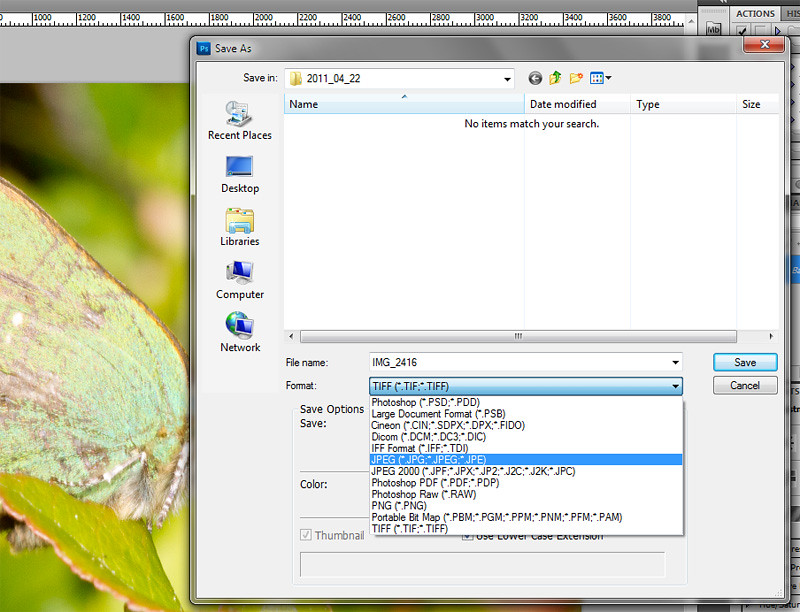
Here's a screen dump from my CS4 screen.
In RGB 16 bit mode with layers present I don't have a JPEG save option.

5648969778_810cc0702f_b_d.jpg
 
Ummm that is strange :thinking:

It is isn't it. Glad it wasn't me just being dumb when I posted my prior comments about switching to 8 bit as that was genuinely the only way I could do it and thus assumed it to be the case for everyone.

Answers on a postcard from anyone who can figure my issue out! :thumbs:
 
:lol:

Have you got the latest updates for CS4,

Anyway in any case its as you say, its easy to convert it to 8 bit then save it :thumbs:

Yeah fully up to date.
I did a Google search and everyone says the same for CS4 - you have to switch to 8 bit before saving as a jpeg. At a loss how you can manage it on your CS4.

Oh well something potentially new going to be learnt today if someone comes up with a solution.

Cheers for your help Dave.
 
Ooops sorry guys just checked my PC and guess what its got CS5 on as well, dont remember putting that on it :bonk:

Still, sure I didnt have to convert it before saving when it was CS4 :thinking:

soz
 
Last edited by a moderator:
Sorry but your wrong, you can save a multi layer, 16 bit as a jpg

5648935644_a105ea3543_b.jpg


Dave

No you can't jpeg doesn't support 16 bit nor does it support transparency, you can save as a jpeg but PS will change the bit depth and flattern for you.
 
Another CS4 user..
Was wondering why i never had to change to 8 bit when saving jpeg after reading this..
Then realised CS4 is converting it as soon as i hit Open in ACR.
After opening the CR2,CS4 reports it as RGB/8 bit..
 
Another CS4 user..
Was wondering why i never had to change to 8 bit when saving jpeg after reading this..
Then realised CS4 is converting it as soon as i hit Open in ACR.
After opening the CR2,CS4 reports it as RGB/8 bit..
You have to click on the link at the bottom of ACR and change it to 16 bits....
 
Cheers for all the help guys, not had the chance to use photoshop yet as i've been stuck at work mainly.
 
Back
Top