
and help to keep the site free for all
You are using an out of date browser. It may not display this or other websites correctly.
You should upgrade or use an alternative browser.
You should upgrade or use an alternative browser.
Photoshop CC why???
- Thread starter ndwgolf
- Start date

BillN_33
Suspended / Banned
- Messages
- 13,952
- Name
- Bill
- Edit My Images
- No
i have photoshop CS6 installed on both my desktop and laptop and nothing to pay. Why would I subscribe to 15 quid a month for what I already have........... Or am I missing something???
The CC version does have a few bells and whistles over CS6 ........... but I agree with you .. I have CS6
presumably "cracks" will start appearing soon to override what Adobe are trying to do ... but that will be illegal
If I were to upgrade I would look at Capture One
Last edited:
I personally would not bother either as like you I have cs6, but I know a lot of people who prefer the relatively small monthly payment to the single expense every few years for the latest product.
I would think for a small business or school a yearly subscription is probably more attractive also.
Although saying that my Mrs who's a designer has CC even though we own CS6 and much prefers it, personally I don't see any real differences apart from CC seems to update more frequently.
I would think for a small business or school a yearly subscription is probably more attractive also.
Although saying that my Mrs who's a designer has CC even though we own CS6 and much prefers it, personally I don't see any real differences apart from CC seems to update more frequently.

Son_of_Thor
Suspended / Banned
- Messages
- 2,106
- Name
- Si
- Edit My Images
- Yes
If you go for the photography bundle it is £8.57/month and you get Photoshop and Lightroom included in that. I suppose it depends on what you've got/what you're after - I wanted Lightroom when 5 was available and 6 was a few months from release. So it was £100 for v5 boxed product followed by shelling out again if I wanted any of the new features (which as it turns out I do) vs monthly subs so it made sense for me.
Son_of_Thor
Suspended / Banned
- Messages
- 2,106
- Name
- Si
- Edit My Images
- Yes
We also use CC for Adobe users at work as the subscription model is easier to manage - its the way a lot of software vendors are going.

htid
Suspended / Banned
- Messages
- 2,497
- Name
- Chris
- Edit My Images
- Yes
I think camera raw comes with Photoshop? I'm a graphic designer so I have CC but tried to open my d7200 files on my other computer with CS3, they weren't supported and there was no version of camera raw able to read the 7200 files available for cs3. As things move on and you maybe get a new camera, it might not be supported in CS6.
Kodiak Qc
Suspended / Banned
- Messages
- 20,285
- Name
- French Canadian living in Europe since 1989!
- Edit My Images
- Yes
•
Yes, you're missing something… but so I thought too!
CC is still developing for imaging work but not for photography. At
a given time, PS even got some typography tools but not much.
This subscription thing did not please everyone in the business and
many pros were hoping that it will encourage application developers
to go ahead and create alternatives pro solutions… and they did!
The most spectacular and promising solutions came from SERIF.
They produced 2 cool alternatives to softwares part of the Master
Series and one more on the way…
at this point, only available from Mac:
• Affinity Photo, for photography and imaging
• Affinity Design, for vector based graphics, and
• Affinity Publisher, for layouts, coming soon.
— Most spectacular and promising?
Oh yes, and boy did they deliver! With new tools and approaches PS
never thought of; and their content aware is something I would not do
without anymore.
Look here:
https://affinity.serif.com/en-gb/
Yes, you're missing something… but so I thought too!
CC is still developing for imaging work but not for photography. At
a given time, PS even got some typography tools but not much.
This subscription thing did not please everyone in the business and
many pros were hoping that it will encourage application developers
to go ahead and create alternatives pro solutions… and they did!
The most spectacular and promising solutions came from SERIF.
They produced 2 cool alternatives to softwares part of the Master
Series and one more on the way…
at this point, only available from Mac:
• Affinity Photo, for photography and imaging
• Affinity Design, for vector based graphics, and
• Affinity Publisher, for layouts, coming soon.
— Most spectacular and promising?
Oh yes, and boy did they deliver! With new tools and approaches PS
never thought of; and their content aware is something I would not do
without anymore.
Look here:
https://affinity.serif.com/en-gb/
Kodiak Qc
Suspended / Banned
- Messages
- 20,285
- Name
- French Canadian living in Europe since 1989!
- Edit My Images
- Yes
•presumably "cracks" will start appearing soon to override what Adobe are trying to do ... but that will be illegal
It's done already! Illegal but done.


Morbid
Suspended / Banned
- Messages
- 1,288
- Name
- Ian
- Edit My Images
- Yes
I think camera raw comes with Photoshop? I'm a graphic designer so I have CC but tried to open my d7200 files on my other computer with CS3, they weren't supported and there was no version of camera raw able to read the 7200 files available for cs3. As things move on and you maybe get a new camera, it might not be supported in CS6.
You can use the free Adobe DNG converter to get round this. My camera isn't supported in CS5 so this is what I have to do. I paid enough for CS5 and have no plans to go down the subscription route.
htid
Suspended / Banned
- Messages
- 2,497
- Name
- Chris
- Edit My Images
- Yes
You can use the free Adobe DNG converter to get round this. My camera isn't supported in CS5 so this is what I have to do. I paid enough for CS5 and have no plans to go down the subscription route.
That's true. Depends on how you edit I guess. I stick with Nikon NEFs but I have CC so I'm OK. Your way obviously removes the issue I mentioned though.
Kodiak Qc
Suspended / Banned
- Messages
- 20,285
- Name
- French Canadian living in Europe since 1989!
- Edit My Images
- Yes
•tried to open my d7200 files on my other computer with CS3, they weren't supported
CO9 supports 400+ cameras and all Nikon NEFs are!
Just so that you stay away from DNGs… my recommendation!
Last edited:

BillN_33
Suspended / Banned
- Messages
- 13,952
- Name
- Bill
- Edit My Images
- No
I use LR (the stand alone v5) and PS CS4 for the odd occasion when LR can't do what I want.
I can't see any need to upgrade, at least not at the moment.
the sneaking thing is that you have to upgrade if you buy a new camera - if you want to import the RAW files - e.g. LR 5 will not import D7200 .NEF's - you have to upgrade to LR 6


russellsnr
Suspended / Banned
- Messages
- 3,121
- Name
- Russell
- Edit My Images
- Yes
If you are a pro or semi pro or run a photography business I can see why you would use CC and be happy to pay but for someone like myself who are into photography as a hobby then one of the stand alone apps apart from photoshop would do the job. In saying that I do also have Photoshop CS6 and Lightroom 6 and they do the job for photographic images so no need to go the CC route.
Russ
Russ

cymruchris
Suspended / Banned
- Messages
- 2,921
- Name
- Chris
- Edit My Images
- Yes
i have photoshop CS6 installed on both my desktop and laptop and nothing to pay. Why would I subscribe to 15 quid a month for what I already have........... Or am I missing something???
For the moment there are only a small number of differences - but the CC will get continual development - the old CS6 will get no more updates. Over a period of time the gap will widen. I have both - and find the newer versions a little smoother and efficient.
Last edited:
Morbid
Suspended / Banned
- Messages
- 1,288
- Name
- Ian
- Edit My Images
- Yes
Depends on how you edit I guess.
How would the way I edit make any difference? Genuine question. I use ACR and PS if more manipulation is required.
From a business point of view the software as a service is fantastic for us, it is around £120 quid a month for 8 seats, to buy the adobe suit as it was would have cost 1000's. And its updated as soon as its available, which is great.
htid
Suspended / Banned
- Messages
- 2,497
- Name
- Chris
- Edit My Images
- Yes
How would the way I edit make any difference? Genuine question. I use ACR and PS if more manipulation is required.
Just that DNG isn't supported in Nikon and Canons own software afaik. If there are only a few adjustments to make, I'll do them in the Nikon software which I couldn't do with DNG. That's what I meant.
*edit* I meant you in general btw, not you personally.

tonybassplayer
Suspended / Banned
- Messages
- 918
- Name
- Tony
- Edit My Images
- Yes
I had nothing and read many many discussions about what to purchase as a relative newcomer but with a view to starting on a good path for the future.
I bought a £99 annual subscription to LR and PS and two months in I am delighted and the software almost encourages me to get out and take more pictures and be creative.
Total win win situation for me but I do totally understand if you already have a package that you use.
I bought a £99 annual subscription to LR and PS and two months in I am delighted and the software almost encourages me to get out and take more pictures and be creative.
Total win win situation for me but I do totally understand if you already have a package that you use.
Morbid
Suspended / Banned
- Messages
- 1,288
- Name
- Ian
- Edit My Images
- Yes
Just that DNG isn't supported in Nikon and Canons own software afaik. If there are only a few adjustments to make, I'll do them in the Nikon software which I couldn't do with DNG. That's what I meant.
*edit* I meant you in general btw, not you personally.
Fair enough, but you'd just use the software that came with the camera in that case, which would support the raw files produced by the camera. My reply was about someone unable to use Abobe software because it was older than the camera they had.
OP

ndwgolf
Suspended / Banned
- Messages
- 4,692
- Name
- Neil Williams
- Edit My Images
- No
Okay so I am leaning towards getting the CC paid version but I have a question..............
Here in Malaysia we have these options
1/.
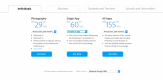
or for double the amount you can get one of these apps which has Photoshop............I'm confused

RM30 = £4.67 RM60 + ~£9 quid but still confused on which one to get??
Here in Malaysia we have these options
1/.
or for double the amount you can get one of these apps which has Photoshop............I'm confused
RM30 = £4.67 RM60 + ~£9 quid but still confused on which one to get??

Swanseajack
Suspended / Banned
- Messages
- 3,659
- Name
- Simon
- Edit My Images
- Yes
Okay so I am leaning towards getting the CC paid version but I have a question..............
Here in Malaysia we have these options
1/.
View attachment 54019
or for double the amount you can get one of these apps which has Photoshop............I'm confused
View attachment 54018
RM30 = £4.67 RM60 + ~£9 quid but still confused on which one to get??
I think the majority on here have the Photography plan, which includes LR & PS , in the second one (single app) you are paying double the price for one app and looking at what you have posted the PS app is in there?? Seems strange as it's already included?? Plus some cloud storage.
If your using PS & LR now then the photography plan is the one to get for RM 29.99.
Edit: Over here Neil I think you have to have Creative Cloud for LR & PS, looking at your area I would guess it's the same. Creative Cloud is an app and I would guess it would be the same for both plans. Download the free trial and see what happens.
Last edited:
htid
Suspended / Banned
- Messages
- 2,497
- Name
- Chris
- Edit My Images
- Yes
I have the full creative cloud with all apps and it allows me to have anything on two devices at once (desktop and laptop for me) so I guess you'd be allowed to do the same with the photography plan, but don't quote me on that because mine is the business one.
Neil, you need the Photography one which includes Photoshop CC and Lightroom as Simon (Swanseajack) has said. You can use this on two machines and your PC's ned to be connected to the internet 'periodically', but not all the time to use them.
cymruchris
Suspended / Banned
- Messages
- 2,921
- Name
- Chris
- Edit My Images
- Yes
What else would you need aside from LR and PS? I use the 29.99 package and is enough for me. Unless you're into the heavier design stuff - the other Adobe items aren't really worth it.

DerekL
Suspended / Banned
- Messages
- 475
- Name
- Derek
- Edit My Images
- Yes
This is not true. If you open up Photoshop CC without internet you get a box informing you the app cannot be verified. It then gives a date which you need to verify your account (ie open app with internet access) before it will disable.With the CC version do you need to have internet access all the time to be able to use it and can you load it on your desktop and laptop without paying for it twice??
Yes you can have 2 install on separate computers for the price
(Sorry I misread your post. As I say you do not need internet access to be permanent to open up the apps)
As for paying about £8.50/Month if the truth be told at that price it was better than the dodgy version I had previously.
Last edited:

Denyerec
Suspended / Banned
- Messages
- 946
- Name
- Denyer
- Edit My Images
- No
The subscription may be of value to someone who currently doesn't own the software, but for someone who *already* has a CS5 or CS6 licence, potentially purchased in the not too distant past, it's an additional overhead.
The new blur filters are the only thing I can think of from CC that i'm actually aching for in CS5, beyond that, nothing. Certainly nothing worth paying a subscription for given that I have the pro version of the CS5 suite locally.
I will have to look into the Serif tools mind you.
The new blur filters are the only thing I can think of from CC that i'm actually aching for in CS5, beyond that, nothing. Certainly nothing worth paying a subscription for given that I have the pro version of the CS5 suite locally.
I will have to look into the Serif tools mind you.

Bythesea
Suspended / Banned
- Messages
- 1,133
- Name
- Brian
- Edit My Images
- No
Except it's not £25, it's £8.57 - though that could still be more than you want to pay per month.(My earnings are so low that, yes, a £25 pcm outgoing is unacceptable)
Denyerec
Suspended / Banned
- Messages
- 946
- Name
- Denyer
- Edit My Images
- No
Ah, I was referring to the equivalent of the 'owned' suite, which is PS, LR and Illustrator. I actually have Acrobat and Indesign off the back of that too, and pricing that up on the Adobe website I'd actually be looking at a combined cost of over £500 per annum via their "All Apps" plan. Admittedly I don't use InDesign much, but it's actually less economical to subscribe to the applications individually the instant you need more than one beyond the PS/LR bundle.Except it's not £25, it's £8.57 - though that could still be more than you want to pay per month.