
Photomerge creating uneven vignette like sky!

  • Thread starter Thread starter Deleted member 11105
  • Start date Start date
D

Deleted member 11105

Guest
Hi,

I have taken some photos and created a photomerge...
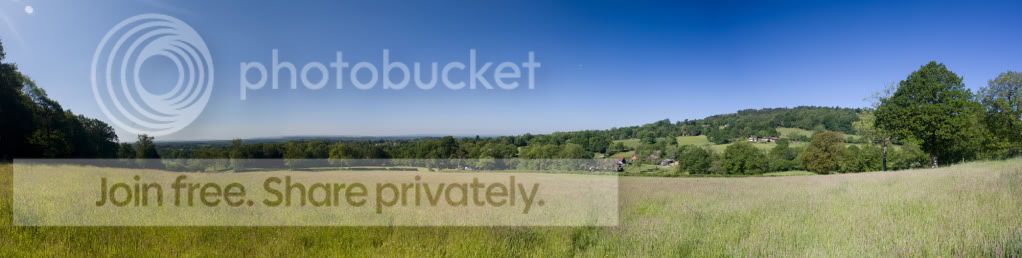

Panorama1_17.jpg


but as you can see the sky is a little strange! is there any way I can fix this? I always seem to get this with photomerges and especially if I used a polarising filter..

I have tried checking 'remove vignette' in the photomerge dialogue box in PS bt that just seems to crash PS every time.

Thanks for your help!
 
Did you use manual exposure or automatic.

I suspect that the polariser may be be having an effect in that it may be affecting the way the sky is reproduced on multiple images. Photomerge may be having a problem handling that.
 
What I've learnt about pano shots is that if you dont lock the exposure then as you move the camera it alters slightly which then gives you lines once stitched together. I've since learnt my lesson.
 
Yeah, that software is trying to blend the different exposures as best as it can but its just too much. You can see the pano is slightly dark at the left and brightens up significantly as it moves to the right.


Tip: Meter the scene as per usual, dial in the shutter and aperture in Manual and then take the shots without adjusting anything. You'll end up with 3 or 4 shots which will blend together perfectly in Ps.
 
To me it doesn't look like different exposures, you get hard diagonal lines.
IMHO it's the polariser, you'll probably observe it through the viewfinder if you pan and keep looking at the sky with the polariser fitted.
 
Its the polariser, it works best at 90 degree angles to the sun, because the angle from the polariser to the sun changes in each image as you move the camera the polariser is only effective in some of the images. When they are stitched the areas where the polariser was effective shows a darker sky.

Wow im bad at explaining things!
 
You must use manual every thing.
Exposure, focus and Colour setting.

Then use a decent panorama programme like PTGui or PTAssembler with a decent blender.
Polarisers are a poor Idea with pans as they have different effects on different areas of the sky depending on the direction of the sun.

Photoshop can work but it is very basic.

I suspect your colour balance was set to auto as it changes left to right.
 
Using a CPL will give result in strange banding effects on a pano (how visible this is will vary according to the lighting conditions and the angular width of the pano).. best results come from using manual focus and manual exposure.. keeping the focus and the exposure unchanged for all the shots, and working quickly if the light is changeable.

Try MS ICE (Microsoft Image Composite Editor) - it's free and very easy to use.
 
Regarding focus, I find manual focus impossible on my 450D and kit lens, even with live view the focus ring on the kit lens is horrible!
I usually autofocus then check the focus using live view, or zooming in on the captured image, then 'Lock' the focus by switching it to manual before taking the series of images.
All shots are then identically focused, I found leaving it on auto the camera would sometimes hunt and change focus for each shot.
 
Back
Top