I'm still not sure a better DR will solve the problem.
In the examples given, the child's face is still going to be very much lighter than the surrounds, but just have more detail.
To get the face to look equally exposed to the background, local adjustment is going to be needed, and it appears the OP wants an in camera solution.
On the camera, there are two possible things that might help.
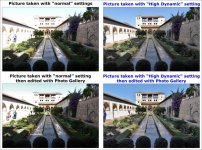
1. Set the top dial to the "art palette" symbol and select "High Dynamic" (this does not increase the DR of the camera, but reduces the DR of the scene to "fit" the camera)
2. Set the top dial to SCN and select HDR, it is the left hand symbol of three photos in the second row.
Although I suggest HDR near the beginning of the thread, I didn't go further as HDR isn't the best for moving subjects, especially in-camera implementations of it, as they do not remove ghosting effectively, and there would be no point in removing one image of a moving face, when that is the part you need.
Shooting RAW could be a solution, but then you need software, most of which requires quite a bit of work to get reasonable results, until you get to know it
And you will still need to do some work to get the face and surrounds to look equally exposed.
Careful tone mapping may help, but I don't think it works well on people, it can look OK on cityscapes or landscapes etc
I have an idea that option 1 above may be doing something similar to tone mapping, and looking at what is wanted, I would probably try that first.
The comes the problem the OP wants to store and display his photos in the camera

So a simple in camera solution would be the ideal answer.
I really think that buying an expensive camera will give the same problem, just in more detail!