Photography "white out"

Is there any chance the next model of Panasonic camera will be better in this respect or is it that with a sensor and lens that small it cannot really get much better ? ?

Instinct say no, but check the reviews before buying. A small sensor compact simply can't cope compared with a large sensor camera because the individual detectors collect much less light.

Having a camera with RAW output instead of jpg will also help a lot.
 
Last edited:
Is there any chance the next model of Panasonic camera will be better in this respect or is it that with a sensor and lens that small it cannot really get much better ? ?
That about sums it up :)
The Panasonics give some of the best photos from a compact.

There are already better ones like the 100, but to be honest, I don't think another camera is going to solve your problem altogether.

It is nearly always a balancing game.

And you would have to become familiar with software and processing.

Try out the things that have been suggested here and see how you go, learn to make the balance,
 
The way I see it, you are hitting the constraints of the dynamic range demanded by the scene being greater than the dynamic range of the TZ70.
You have said that you want to retain the detail in the dark areas whilst also retaining the highlights.
Your examples have been in natural light, so there is likely little you can do in that space.

So... Options.
jpg:
1. Use HDR in camera - This will take a number of shots and attempt to combine them to give you a better exposure
2. Use AE Bracketing and then combine them (HDR) in your post processing software - this will be similar to the in camera HDR, but will give you mor control.
These two options will present you with a jpg.

3. Try using RAW - This will give you more flexibility in your post processing software to recover the highlights or dark areas. It may be sufficient to allow you to get the exposure you need in a single shot (rather than combining images). I'm fairly sure they TZ70 does RAW.

You asked about your next camera, stating it needs to be the same size as the TZ70. Have a look at the TZ200. It's very similar to the 70, but has a larger sensor. The negative is that the zoom is not as good (if that's important to you).
The TZ200 came out in 2018 iirc, but I've not seen a newer version announced (sods law says they will announce it days after you order your upgrade from the 70).
 
Useful info, though that is hard to do on an action shot ! Also, it's hard to see when a highlight is being whited out on a compact camera's small display !

Yes, action shots would be harder and I'd probably guestimate the exposure compensation required but for pictures like that picture of the boy in the buggy in the garage (?) or in the car seat spot focus would be perfect.

Anyway, good luck sorting it. I'm sure you'll get there.
 
The way I see it, you are hitting the constraints of the dynamic range demanded by the scene being greater than the dynamic range of the TZ70.
You have said that you want to retain the detail in the dark areas whilst also retaining the highlights.
Your examples have been in natural light, so there is likely little you can do in that space.

So... Options.
jpg:
1. Use HDR in camera - This will take a number of shots and attempt to combine them to give you a better exposure
2. Use AE Bracketing and then combine them (HDR) in your post processing software - this will be similar to the in camera HDR, but will give you mor control.
These two options will present you with a jpg.

3. Try using RAW - This will give you more flexibility in your post processing software to recover the highlights or dark areas. It may be sufficient to allow you to get the exposure you need in a single shot (rather than combining images). I'm fairly sure they TZ70 does RAW.

You asked about your next camera, stating it needs to be the same size as the TZ70. Have a look at the TZ200. It's very similar to the 70, but has a larger sensor. The negative is that the zoom is not as good (if that's important to you).
The TZ200 came out in 2018 iirc, but I've not seen a newer version announced (sods law says they will announce it days after you order your upgrade from the 70).
Is there any negative to using RAW ?
 
Is there any negative to using RAW ?

Time and kit I suppose. You need the time to process the shots and the gear and software to do it on.

I'd recommend it though. If you have the time and the gear.
 
The way I see it, you are hitting the constraints of the dynamic range demanded by the scene being greater than the dynamic range of the TZ70.
You have said that you want to retain the detail in the dark areas whilst also retaining the highlights.
Your examples have been in natural light, so there is likely little you can do in that space.

You asked about your next camera, stating it needs to be the same size as the TZ70. Have a look at the TZ200. It's very similar to the 70, but has a larger sensor. The negative is that the zoom is not as good (if that's important to you).
The TZ200 came out in 2018 iirc, but I've not seen a newer version announced (sods law says they will announce it days after you order your upgrade from the 70).
I juts looked at the TZ200, it has a 15X zoom v 30X of the TZ70 and I frequently use the max zoom on the TZ70, but a higher dynamic range would be good to have, I would consider the trade off when I next replace my camera. That said, £700 v £200 is a consideration !
 
Just out of interest, was film better or worse for dynamic range than digital ?

Colour negative 100 ASA was better, transparency quite a bit worse - depending on which generation of digital camera you compare it too.

FWIW there's no cheap, effortless option to do ALL the things you would like to do. The most cost-effective option is to learn how to control the camera more effectively.
 
I'm still not sure a better DR will solve the problem.

In the examples given, the child's face is still going to be very much lighter than the surrounds, but just have more detail.

To get the face to look equally exposed to the background, local adjustment is going to be needed, and it appears the OP wants an in camera solution.

On the camera, there are two possible things that might help.

1. Set the top dial to the "art palette" symbol and select "High Dynamic" (this does not increase the DR of the camera, but reduces the DR of the scene to "fit" the camera)

2. Set the top dial to SCN and select HDR, it is the left hand symbol of three photos in the second row.

Although I suggest HDR near the beginning of the thread, I didn't go further as HDR isn't the best for moving subjects, especially in-camera implementations of it, as they do not remove ghosting effectively, and there would be no point in removing one image of a moving face, when that is the part you need.

Shooting RAW could be a solution, but then you need software, most of which requires quite a bit of work to get reasonable results, until you get to know it

And you will still need to do some work to get the face and surrounds to look equally exposed.

Careful tone mapping may help, but I don't think it works well on people, it can look OK on cityscapes or landscapes etc

I have an idea that option 1 above may be doing something similar to tone mapping, and looking at what is wanted, I would probably try that first.

The comes the problem the OP wants to store and display his photos in the camera :)
So a simple in camera solution would be the ideal answer.


I really think that buying an expensive camera will give the same problem, just in more detail!

 
I juts looked at the TZ200, it has a 15X zoom v 30X of the TZ70 and I frequently use the max zoom on the TZ70, but a higher dynamic range would be good to have, I would consider the trade off when I next replace my camera. That said, £700 v £200 is a consideration !

I have a TZ100. If you do go for a new camera that could be a cheaper option than the TZ200 but I still think spot metering or dialling in exposure compensation and lifting shadows post capture could be viable options for you.
 
I just tried the High Dynamic artistic setting, it may do what you want.


This is just in P mode

thi.jpg


And then this was just switching the camera to the first option above, no other settings changed

thii.jpg


I think that is as close as you will get to a simple in camera solution :)

This is not HDR, it is just lowering the highlight and raising the shadows a bit


Edit: I used a TZ70 for that :)
 
Last edited:
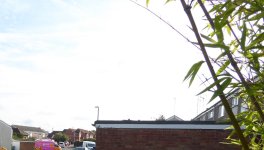
I just tried the High Dynamic artistic setting, it may do what you want.


This is just in P mode

View attachment 367436


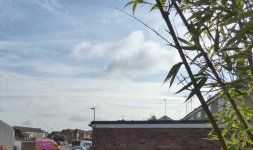
And then this was just switching the camera to the first option above, no other settings changed

View attachment 367437


I think that is as close as you will get to a simple in camera solution :)

This is not HDR, it is just lowering the highlight and raising the shadows a bit


Edit: I used a TZ70 for that :)
That's very good, just to check that's the High Dynamic artistic setting ?
TBH when editing my pics there are loads of them where I end up dropping the highlights and upping the low lights, but that setting seems to make a good of of it ! I will experiment with it.

That seems so good, is there a downside ? ! ?
 
Last edited:
That's very good, just to check that's the High Dynamic artistic setting ?
TBH when editing my pics there are loads of them where I end up dropping the highlights and upping the low lights, but that setting seems to make a good of of it ! I will experiment with it.

That seems so good, is there a downside ? ! ?
Yes, the high dynamic artistic setting.

There always is :) It makes the photos a little less vivid looking, slightly flatter, but it isn't really noticeable.

What software do you use for editing?
That in itself opens up other suggestions people have made
 
That's interesting and looks like the kind thing the OP wants.
I don't think that setting is available on my old TZ12 (I'll have a look though) but it may well be on the wife's TZ100.
I think it has, but it may be under the scene menu, I don't know when they introduced the art menu.

It is quite an old feature, been around since at least the TZ10. (I still have my original TZ1, I will get that out and look sometime :) , most of the others along the way I didn't keep. )
 
Yes, the high dynamic artistic setting.

There always is :) It makes the photos a little less vivid looking, slightly flatter, but it isn't really noticeable.

What software do you use for editing?
That in itself opens up other suggestions people have made
I use Photo Gallery basic photo editing (highlights, low lights, straightening, simple retouching, red eye, colour adjustment) and Webplus for multi pics, cutting and pasting parts of the pic, and stuff like that.
 
Point and shoot cameras are a dying breed. Modern smart phones are better than the vast majority of them nowadays, they are also more flexible definitely pocketable and are also much better at showcasing/reviewing your images. They are also excellent at video too.

Not sure why you are resisting owning a smart phone but it seems the solution to all your problems. You'd be hard pressed to find a much better pocketable camera for reasonable money nowadays (the RX10s of this world come to mind and they are well over 1k)

I know this is not really helping you with your current camera but definitely something to consider.
 
Point and shoot cameras are a dying breed. Modern smart phones are better than the vast majority of them nowadays, they are also more flexible definitely pocketable and are also much better at showcasing/reviewing your images. They are also excellent at video too.

Not sure why you are resisting owning a smart phone but it seems the solution to all your problems. You'd be hard pressed to find a much better pocketable camera for reasonable money nowadays (the RX10s of this world come to mind and they are well over 1k)

I know this is not really helping you with your current camera but definitely something to consider.

I have a smart phone, with good cameras, but it can not do what I want, in fact I haven't seen a smartphone with the very basic needs I have.

If you want to take photos, I think they are far less suitable than a good compact.

I agree they do a good job if they have what you need.
 
Point and shoot cameras are a dying breed. Modern smart phones are better than the vast majority of them nowadays, they are also more flexible definitely pocketable and are also much better at showcasing/reviewing your images. They are also excellent at video too.

Not sure why you are resisting owning a smart phone but it seems the solution to all your problems. You'd be hard pressed to find a much better pocketable camera for reasonable money nowadays (the RX10s of this world come to mind and they are well over 1k)

I know this is not really helping you with your current camera but definitely something to consider.
There are a few reasons why I do not want a Smart phone (I want to be able to get away from the internet and I am coming to the view there really is something in "digital dementia") but in any case I would dispute that a Smartphone has any where near the flexibility of my camera. For a start most have no Zoom (certainly not a large zoom), something I use very often and not just for magnifying things a long way away (or going wide angle) but for altering the depth of field. The latter as much for compressing the perspective (if I want something far away to look bigger relative to something up close) as for focus reasons. I often step right back from my subject and pile on the zoom to achieve that.
 
Yes, the high dynamic artistic setting.

There always is :) It makes the photos a little less vivid looking, slightly flatter, but it isn't really noticeable.
I have just been doing some quick and crude experiments using High Dynamic and it can wash out the contrast and colour a bit but to a large extent it seems that can be retrieved in editing. On the other hand, if an area of the pic is whited out, that cannot be retrieved as there is no detail there to retrieve.
I think I will leave High Dynamic as the default on my camera and monitor the results over the next few weeks.
 
Last edited:
I have been experimenting with "High Dynamic" for a few weeks now and initial results are that it does reduce the chances of "white out" but does give a flat low colour and low contrast picture. This can be alleviated to a certain extent with editing but it takes time and the result never seems to be as good as a pic taken with a "normal" setting. Since most pics don't suffer from "white out" I am still unsure whether, on balance, it's worth it.
Ideally one would decide before taking each pic if "High Dynamic" might be required but one does not always have the time to do that plus there are times when "white out" occurs when one would not expect it.
I suppose it would be best if the camera could take two pics, one "High Dynamic", and one "Normal", but even that is complicated by the fact I normally have my drive mode in "burst" as I have found that is the best way to take pics of moving subjects and to get pictures of people with the least chance of blinking.
 
I have been experimenting with "High Dynamic" for a few weeks now and initial results are that it does reduce the chances of "white out" but does give a flat low colour and low contrast picture. This can be alleviated to a certain extent with editing but it takes time and the result never seems to be as good as a pic taken with a "normal" setting. Since most pics don't suffer from "white out" I am still unsure whether, on balance, it's worth it.
Ideally one would decide before taking each pic if "High Dynamic" might be required but one does not always have the time to do that plus there are times when "white out" occurs when one would not expect it.
I suppose it would be best if the camera could take two pics, one "High Dynamic", and one "Normal", but even that is complicated by the fact I normally have my drive mode in "burst" as I have found that is the best way to take pics of moving subjects and to get pictures of people with the least chance of blinking.

I think that you are probably hoping for too much :)

I decide if I need a higher dynamic range before hand, and shoot HDR (just means changing the dial from P to C1), but you can't have burst at the same time :)

I don't think any camera is going to give you everything, an there will be a compromise.
There have been suggestions to make it better, but the best one is to shoot raw and under expose slightly.

As for contrast and low colour, it takes a few seconds to boost that, and it can be done in a batch process for all the shots in a day.

You can also mask and adjust the picture just on the face, if you want to keep the rest of it as it is.

Looking at the photos my 12 year old son took a school a couple of weeks ago, I noticed that the surroundings were different in photos taken within a few seconds of each other, and looking at the data on the photo, I saw he was correcting + for dark faces, - for light faces, and 0 for pupils with his skin tone :) He also used burst sometimes, but his finger goes to the exposure correction first almost without thinking. He does it most of the time, far more often than I do, at the same time he goes positive if it is a face against a white wall, as he wants the face not the wall.
Just a case of making the best of a situation, correcting what you can, and accepting what you can't, and I think that would be the case no matter how good a camera you had :)
 
Slightly on a different angle, many consumer and phone cameras have face recognition mode, that may well serve you better. These recognise faces in the image and expose accordingly (some also fire when people smile - no good for me)
 
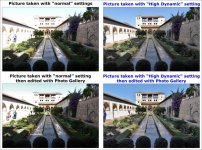
Took some, photos at the Alhambra which vividly showed "High Dynamic" working at its best. For most pics it just gives a washed out image which no amount of editing seems to be able to get back to "normal". But for these it worked fantastic, so thanks again to Sangoma for the info, exactly how a forum should work......

It's arguable whether the pic taken with High Dynamic looks better before or after editing, but either is better than the best I could manage with the pic taken without the setting.
Ideally,with these sort of difficult lighting conditions, it's best to take two pics, one with High Dynamic and one without, then when editing the best one can be chosen, but that is not always possible if the subject is fleeting.....
 

Attachments

  • Alhambra pics with normal and High Dynamic settings 2000W L20.jpg
    Alhambra pics with normal and High Dynamic settings 2000W L20.jpg
    233.6 KB · Views: 12
Last edited:
Took some, photos at the Alhambra which vividly showed "High Dynamic" working at its best. For most pics it just gives a washed out image which no amount of editing seems to be able to get back to "normal". But for these it worked fantastic, so thanks again to Sangoma for the info, exactly how a forum should work......

It's arguable whether the pic taken with High Dynamic looks better before or after editing, but either is better than the best I could manage with the pic taken without the setting.
Ideally,with these sort of difficult lighting conditions, it's best to take two pics, one with High Dynamic and one without, then when editing the best one can be chosen, but that is not always possible if the subject is fleeting.....
You could also try a 5 shot exposure bracket and merge them, I think you can do that using High Dynamic as well, I tried it but can't remember if you can, or what I thought of the results.

It's good to see the camera has a setting that helped with your issue though.
 
Back
Top