
Photo Edit Help

Ruffy

Suspended / Banned
Messages
1,623
Name
Paul
Edit My Images
Yes
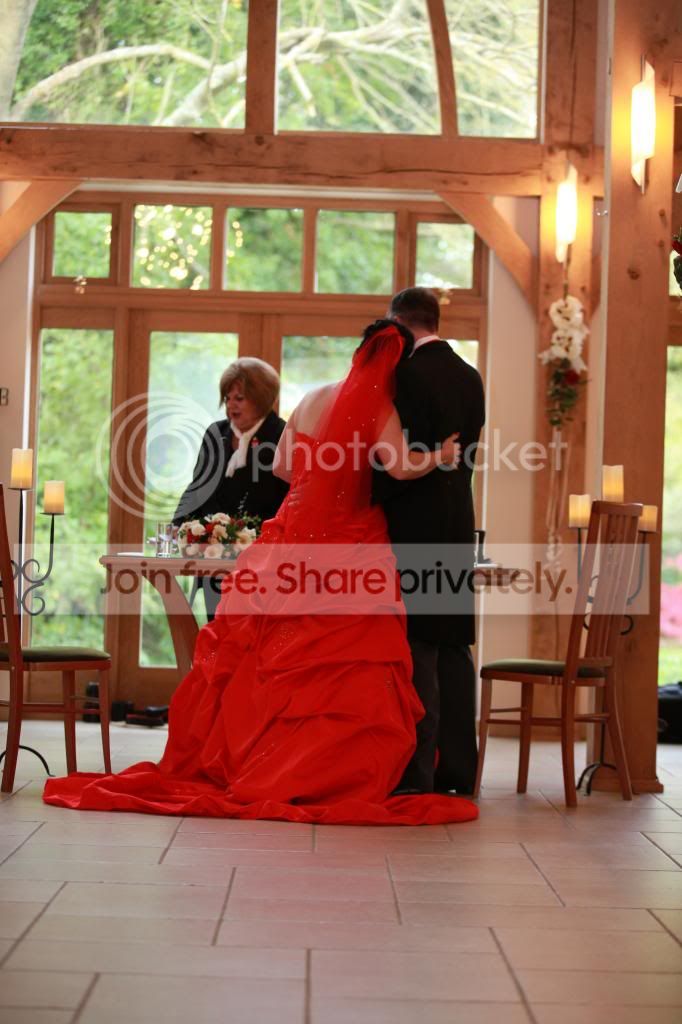
Anybody real good with cloning etc, i have the below picture which i would like edited but my skills are a little on the 'just starting side' lol

I would like the registrar cloned out ! I only have the image in jpeg format though

Regards
 
Yes David a nice job indeed :thumbs:
 
Dave, that is a fantastic job, could I email you the original for you to do....I know it's a bit cheeky but don't ask don't get:)
 
Dave, that is a fantastic job, could I email you the original for you to do....I know it's a bit cheeky but don't ask don't get:)
I used the original off the hosting site you used which looks like the full size one. Let me tidy up a couple of areas in the morning and I'll upload the full sized one to Flickr for you.
 
I used the original off the hosting site you used which looks like the full size one. Let me tidy up a couple of areas in the morning and I'll upload the full sized one to Flickr for you.
Your a star
 
Paul, the couple are now just looking straight out of the window ? I'am asking myself at what, you and I know, they will ask YOU where has the registrar gone ? anyway that is not the moment LOOKING OUT THE WINDOW ? my only advice is, when you pressed that shutter, it was for a reason was it NOT ? and only you can answer, all the photo shopping in the world isn't great IMO please please please; go back to your original image and ask yourself why did I press the shutter ? and if in doubt with any image after shooting BIN IT.
 
Last edited:
If you click on the image below, then on the '...' at the bottom right of the image, you can select 'view all sizes'. From here you can download the original size.

PS. I've popped the registrar into a nice Caribbean beach scene, complete with a free bar and topless male serving staff. Kevin need not worry - she looks happy enough.


Photo (1 of 1).jpg
by Furtim!, on Flickr
 
Last edited:
PS. I've popped the registrar into a nice Caribbean beach scene, complete with a free bar and topless male serving staff. Kevin need not worry - she looks happy enough.

:lol: :lol: :lol:
 
Paul, the couple are now just looking straight out of the window ? I'am asking myself at what, you and I know, they will ask YOU where has the registrar gone ? anyway that is not the moment LOOKING OUT THE WINDOW ? my only advice is, when you pressed that shutter, it was for a reason was it NOT ? and only you can answer, all the photo shopping in the world isn't great IMO please please please; go back to your original image and ask yourself why did I press the shutter ? and if in doubt with any image after shooting BIN IT.

That is sound advice and i agree, thanks
 
If you click on the image below, then on the '...' at the bottom right of the image, you can select 'view all sizes'. From here you can download the original size.

PS. I've popped the registrar into a nice Caribbean beach scene, complete with a free bar and topless male serving staff. Kevin need not worry - she looks happy enough.


Photo (1 of 1).jpg
by Furtim!, on Flickr


That is great, thank you so much, i owe you a virtual beer lol

Now.....seeing as you have shown me your skills, i have one last request lol

Watch this space lol
 
As you will see from the photo below, my wife managed to close her eyes and i missed it


Is their any chance they can be opened or perhaps swapped for her eyes which are open on the image below ???


I know you have already helped me out already but she really likes the photo and as you know, my skills are some what limited lol
 
2 great edit's there David.

Well done.. :thumbs:
 
Yes indeed David excellent PP skills there :clap:
 
Outstanding.....your skills are simply amazing, may i ask what software you used.

You should do a tutorial on this !!!!

THANK YOU VERY MUCH
 
Outstanding.....your skills are simply amazing, may i ask what software you used.

You should do a tutorial on this !!!!

THANK YOU VERY MUCH
You're welcome. It's nothing too difficult really - these were both fixed in simple old adobe elements 12. I've CS5 too but I find elements much faster to work with now my PC is getting a little long in the tooth.
 
I have a few more like this, a simple tutorial would be great if you find the time, I'm using PSE12 too but on an iMac

Thanks again

Paul
 
I have a few more like this, a simple tutorial would be great if you find the time, I'm using PSE12 too but on an iMac

Thanks again

Paul
Quite honestly, I don't think anything worthy of a tutorial. If it helps, for the first picture the basic steps were:

In Elements 12 (only the bits that need work with layers)
  • Review the image and look at the lighting (note the reflections on the door glass etc).
  • Identify if there are sufficient elements of the image to reuse - in that particular case, the vertical door elements (copied from the left hand side of the frame, duplicated), the door glass itself (copied from the visible portion of the glass and stretched a little)
  • Rebuild the doors and windows in rough form into a new layer (looks a real mess at this stage)
  • on the new layer, mask out the elements we want to see - the flowers, the brides arm, dress etc - this is the tricky bit (I use a tablet and pen, and a soft edged blush - you want to avoid hard edges on this)
  • Check for colour matches, dodge and burn as needed to match on the newly reconstructed areas, healing brush to tidy, spot clone, blur around the 'interfaces' between old and new - basically a lot of very small adjustments.
Then in Lightroom 5 (everything else - could be done in elements, probably)
  • Profile correction (removes a degree of barrelling), straighten, crop etc.
  • Any small exposure / levels tweaks
  • Add a bit of clarity
  • Add a bit of vibrance
  • Export to flickr.

On the second image I basically copied the head from the second photo into a new layer on the first one. Then set the layer transparency to 30% or so, so I could see the old head through. Then I used the transform layer button to move the 'new' head over the old head - you'll notice when you do this, the heads are at a different angle and size. I resized the 'new' head and rotated it so it matched the old as closely as possible - using the nose as the main point to line up.

Once happy with that, I put the transparency back to zero and added a layer mask to the layer with the new head and basically removed everything apart from the eyes and the immediate area around those. Then it was into Lightroom for the same finishing touches.

There are hundreds of 'how to' tutorials out there - learn the basic tools and then learn how to apply them. I'm sure my methods are very crude, so am confident there are many better tutorials out there.
 
Last edited:
Back
Top