PC Components upgrade time :)

futureal33

Suspended / Banned
Messages
2,390
Name
Nick
Edit My Images
Yes
Morning chaps,

I am looking at upgrading my PC components :)

I currently have
  • Intel i5 CPU - older gen one, not Sandybridge
  • 4GB 1333mhz Mushkin RAM
  • USB 2.0 M/B - not sure of model etc

Now I am looking at the overclocked bundles from Scan, I have used them previously and they have been superb.. so I am inclined to use again.

I am looking at two packages...

1) i5 2500k + 16GB 1600mhz RAM
or
2) i7 2600k + 16GB 1600mhz RAM

Clearly the i7 is the better processor of the two, but statistically only about 2-3% better, and most of the marketing hype mentions "hyperthreading" which is useful for video or 3D editing.

My question to you is, would there any real world difference between an i5 and i7 for using Photoshop CS5 to process RAW files.
I do very little gaming, maybe 2-3 hours a week, a lot of Photoshop, a lot of internet browsing and iTunes etc.

As there is around a £200 difference between the i5 and i7 bundles... I am thinking Id be better off with the i5?

Can anyone comment on which would be the advised route, for mainly Photoshop processing.

Reason for wanting to upgrade is due to lack of RAM in my current config (4GB) I find it sometimes slows down when having 5-10 RAWs open at a time.

Thanks :)
 
I recently used Aria.

I bought one of their overclocked I5 bundles with a guaranteed overclock of between 4.20 and 4.40. Came in at 4.30. Bundle included Mobo, cpu, cooler 8GB RAM. Fitting more RAM reduces the overclock available.

I also bought a new psu, graphics card, case and most importantly a SSD for the operating system, CS5 and Lightroom.

Opening time for CS5 to load approx 2.5 seconds.

The SSD is large enough to allow me to work on raw files from a shoot on it. Then backed up and transferred to other hard drives for long term storage.

As it was a whole system Aria built all for me for an additional £25.
 
I recently used Aria.

I bought one of their overclocked I5 bundles with a guaranteed overclock of between 4.20 and 4.40. Came in at 4.30. Bundle included Mobo, cpu, cooler 8GB RAM. Fitting more RAM reduces the overclock available.

I also bought a new psu, graphics card, case and most importantly a SSD for the operating system, CS5 and Lightroom.

Opening time for CS5 to load approx 2.5 seconds.

The SSD is large enough to allow me to work on raw files from a shoot on it. Then backed up and transferred to other hard drives for long term storage.

As it was a whole system Aria built all for me for an additional £25.

Hi thank you for the reply,
I have highlighted a part of your reply in bold... this is the part that confuses me!
I have actually just this minute been on the phone to Aria (who my current system was bought off) and asked them the question "if I stuck another 12GB of RAM into my system, to bring it upto the desired 16GB... what would happen"
He responsed that it would slow my CPU Overclock down...

Can anyone who understands PC's explain this to me? Why would it slow down my CPU?
 
Given I own the i7, I'd suggest you get the i5 unless you do any video recoding ;) :D You do have a decent SSD don't you (not all SSDs are equal - given the choice I'd go for a Corsair Performance Pro 128G or 256G drive)?
 
I have actually just this minute been on the phone to Aria (who my current system was bought off) and asked them the question "if I stuck another 12GB of RAM into my system, to bring it upto the desired 16GB... what would happen"
He responsed that it would slow my CPU Overclock down...

Can anyone who understands PC's explain this to me? Why would it slow down my CPU?
I don't think it would with a decent motherboard. The memory bus is clocked independently from the CPU overclock on the i5/i7. Assuming a decent enough mobo that has good power supplies, it should be a non issue.

BTW: which bundle deal are you looking at?
 
I don't think it would with a decent motherboard. The memory bus is clocked independently from the CPU overclock on the i5/i7. Assuming a decent enough mobo that has good power supplies, it should be a non issue.

BTW: which bundle deal are you looking at?

Hi Andy,

This is the bundle Im considering

http://3xs.scan.co.uk/ShowSystem.asp?SystemID=1295

But with 16GB of RAM, not the advertised 4GB - if you click configure you can change it. I would also probably go for the 3rd motherboard option from the dropdown list.

Comes to £399 inc vat in total

BUT

If I could just add 12GB to my current i5 system then Id rather do this! Although Aria are telling me it would slow everything down?
 
Last edited:
My understanding is it is something to do with the RAM timings in the Bios.

Apparently it can be set much tighter with 8gig than it can with more.

Lots of confusing articles on the web. Perhaps you should ask Aria.

All I can say is My system with 8gig runs CS5 and Lightroom simultaneously with no problems whatsoever.

It is completely stable and hasn't fallen over once since I had it delivered.

My understanding from my Account manager is the bench/stress testing is quite brutal.
 
fiddling with RAM timings is only going to give you minute changes in performance anyway i wouldnt worry too much about them. providing all sticks are identical increasing memory really shouldnt be an issue.
 
My understanding is it is something to do with the RAM timings in the Bios.

Apparently it can be set much tighter with 8gig than it can with more.
But the RAM timings are separate from the CPU overclock multiplier. Unless they are also upping BCLK (which is the base clock for the board). This gives you a few % extra at max and can cause instabilities.

The second gen core i processors are very easy to overclock compared to previous processors.
 
Im tempted to just buy a complete new overclocked bundle than risk messing this system up, as it is working really well.

Any idea what money Id get for my current system?
  • Intel i5 @ 3.8Ghz
  • 4GB Mushkin Silverline RAM 1666mhz
  • MSI P55-GD55 Motherboard
  • Massive CPU cooler - cant remember the brand, but its huge

Thanks
 
Any idea what money Id get for my current system?
No, but why not just up your memory to 16G in the current system plus a decent SSD. i5 @ 3.8G is not too shabby a processor you know ;)
 
Get a SSD for your system drive and see if you still think you need to upgrade afterwards. I got a SSD just over a year ago and have only recently upgraded the other hardware as the improvement was so great.
 
No, but why not just up your memory to 16G in the current system plus a decent SSD. i5 @ 3.8G is not too shabby a processor you know ;)

If I was going down that route, would you advise using the same memory as I currently have?
Would I need to change anything in the BIOS etc?
 
If I was going down that route, would you advise using the same memory as I currently have?
Would I need to change anything in the BIOS etc?
Not sure what you currently have - whether it's 4x 1GByte or 2 x 2GByte modules. Whichever, unless you completely replace what you have you will end up with less than 16G. Also, I think it's 1066MHz, not 1666MHz. A branded 16G kit of memory is £79 from ebuyer (DDR3 1333MHz which will fit in your board fine see: http://www.ebuyer.com/274404-corsai...emory-kit-cl9-9-9-9-24-1-5v-cmx16gx3m4a1333c9). Careful if it has any heatsinks attached - they may foul the CPU heatsink.

BIOS, you may need to upgrade that depending on what version you have shipped. Have a look here: http://www.msi.com/product/mb/P55-GD55.html#/?div=BIOS to see the latest and greatest. Personally, I'd try it first before upgrading the BIOS.

Add a decent SSD. Personally, I'd go for this one: http://www.ebuyer.com/343444-corsai...ta-iii-2-5-read-500mb-s-write-cssd-p128gbp-bk and jobs a good un' :)
 
Andy, thank you for the helpful reply and in particular taking the time to reference those links.

I actually have an SSD so im covered in that regard :)

One question about memory and BIOS - been thinking about this all day. If I sold off my current RAM, and replaced the lot with a 16GB pack such as the one you linked me to and tried that in my system - the worst that could happen would be that it either
a) failed to boot
b) BSOD / random crashes ?

In which case, it would indicate my current CPU overclock and increased memory wasnt running well together.

How easy would it be to un-overclock my system (given that it was done by Aria from day 1) and re-overclock it manually taking into account the newly fitted 16GB RAM?
 
How easy would it be to un-overclock my system (given that it was done by Aria from day 1) and re-overclock it manually taking into account the newly fitted 16GB RAM?
That one I have no idea of unfortunately.....

The way I'd approach this would be to spend a day or so googling your processor and overclocking, then enter the BIOS, note down all the non-auto values, reset to auto and upgrade the RAM. Check it's stable. Then wind up the values - clocks first, voltage second to get back to where you were. You MAY find that you can't get back to 3.8GHz though
 
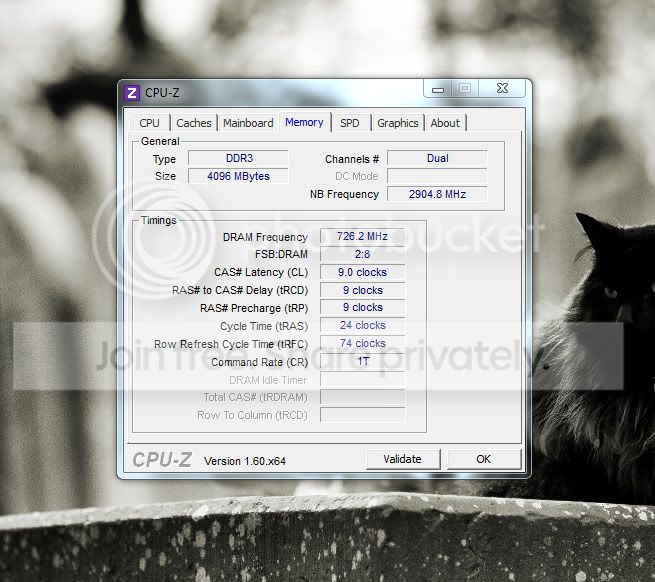
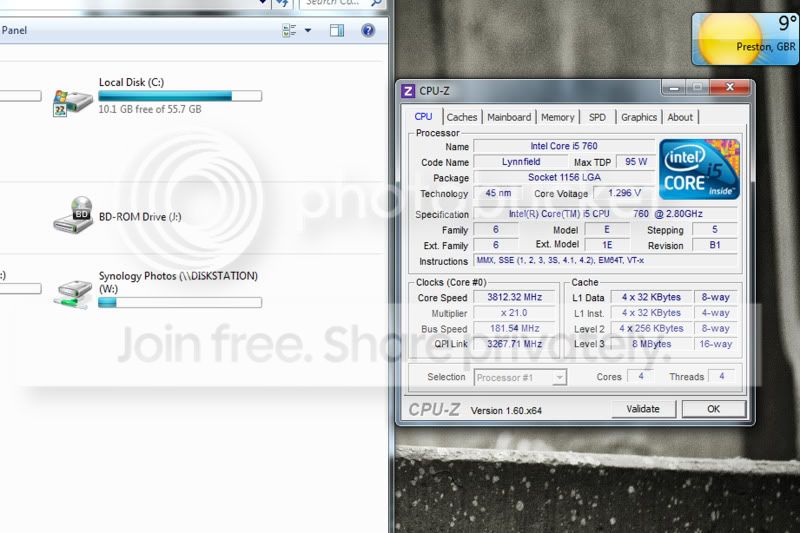
I have taken a print screen of my system speed etc using CPU-Z

Does this mean anything more to anyone?

CPU
Untitled-1.jpg


Memory
2-3.jpg


Thanks
 
Last edited:
All that detail is set in the BIOS. The nominal clock frequency (bus speed) is 133MHz on that chip, but they have upped it to 181.54. They have also upped the DRAM frequency from 666MHz (1333/2) to 726MHz by changing the DRAM multiplier from 5 to 4 (8/2) but remembering the bus speed is now 181MHz and not 133MHz. You should be able to keep that the same if you go for 1600MHz memory - you might be lucky to keep it if you go for 1333MHz memory.

You'll have to look at the BIOS settings to see what has actually been done but the idea is up the bus clock and then adjust the memory bus timings to keep them still working. For example, if you change no hardware but reset everything to factory defaults, turn up the bus clock to 181MHz and DON'T change the memory multiplier, you'll be trying to run the memory bus at 181 * 5 = 905MHz. It's unlikely this will be stable.

I'm not explaining things very well, but it's a bit of a juggling act and it helps to see how one parameter affects another on the board. The second gen core processors are MUCH easier to change as you change the max multiplier rather than the bus speed.
 
Andy,
If it was you... would you go for adding another 4GB of 1333mhz memory, and fiddle, or just buy a whole new bundle? lol... sorry if it sounds like Im taking the easy way out but in some ways I am happier to spend a bit more and let someone who understands all this do it for me... rather than me trying to do something I have no idea about lol.

The other half of me says that my system is fantastic as it is, its a flying machine, but I just want to add more RAM..
 
If it was me, I'd buy the RAM and upgrade, but then I've a degree in Electronics and deal with complex microprocessor based system architectures (and getting clocking set up correctly!) for a living.... It's going to depend on your experience and confidence............

To answer your second question, it will be relatively easy to reset everything back to standard (in the BIOS) but that will drop your CPU to 2.8GHz. I think it should work with 1600MHz memory dropped in without changing anything.

Note the use of THINK and SHOULD there ;)
 
I guess if I bought 16GB on Amazon, stuck it in, and my PC didnt boot, or kept crashing etc - I could always return it to Amazon...
or
I could remotely log on TP through my iPad and ask you to help :p

Seriously though, I think I will buy 16GB and see how I get on - without changing any BIOS settings for now

Thank you for the help :)
 
Should it make any difference as to whether it will work or not going for 16GB vs 8GB?
Possibly. Basically if you fit 4 memory sticks in, you are loading the bus with 2x the electrical characteristics as only 2, but then if you up the speed of the memory (1333 is designed to run at 666MHz and yours is clocked at 726MHz) it should compensate as you will have faster memory. Have a look at what you have in there (is it 2 or 4 sticks). You should find that jumping to 4 sticks of 1600MHz memory (which is clocked at 800MHz in reality) should be fine on a bus running at 726.2MHz, especially if you have 2 sticks that are designed to run at 666MHz operating at 726MHz. The 2 or so years since you put 4Gx1333MHz has probably seen memory prices fall so that 16G@1600MHz is around the same price as 4G@1333MHz was then.

Does that make sense?
 
Last edited:
Andy,
I must have read your last two replies 20 times now, and I think I am finally understanding it :)
So overclocking the CPU also increases the memory speed - so in order not to make the memory go too fast, you need to reduce the memory multiplier thus reducing the overall speed of the memory?
And, because there is currently 1333 RAM in there which is running faster than it was designed (1452), but I am looking at replacing that with even faster RAM (1666 - which if I dont change any of the settings will be running slower than it was designed @ 1452)
which shouldn't cause any problems as it will technically be happier running slower?

Is that right?

Thanks very much btw :)
 
Back
Top