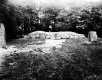
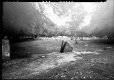
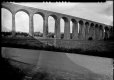
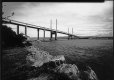
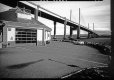
Paper negatives anyone?

From the colour the bottom right one looks improperly fixed. though all have a few patches that look odd. I would expect a nice blue black all over.
I have always preferred paper to have a very full development to avoid partial development effects. I.e.: not to remove them from the developer till development is fully complete. Which will depend on both time and temperature.
Fixing should be long enough to remove all the unexposed silver halide. So twice as lone as you think is usually best. (With film twice as long as it take to clear.) Unfortunately with paper, you only find out, later when the print is exposed to light, if you have fixed it long enough as it is only then that it discolours.

Those negative prints show fogging and uneven development and partial fixing effects.
 
Last edited:
From the colour the bottom right one looks improperly fixed. though all have a few patches that look odd. I would expect a nice blue black all over.
I have always preferred paper to have a very full development to avoid partial development effects. I.e.: not to remove them from the developer till development is fully complete. Which will depend on both time and temperature.
Fixing should be long enough to remove all the unexposed silver halide. So twice as lone as you think is usually best. (With film twice as long as it take to clear.) Unfortunately with paper, you only find out, later when the print is exposed to light, if you have fixed it long enough as it is only then that it discolours.

Those negative prints show fogging and uneven development and partial fixing effects.
The joys of tray devloping instead of using the Nova, but the strange viaduct one was actually given longer in the freshly made fixer than any of the others. All part of the great learning curve, and hopefully better results next time.
 
The joys of tray devloping instead of using the Nova, but the strange viaduct one was actually given longer in the freshly made fixer than any of the others. All part of the great learning curve, and hopefully better results next time.
that could be a cause depending on the fixer.
It is not a good Idea to leave them in Rapid fixer for a very long time (ammonium thiosulphate as against sodium thiosulphate) though either can have that effect if left over night. with out washing, but five minutes or so should not make any difference, unless very hot.

I have processed prints up to 3 meters long with sponges with no problems, and 50 or so 10"x8"prints at a time in dishes. How you process should make no difference. if you understand what you are doing.

When dish developing I would leave fixer in the dish for several days till it failed a film test. A small piece of undeveloped film is left in the fixer for five minutes, if it does not clear completely the fixer is shot. Paper fixes more quickly than film.
 
I still have the end of a bulk roll of FP3 (sic) I use for fixer testing.
 
Just a quick update now that I've scanned the negs, and clearly the excessive contrast means I'll need to do a bit more research before processing the shots I took today. I increased the iso to 8 from 3, so hopefully that will give a more accurate exposure. The viaduct shot is absolutle filthy with spots as well as badly processed, but no idea why as the darkslides were dusted before loading the sheets. :thinking:

img323-copy.jpg-tp.jpg

img325-copy-tp.jpg

img326-copy-tp.jpg
 
You should use the softest multigrade filter colour on the lens.
You may also find that you need a soft working developer or a very dilute one where you can give a longer but accurate developing time. It will take considerable experimentation.
You might find a film developer to be better.
 
Second attempt shooting this time at iso 8 and developing in Multigrade at 1:28 dilution, which resulted in extended times of around 2 minutes or more. I didn't use filters, as the old Multigrade II set filters I have are too small for the 120 lens I was using. I have another lens that they might just about cover, so will try that next time. I'll need to solve the black specks issue though. :rolleyes:

img327-copy-tp.jpg

img329-copy-adj-tp.jpg
 
Second attempt shooting this time at iso 8 and developing in Multigrade at 1:28 dilution, which resulted in extended times of around 2 minutes or more. I didn't use filters, as the old Multigrade II set filters I have are too small for the 120 lens I was using. I have another lens that they might just about cover, so will try that next time. I'll need to solve the black specks issue though. :rolleyes:

View attachment 284294

View attachment 284295

Yesssss!

Well done Peter they look very good. [emoji106]
 
Yesssss!

Well done Peter they look very good. [emoji106]
Thanks Asha, I was a lot more careful this time round, but I'll be interested to see how they would look with reduced contrast. Maybe next week.

It has also just dawned on me that I have older MG IV 10x8 paper that I could cut down and use as it might have lost a bit of contrast. :thinking: I might even try it at wholeplate size for fun! :)
 
Last edited:
The quality of your latest images is greatly improved. You must investigate if the speck problem is dust on the paper or chemical related or perhaps micro bubbles. Thought the best agitation when dish developing prints is to remove and replace them a few times during development. And always develop emulsion up to prevent bubbles blocking developer getting to the surface.
Just tipping the dish and rocking the developer is not sufficient to guarantee even development.

By the look of the prints. The toe of the curve that contains the shadow detail is too steep. It may need the use of a film developer to correct this. The paper emulsion has a naturally higher contrast as do print developers. However a print developed in film developer does not look very nice, but would perhaps be a better starting point for later digital processing.
 
The quality of your latest images is greatly improved. You must investigate if the speck problem is dust on the paper or chemical related or perhaps micro bubbles. Thought the best agitation when dish developing prints is to remove and replace them a few times during development. And always develop emulsion up to prevent bubbles blocking developer getting to the surface.
Just tipping the dish and rocking the developer is not sufficient to guarantee even development.

By the look of the prints. The toe of the curve that contains the shadow detail is too steep. It may need the use of a film developer to correct this. The paper emulsion has a naturally higher contrast as do print developers. However a print developed in film developer does not look very nice, but would perhaps be a better starting point for later digital processing.
Thanks Terry. It bugs me that the specks seem to be mainly/worse towards the flap end of the darkslide, although not exclusively. This would be the end of the sheet that I pull out of the darkslide, and would therefore be holding as I slip it into the tray of developer (face up). I don't think I'm covered in fine dust that jumps onto the paper, so there must be another solution for me to find. Onward!
 
I would vac your dark slides. And also damp dust them with a lint free micro fibre cloth. Pay special attention to the velvet ligh traps it your slides have them as they become loaded with dust. This can be pushed out over the film. /paper when inserting the slide covers. This is usually worse on the right/ open side of the slide
 
As Terry says vac your holders inc the dark slides! .... I have a small cheap handheld vacuum specifically for my holders, changing tent ( when I use it) and also for occasionally vacuuming the insides of my bellows.
 
As Terry says vac your holders inc the dark slides! .... I have a small cheap handheld vacuum specifically for my holders, changing tent ( when I use it) and also for occasionally vacuuming the insides of my bellows.
I had a small Jessop's vacuum for this sort of purpose, but I think I may have junked it sometime over the years. Another thing to search for!
 
Back
Top