Painterly tutorials?

psybear

Suspended / Banned
Messages
1,895
Name
Brian
Edit My Images
No
I've seen a few images - what I would describe as 'painterly' images - and maybe that's a total misuse of the word by me, and I'd love to know how to achieve the effect. So maybe like a single boat on the water -and it looks almost like a watercolour painting, with very little going on in the background...
 
Get Painter or Topaz Simplify. Painter ofers many many diferent looks but is more involved. Hope this helps.
 
Thanks Glyn. I had assumed this was a Photoshop technique, hadn't thought of specified software. I'll check those out.
 
Thanks Sarah, hadn't realised that I'd posted in the wrong place. Definitely intend to check out Topaz - I'm afraid that Painter is way out of my price range considering it's just a processing technique I'd like to try!
 
I expect it's possible to create the desired effect without specialised software. Including at the shooting stage. Post links to what you are after.
 
Can you show us what you mean Brian? It's just that I use photoshop + textured layers to create images that might look as though they've been painted - it's quite simple to do, but I may have misinterpreted your 'painterly' explanation.
 
Hi Maria - and that could be the technique that I'm referring to.

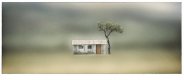
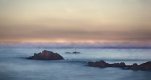
Here are some examples - these are by a NI based photographer called Laurie Campbell.
 

Attachments

  • Screen Shot 2015-08-26 at 18.01.27 copy.jpg
    Screen Shot 2015-08-26 at 18.01.27 copy.jpg
    59.6 KB · Views: 50
  • Screen-Shot-2015-08-26-at-18.05.14.jpg
    Screen-Shot-2015-08-26-at-18.05.14.jpg
    119.2 KB · Views: 46
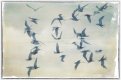
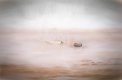
And a couple more, same photographer.

Screen-Shot-2015-08-26-at-18.04.10.jpg Screen-Shot-2015-08-26-at-18.04.59.jpg
 
Any further suggestions based on these examples?
 
If you really, really must attempt this sort of cheap gimmick, something quick & easy like this will give roughly similar results in photoshop:

Duplicate layer.
Blend mode: overlay
Apply gaussian blur to the duplicate layer to taste.
It will look very dark, probably. Play with shadows/highlights, contrast/brightness, and layer opacity to personal taste.

The first one up there is a complete dog's dinner, though. I don't know why you'd want to replicate it.
 
Not that you're judgemental eh? I wasn't asking for subjective opinions on the style of processing, just about the actual methodology. So thank you for the processing suggestion, I'll just ignore the rest.
 
If you really, really must attempt this sort of cheap gimmick, something quick & easy like this will give roughly similar results in photoshop:

Duplicate layer.
Blend mode: overlay
Apply gaussian blur to the duplicate layer to taste.
It will look very dark, probably. Play with shadows/highlights, contrast/brightness, and layer opacity to personal taste.

The first one up there is a complete dog's dinner, though. I don't know why you'd want to replicate it.

I don't think the word "gimmick" really comes into it. It's one way, & one way only, to show your own expression of a subject. One could argue that this sort of thing, or more, the end result may not be photography. BUT it isa a way one can be 'artistic' and the camera was only the FIST stage of the process.
 
I don't think the word "gimmick" really comes into it. It's one way, & one way only, to show your own expression of a subject. One could argue that this sort of thing, or more, the end result may not be photography. BUT it isa a way one can be 'artistic' and the camera was only the FIST stage of the process.
I'd argue that this kind of thing isn't artistic or creative at all. And I've absolutely nothing against processing.

It's the kind of thing that can be done in about 5 minutes while you've got one eye on the TV and are thinking about what you're going to have for dinner later. It's like selective colour or HDR. Highly stylised, low effort, low originality Fordism. In my opinion of course.

But that's another discussion. Who am I that you'd get antsy about my opinion anyway? If you like it, knock yourself out.

You could probably get a more severe effect like this by forgetting the blend mode and lighting adjustments altogether and just throwing heavy gaussian blur at the duplicate layer then doing some selective opacity (probably want to adjust the global opacity). Alongside your usual processing workflow of course. A few ways to recreate it.
 
To do it properly or to get some really good results, then try it in Painter.... Could not be done in 5 mins. Like I said, the camera is only the first process.... maybe then, it becomes computer art.

Either way, it is something I like and some great 'artistic' results can be seen by searching google for: "Corel Painter examples"

I admit and accept that a lot of folk do not consider it 'photography' But, who cares if it's photography or art as long as the creator is happy with his results?
 
Last edited:
Back
Top