Beginner Over exposure

Messages
422
Edit My Images
Yes
I have been out and about with my camera, lovely bright weather, very bright.
While looking at the images I have taken in the sunlight, lots of them look over exposed.
But I did have the meter set exactly on the middle of the gauge.
So is this normal, do you have to take into account its very bright conditions and try and under expose a bit, or do you do that on post processing.
Nikon D3100 with a fixed prime 35 mm lens.
 
It was set on spot, did not have this sort of thing happening in the winter, we have to not forget that I am not at the moment very good at this.
Still I have a long weekend and will play about,, with it, I don't think its the camera.
 
It was set on spot, did not have this sort of thing happening in the winter, we have to not forget that I am not at the moment very good at this.
Still I have a long weekend and will play about,, with it, I don't think its the camera.

If you are in spot mode the camera only looks at that small spot area and if it's relatively dark and the rest of the frame is relatively bright then you could end up with a picture with over exposed areas. Maybe give evaluative a try?
 
To clarify - was the meter reading in the middle the target for the camera to achieve or the actual metering as you were taking the photo?
I'm thinking that it's possible that if target metering is in the middle and the photos are too bright then perhaps the issue is that the camera can't achieve the target metering due to either shutter speed too slow or aperture to wide open.
 
It was set on spot, did not have this sort of thing happening in the winter, we have to not forget that I am not at the moment very good at this.
Still I have a long weekend and will play about,, with it, I don't think its the camera.

To find out if it is the camera and based on what you say it probably isn't. Put the camera in auto and take to test shots if these look OK it will be the use of spot metering as has been explained above.
I suggest ditching manual mode and using semi auto aperture or shutter priority at least for now. remember composition and creative use of apertures and shutter speeds is more important than what mode or camera you use.

This video ( I have not watched it all) seems OK at explaining this stuff which you need to understand to use spot metering.

View: https://youtu.be/cXpbzifLh88?si=lXw8_hKGZBlcSsol
 
Last edited:
it could be down to slow shutter speed. get the exif data and check

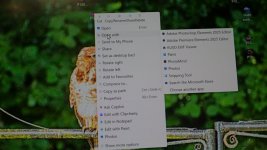
I use one called Kuso exif data. what you do is download it free onto your computer. Once on the computer if you right click over a photo you will see the dropdown list.


first view of drop down list. In to photo below the arrow point as to where to find. On the right shows Kuso exif viewer. This only lets you know you have downloaded it properly (Jpg files only)
P1006310.JPG


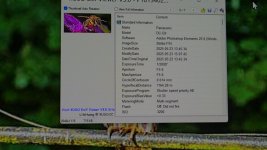
next just right click over the photo and you get all the exif you could possibly need as shown below (which is just a small fraction of what is on it) expossure time is shutter speed


P1006313.JPG

so that list shows every thing and a lot more as well
 
Last edited:
Having the meter in the middle isn’t necessarily the correct exposure. It’s what the camera thinks is correct and is often wrong. That’s why cameras have exposure compensation.

Use your histogram to correctly judge exposure.
 
It was set on spot, did not have this sort of thing happening in the winter, we have to not forget that I am not at the moment very good at this.
Still I have a long weekend and will play about,, with it, I don't think its the camera.

I use Spot metering mode all the time and love it. But you do need to be in Manual exposure mode for it to work. If you are not, then Evaluative metering is the one for you.

If you do decide to stick with Spot metering in Manual exposure then you need to point the middle of the viewfinder at something in the scene that is kind of mid-tone, Asphalt or grass work pretty well. Adjust the shutter speed and aperture to centre the meter. Recompose and focus. Press the button!

When you get more used to it, you can work with light or dark objects for metering, with the meter needle +/- one or even two stops. But let's walk first.

In summer the contrast in any scene is much higher than in winter, which could be why you were OK, but now not.
 
Ensure that exposure compensation isn't active. If there is a positive exposure compensation set it will result in a brighter exposure when the meter is centered.

If you do decide to stick with Spot metering in Manual exposure then you need to point the middle of the viewfinder at something in the scene that is kind of mid-tone, Asphalt or grass work pretty well. Adjust the shutter speed and aperture to centre the meter. Recompose and focus. Press the button!
That's not a way I've ever used spot metering... rather defeats the whole reason for spot metering IMO.
 
I’ve said it before, that whilst metering patterns themselves are irrelevant* the hardest one to master is spot metering.

*now back to this, it doesn’t matter which metering mode you pick, the important point is understanding exactly what it is you’re metering.

Spot metering assumes that you’re experienced enough to have either found a small area of 18% reflectance, or that you know exactly how far away from 18% your spot is so you can compensate.

I’d suggest you read your manual to understand what the different metering modes measure, and then you’ll realise that the matrix metering that adds some intelligence to the reading will be right most often.

But the other truth is, it’ll never be right all the time, and the important thing is to understand what will fool the meter. It really isn’t complicated. But it’s also the reason I don’t advocate Manual exposure, because setting my camera to do exactly what I want automatically, means I have mental capacity to check whether the meter was right. When shooting in M there’s too many spinning plates for my little brain.
 
I could recommend the work of Michael Freeman for beginners, The Photographer’s Exposure Field Guide, for example. Using various metering modes for exposure can be tricky. I’d agree that evaluative metering these days does a good job in a wide range of contexts.

As for spot metering:

“Spot-metering mimics that of a handheld meter. Only a very small circle, usually between 1% and 2% of the entire area, is measured, which allows you to focus on any detail of the scene. If that happens to be the key detail, you can see how valuable spot-metering can be at times. As with center-circle metering, the limitation is when you cannot see exactly the circle being measured on the focusing screen.

“Handle this [spot-metering] challenge well and you’ll have given yourself a bit of knowledge and experience that will see you through some very tricky metering situations. As you know by now, your camera’s spot meter is designed to read a very finite area of the frame—often an area that’s only a few degrees in angle of view. But isolating those few degrees can be the only way to precisely meter the important areas of a complex scene.

“By combining your ability to read such a small area with your knowledge that your meter wants to render that area as a neutral gray… you’ll know exactly how to set exposure for the most important part of the scene. Whether the surroundings are overly bright, very dark or even intensely dappled with both, by metering just the key subject area you have taken control over setting the best possible exposure.”

Michael Freeman
 
To over simlify it, spot metering is best used when you have a subject thats in a light or dark background and you need to meter for the subject. You would normally use a neutral midtone to meter off (ideally) or compensate for a darker or lighter tone.
For general use matrix metering is probably a better option. It sort of averages out the scene.
 
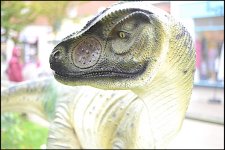
An unintended consequence of of an unintended switch to spot metering...

Dinosaur statue at Strand Exmouth D600 D60_4303.JPG

Oddly enough, I rather like it. Very "Primeval" special effectish. ;)
 
Last edited:
Ooh, tell us more?
Spot metering is primarily beneficial when your subject is in different lighting which would fool matrix/evaluative/center weighted metering modes... I.e. the subject is backlit and you don't want a silhouette.

The method you describe is using it as more of a simulated incident metering reading, which only works with fully manual exposure. It is also generally no better than an evaluative/matrix reading, potentially worse; and negates all of the capabilities of the camera which you paid for.
 
Thank you for all the replies, o have found that wearing reactolight glasses is really not helping me on bright sunny days.
That being said, taking a shot at a bright thing on a very bright day looks washed out,
I was doing far better in the winter months,
I have been gifted a very nice book from my stepson, which has also helped me find a path to being more positive with my camera, hope to add some more pics soon
 
Thank you for all the replies, o have found that wearing reactolight glasses is really not helping me on bright sunny days.
That being said, taking a shot at a bright thing on a very bright day looks washed out,
I was doing far better in the winter months,
I have been gifted a very nice book from my stepson, which has also helped me find a path to being more positive with my camera, hope to add some more pics soon
I know several photographers with the same problem with these photochromic glasses (or whatever they are called) my wedding oppo has to lift his to "chimp" the back of the camera. every time.
I went for the cheap generic poundland glasses for photography,
They have two big advantages, they are cheap (I'm tight) and they dont have a tint. I keep my proper glasses for driving
As I loose or break sunglasses weekly, I more or less dont bother, or use cheap tinted safety glasses, they work and they rae harder to break...... so they say.. ;)
 
Thank you for all the replies, o have found that wearing reactolight glasses is really not helping me on bright sunny days.
That being said, taking a shot at a bright thing on a very bright day looks washed out,
I was doing far better in the winter months,
I have been gifted a very nice book from my stepson, which has also helped me find a path to being more positive with my camera, hope to add some more pics soon

It might be helpful if you could post an example and state what metering mode you were using. Also, I think the D3100 has a max shutter speed of 1/4,000 so if you are using a prime at wide apertures you may run into the max shutter speed and end up with an over exposed picture.

If you can post an example picture please state the metering mode, ISO, aperture and shutter speed. Other than that... practicing and learning from your mistakes is pretty much cost free with digital. Good luck going forward.
 
I have a highlight warning enabled in my viewfinder, so just dial down the aperture accordingly. I can usually pull back the shadows afterwards. I don't really use the meter.
 
I use the meter, I always put it in the center every time.
I will post a few pics.
1.1 OE.jpg

Nikon D3100
35mm f/1.8g
l (4608 x 3072) -10.6 MB
35mm ISO 100
1250s-f/2
OEV- auto
 
I use the meter, I always put it in the center every time.
I will post a few pics.
View attachment 456027

Nikon D3100
35mm f/1.8g
l (4608 x 3072) -10.6 MB
35mm ISO 100
1250s-f/2
OEV- auto

You have to be aware though that the meter will trick you if it's taking an average reading and there is a bright background.
 
Last edited:
I use the meter, I always put it in the center every time.

View attachment 456027

Nikon D3100
35mm f/1.8g
l (4608 x 3072) -10.6 MB
35mm ISO 100
1250s-f/2
OEV- auto

As previously stated earlier in the thread, if you are using spot or centre weighted metering and if that area is relatively dark the areas outside of that area may be over exposed. Also at f2 you're not going to get a great deal of depth but maybe a shallower look is what you are going for.

That pictures looks out of focus and very soft and it does look flat. The flat look could well be because of the lighting at the time but I wonder do you shoot raw or jpeg? It could be that an in focus shot might be worth processing for best effect.
 
I use the meter, I always put it in the center every time.
Handy things, meters, but it all depends (1) where you point them & (2) how you interpret & maybe modify what they're telling you.

You have to be pretty serious to use spot metering, & even then you'd be unlikely to use it all of the time. For general purposes, I'd use matrix or centre-weighted. The rest comes down to experience - and if you're in an auto exposure mode (A, S or P), then using or not using the exposure compensation dial accordingly.

This is all a bit disjointed to talk about via messages. But let's keep having a go.

Re the posted pic - the focus is off. Why f/2? - explain your thinking there, if you can. Focus technique is a craft in itself, but f/2 and close-to means that you need to be pretty much on the ball. And what exposure mode were you in?

The light looks flat (low contrast), implying a cloudy sky. That's not a bad, it's just a fact, AND MAKES EXPOSURE EASIER - but light's something to cultivate an awareness of ...

So as it happens, the exposure's fine in this example! Meaning that there are no blown highlights or blocked shadows - both of which can be allowable in black & white but can be tough issues in colour.

Photography's like walking a tightrope - or falling down a well - sometimes both together!

KEEP PURSUING YOUR ENQUIRY! And using what gear you've got.
 
Last edited:
the weather this month and looking forward is not an easy subject - bright light and darks shadows are difficult to shoot in
 
To me it looks like an average exposure - the ground has been exposed to middle grey, or thereabouts, over exposing the image.

With mirrorless there is no guesswork any more but with a dslr, I would typically meter the subject and just dial in compensation, experience gets you to a place where you can get it right most of the time.

Exposure compensation is the key here - learn how your meter works - dial in the compensation that works for the shot - and crucially, you don’t always have to meter your subject. Sometimes it’s easier, in this case to get the background looking how you’d like it and then the flower will follow. My guess is the ground is 2 stops over, if you’d exposed there the flower would look perfect .
 
Last edited:
I use the meter, I always put it in the center every time.
Well that won’t give you the correct exposure every time. And if that’s all you’re doing in M you might as well use an auto mode to make life easier. Though I would recommend Aperture priority and exposure compensation to do it properly.

As per my previous post, your meter assumes what it’s measuring is 18% reflective. That’s true whether it’s spot metering, partial metering, centre weighted etc.

The only time that’s not the case is when using modern matrix metering systems, where the light pattern is analysed and compared to other known patterns.
 
One of my replies to another post some time ago. Not sure if it will help or not :)

EXPOSURE: Simplified & non-technical explanation.

The first thing to realise is that the light falling on a scene determines what the exposure should be, the light reflected from a scene varies according to what is doing the reflecting. As camera meters measure reflected light this can cause problems. If you were to measure the light falling on the scene, using an incident light reading, you would not have to worry about adjusting exposure for different scenes which reflect different amounts.

Your camera is taught that all scenes reflect 18% of the light falling on them (Digital cameras may be taught that it is 14% or 12% depending on the camera but I will continue with 18%)

First consider taking a picture of a landscape which, on average, is reflecting 18% of the light falling on it.

When your camera is pointed at the landscape it thinks ' That scene must be reflecting 18% of the light falling on it so I need to set an exposure to suit that light. '

If the light gets brighter the camera thinks ' That scene is still reflecting 18% but it is brighter now so the sun must have come out so I need to reduce the exposure to suit the new brighter light '

If the light gets dimmer the camera thinks ' That scene is still reflecting 18% but it is darker now so the sun must be behind a cloud so I need to increase the exposure to suit the new dimmer light'

So far so good but what about scenes which reflect more than 18% such as snow.

When your camera is pointed at the snow scene it thinks ' That scene must be reflecting 18% of the light falling on it but it is very bright so it must be very sunny so I need to reduce the exposure to suit the very bright light '

This means that, although the camera meter shows the exposure as correct, it has actually reduced the exposure and will cause the white snow to be grey.

A similar thing occurs when you photograph a very dark scene, a black horse for example.

Your camera thinks ' That scene must be reflecting 18% of the light falling on it but it is very dark so it must be very overcast so I need to increase the exposure to suit the very dim light'

This means that, although the camera meter shows the exposure as correct, it has actually increased the exposure and will cause the black horse to be grey.

Having read and hopefully understood all that, many digital cameras have an in-built library of shots which your shot is compared with, the camera can then think 'OK that shot is very like the snow shot that I have in my library so I will overexpose it a bit' I am only familiar with my Nikon and that compares shots with its library when it is in Matrix metering mode and not in the other modes.

The best solution to all the above is to use the histogram, this will show you what you have recorded and you can can use exposure compensation to get the correct exposure for that particular shot – making whites white or blacks black. Of course you then need to know what the histogram is showing you and how to interpret it for various shots and the effect that you want

 
Last edited:
I have been watching and trying to get better with things, read a bit and watched YouTube.
Really struggling, but things are getting better.
Its amazing how a slight setting will make such a difference.
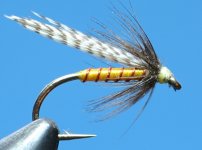
Been trying for a while to get a decent pic of some of the things I do.
This item is very small, you could get three of them on a ten pence piece no problem at all.
I am feeling a lot better, thought I was going soft in the head or my eyesight was tricking me.
So I just calmed down and took a breather now I am back on track.
Thank you all so much.

33 old fly.JPG
 
Last edited:
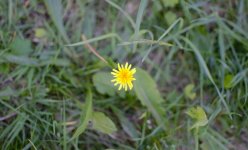
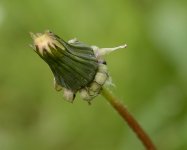
I'm not even sure the yellow flower picture above is overexposed. To my tastes anyway.

What is a tell tale sign that it's overexposed / makes anybody think it's overexposed?

The flower is slightly out of focus, which I think is probably due you having moved very slightly towards or away from the flower between acquiring focus and actually taking the shot.
Not sure if the flower itself may have also been moving if it was windy.
You probably only moved a few cm, but if the flower is only, I don't know, 20cm away, that's 10%. The depth of field is probably only a cm or two.
You could either use a tripod OR, try using AF-C, as it might adjust to slight movements.
That said, it's not out of focus enough to detract from the picture.
 
Thank you for your comments.
Yes it was windy and I was leaning over to take the shot, so there was probably lots of movement going on.
Still I am getting more comfortable with things,.
I do find that I don't take the time to take the shots properly, and I don't know why that is.
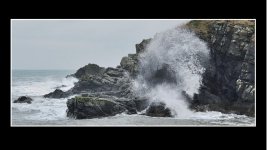
The only time I have stood and taken time was the below shot.
And this was a good while ago now, last winter in fact.
I am pretty happy with it and have kept it for my portfolio.
So I feel that I am struggling, took this and now can not get a good shot of a small flower.

Newtonhill blowhole in action.2412.jpg
 
I use spot evaluation and deliberately under expose in bright light and over expose in dull light and then fix it up in post processing.
 
I went out yesterday, very bright and very sunny.
35mm 1.1 8G lens.
A bit editing.
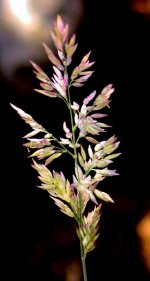
Very simple example of a tall grass.
I never realized that taking away the light would then show colors that I could no see.
DSC_2620.JPG
 
Last edited:
Took a quick look at the dandilion picture, if you look at the histogram it is likely to be mainly to the left with a small area to the right of centre (the flower).
If it was a "snap" type picture I would possibly just focus on the brighter section of the longer leaf, just to the bottom left, tap Exposure lock and refocus on the flower.
That may bring up the background without over doing the subject.
Same issue on sunny days, try to cut out of frame a washed out sky and "Focus Lock" on what looks to be around mid level and refocus for shot.
 
So is this normal, do you have to take into account its very bright conditions and try and under expose a bit, or do you do that on post processing.
I'm underexposing when it's clearly bright with no clouds in sight, but when it's a sunny day and there are occasional clouds you can never be sure whether the settings would be too much, so I just stay with my usual ones and fix overexposure in the post. Here is a good article about that if you need it, as for me going with the flow and fixing the colors afterwards has been the only answer so far.
 
Back
Top