Options for CS2 / Windows 8

ernieh

Suspended / Banned
Messages
178
Name
Ernie
Edit My Images
Yes
Hi All,
I started a thread in another section earlier regarding compatibility of CS2 and Windows 8, and again thanks to all those who replied pointing me to the Adobe website where it looks like the two are not compatible.

This means I will have to consider what options there are to replace CS2 bearing in mind that I couldn't justify the cost of CS6 for what I do, but
Elements 11 would, for example be do-able.

As I only use CS2 for basic functions like cloning, spot healing, cropping, levels, cloud enhancement, etc, would Elements 11 meet the requirements, given that there has been a lot of development since the days of CS2? I know that these can be trialled for free, but I can probably get Elements 11 worked into the deal if that is the best way to go in your view.

Once again, many thanks for any help!


Ernie
 
I'm running it in compatibility mode for XP SP2 (my go to mode!) on W8 with no issues. Bear in mind you can use the full CS2 free these days without spending a penny!
 
I don't find it super slow, but I've no other versions to compare it to. Either way can't go wrong with something for nothing!
 
I'm running it in compatibility mode for XP SP2 (my go to mode!) on W8 with no issues. Bear in mind you can use the full CS2 free these days without spending a penny!

Thanks for that, Ross; not sure that I understand it, though. (my fault, not yours!!) Do you have both XP and W8 installed on your machine? I'm looking to replace my PC with one that comes with W8 pre-installed so don't know yet whether the new machine will run XP. Any further help would be much appreciated preferably along the lines of no cost!

Also thanks to others for comments; all very helpful.


Ernie
 
Thanks for that, Ross; not sure that I understand it, though. (my fault, not yours!!) Do you have both XP and W8 installed on your machine? I'm looking to replace my PC with one that comes with W8 pre-installed so don't know yet whether the new machine will run XP. Any further help would be much appreciated preferably along the lines of no cost!

Also thanks to others for comments; all very helpful.


Ernie

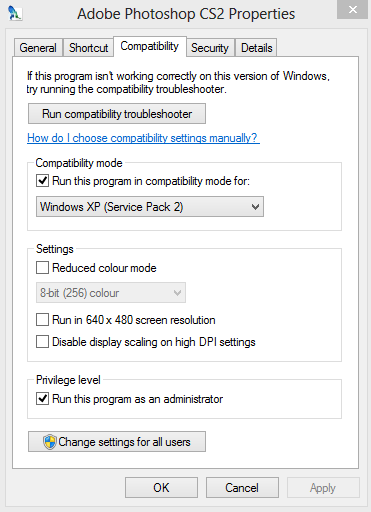
I've just got W8 installed. I downloaded CS2 and installed it for free from here. Once installed right click the icon and you should get a window like this:
90fee2ebc504ad7bec4ac99fb67db9d4.png

Click on the 'compatibility' tab and make sure you tick the box to run in compatibility mode. XP SP2 works for me, but I haven't tried any others. Then you can click apply and okay and next time you open CS2 it should work as normal.
 
Many thanks for the very full response, Ross; I'm just about to order the computer now so will have a go once I've got my head round W8!

Thanks, Ernie
 
A handy tool I've found for new computers is ninite. You can select all the things you want, to install on your new machine and it gives you a file to run on your new computer that'll install everything you ask it too, without having to download each program from the different websites. I highly recommend putting classic start on W8 makes it so much better, I don't ever use the tiles screen now. Hope you get on well with your new computer :)
 
Again, thanks, Ross; these hints and tips make for a much more stress-free life and I appreciate your help.


Ernie
 
I've just got W8 installed. I downloaded CS2 and installed it for free from here. Once installed right click the icon and you should get a window like this:
90fee2ebc504ad7bec4ac99fb67db9d4.png

Click on the 'compatibility' tab and make sure you tick the box to run in compatibility mode. XP SP2 works for me, but I haven't tried any others. Then you can click apply and okay and next time you open CS2 it should work as normal.

Ross,
Just to say thanks again for your help and information shared here. The new computer has been installed and I've got PS2 up and running with the minimum of hastle. Clearly it is backwards compatible although no longer supported, so has also saved some cash as well. As well as that, I hadn't known about Ninite so also reduced the hastle of a changeover.

All the best,


Ernie
 
I'll soon have to address the same issue and have noted the advice above (thanks).

Using Windows XP SP3, I downloaded Windows 8 Upgrade Assistant, ran it, and it gave a summary of which installed programmes were compatible with W8. Photoshop CS2 got the go ahead, as did Acrobat 7, but curiously Illustrator CS2 & InDesign CS2 did not.

InDesign's a shame but I'm relieved about Pshop because I don't know of a comparable programme (16-bit, layers, CMYK).
 
Back
Top